

What is an identity provider?
An identity provider (IdP) creates, stores, and manages digital identities for an organization's users. It is a core component within identity and access management (IAM). When someone requests access to an application, the IdP verifies who they are and determines what they can reach.
What does that look like in practice? Consider Jane. She is a corporate financial manager overseeing three analysts at an IT security firm. Her company's IdP stores key details about her: her name, her department, her seniority, and the applications she is authorized to use.
When Jane logs into her company's accounting software or HR portal, the IdP confirms her identity. It passes a digitally signed confirmation, called an assertion, to each application. The application trusts the IdP, so Jane gets in without creating a separate login for every tool.
Think of the IdP like a passport authority and a border control officer combined. It issues Jane's credential and verifies it every time she enters a company system. If Jane leaves the company, IT revokes her identity in the IdP, and access stops everywhere at once. If she is promoted to CFO, her IdP record is updated, and she gains access to executive dashboards and wire transfer portals immediately.
How does an identity provider work?
Now that we understand what an IdP stores, here is how identities are created and how they work when someone logs in.
How organizations create identities in an IdP
Every user starts with an identity record in the system. This might happen in a few different ways. An IT administrator enters the information manually. The company's HR software automatically sends new employee records to the IdP. Or, in some cases, a person sets up their own account through a self-service portal.
Once the identity exists, the IdP stores details about each person: their name, their department, their job title, which applications they need, and what they are allowed to do inside them. If Jane is promoted from financial manager to CFO, those details are updated, and her access changes with them.
How an IdP-enabled login works
You may already know the term single sign-on (SSO): the experience of logging in once and accessing multiple applications without logging in again. The IdP makes that possible behind the scenes, and it does more than SSO alone.
SSO is what the user experiences. The IdP is the system doing the work: verifying who someone is, confirming they are allowed in, and telling the application what they can do. Here is how it works step by step.
The user requests access. They navigate to an application — a cloud-based HR platform, for example. In an IdP-enabled login, that platform does not store their credentials and does not need them. Instead of presenting its own login screen, the application redirects the user to the organization's IdP to sign in.
The user authenticates on the IdP. This could be a password, a biometric scan, a push notification to their phone, a passkey, or any combination the organization requires. If multi-factor authentication (MFA) is required, the IdP enforces it here.
The IdP issues an assertion. After successful authentication, the IdP generates a secure, digitally signed message called an assertion or token and sends it to the application. This assertion carries a set of claims: who the user is, what groups or roles they belong to, and when the authentication happened.
The application grants access. The application receives the assertion, validates the signature to confirm it came from a trusted IdP, and uses the claims inside to determine what the user is allowed to do. No separate application login is required.
What holds it all together? Someone on the IT team connects the IdP to each application the organization uses. Both sides exchange configuration so they can verify that each other's requests are legitimate. Every login flows through this connection, and the IdP issues an assertion each time. However, the way they exchange this information depends on the protocol they use.
Key protocols identity providers use
A protocol is an agreed-upon set of rules for how two systems exchange information. These are the four you will encounter most often.
Authentication Protocol | What it does | In practice |
|---|---|---|
SAML (Security Assertion Markup Language) | The standard that lets an IdP send identity confirmations to applications. SAML uses a structured format called XML to package these confirmations. It is one of the oldest and most widely supported protocols in enterprise environments. | Used for enterprise SSO in browser-based web applications, especially older or on-premises systems built before mobile and cloud became standard. For example, an employee logs into their company's IdP and accesses Salesforce, SAP, and SharePoint without logging in again. Each application receives a SAML assertion confirming the employee's identity. |
OIDC (OpenID Connect) | A modern authentication layer built on top of OAuth 2.0 (see below). OIDC verifies a user's identity using lightweight, compact tokens called JWTs (JSON Web Tokens). It was designed as a simpler, more flexible alternative to SAML. | Used for web apps, mobile apps, and cloud-native applications that need fast, scalable authentication. Also common for social logins ("Sign in with Google"). For example, a user logs into a mobile banking app using their organization's IdP and receives a compact token confirming their identity, without the app ever handling a password. |
OAuth 2.0 (Open Authorization) | A standard for authorization, not authentication. OAuth lets an application access specific resources on a user's behalf without seeing their password. It answers "what is this app allowed to do?" not "who is this person?" OIDC adds identity verification on top of it. | Used wherever applications need to access data on a user's behalf without sharing login credentials. For example, an expense tracking app connects to a company's accounting software to pull transaction data. It never sees the user's username or password. It only has permission to read that specific data. |
SCIM (System for Cross-domain Identity Management) | Unlike the protocols above, SCIM is not about login. It automates the creation, updating, and removal of user accounts across applications. When someone joins, changes roles, or leaves, SCIM keeps every connected application in sync. | Used to keep user accounts consistent across dozens of applications without manual work. Especially valuable for large organizations with frequent onboarding and offboarding. For example, HR onboards a new employee in the company's HR system. SCIM automatically creates accounts in email, the CRM, cloud storage, and every other connected application with the correct permissions from day one. |
Most organizations use a combination of these protocols. A company might use SAML for older enterprise applications, OIDC for modern cloud tools, and SCIM to keep user accounts in sync across all of them.
Identity provider vs. service provider
An identity provider (IdP) verifies who you are. A service provider (SP) is the application or resource you are trying to access. The IdP handles authentication. The SP handles what happens after authentication.
Think of it this way: your passport confirms your identity, but the airline determines whether you have a ticket and which seat you are in. The IdP issues the confirmation. The SP decides what you can do with it.
This relationship is not limited to people. Applications, automated services, and AI agents also need verified identities to access resources, and the IdP manages those too.
Identity provider (IdP) | Service provider (SP) | |
|---|---|---|
Primary role | Verifies who the user is | Provides the application or resource the user wants to access |
Managed by | IT security or identity team | Application owner or vendor |
Action | Authenticates the user and sends a verified identity assertion | Receives the assertion and grants or denies access based on it |
Direction | Sends identity information | Receives identity information |
Role in zero trust | Enforces "never trust, always verify" by authenticating every access request | Relies on the IdP verification to grant access rather than managing its own credentials |
Examples | Cisco Duo, workforce identity platforms, cloud directory services | SaaS applications, email platforms, collaboration tools |
Analogy | The ID checkpoint that verifies your credentials | The building entrance that opens after verification |
Identity provider (IdP)
Creates and manages digital identities. Authenticates users and issues signed assertions that confirm who someone is and what applications they can access. The IdP is the single source of truth for identity across the organization.
Service provider (SP)
The application or resource being accessed, whether it is a messaging app, a CRM, or an executive dashboard. The SP receives the IdP's assertion and uses its claims to determine whether the user is allowed in and at what level of access.

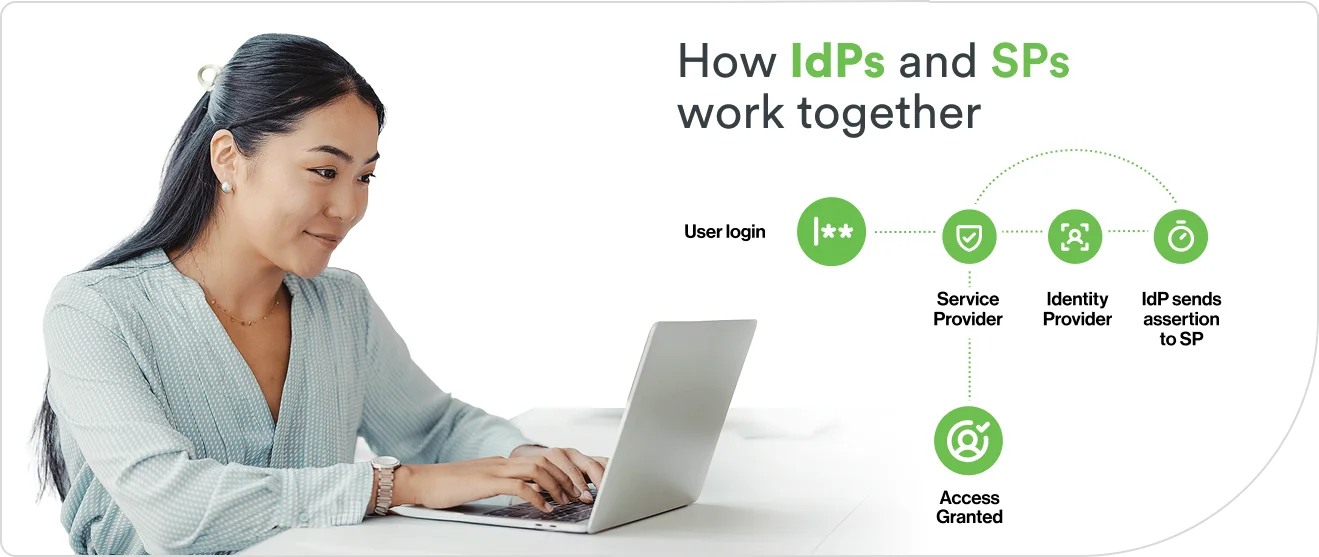
How IdPs and SPs work together
When a user tries to access a service provider, like a CRM or cloud storage tool, the SP does not authenticate them directly. Instead, it redirects the user to the organization's IdP.
The IdP verifies the user's identity and sends an assertion back to the SP. The SP validates the assertion, reads the claims inside it, and determines what the user can access. The user never creates a separate login for the SP, and the SP never handles the user's credentials.
This separation is what makes IdP-based authentication more secure than application-managed logins. Credentials are stored and verified in one place. Access decisions flow from one source of truth. And when an employee leaves, revoking their IdP identity removes access to every connected service provider at once.
What are the different types of identity providers?
Identity providers are designed for different environments, workforce models, and compliance requirements. Here are the four main types.
Type | Overview | Key tradeoff |
|---|---|---|
Cloud-based (IDaaS) | Designed for organizations with SaaS-heavy, multi-cloud, or hybrid environments and distributed workforces. Fully hosted and managed by a third-party provider and accessed over the internet. | Fast deployment, automatic updates, and elastic scalability, but less customization for highly specialized or air-gapped environments. |
On-premises | Built for regulated industries, government agencies, or environments that require full data sovereignty and infrastructure control. Deployed and managed on hardware owned by the organization within its own data centers. | Maximum control over data and configuration, but higher maintenance burden, slower updates, and limited scalability. |
Hybrid | Used by organizations migrating from legacy systems to the cloud or those that need to maintain some on-premises infrastructure alongside cloud services. Combines on-premises and cloud-hosted components with identity federated across both. | Bridges old and new infrastructure during transition, but adds integration complexity and requires consistent policy enforcement across environments. |
Social | Common in consumer-facing (B2C) applications where reducing signup friction and improving user experience are the priority. Authentication is delegated to a consumer platform the user already has an account with, such as Google, Facebook, or Apple. | Minimal friction for end users and no new credentials to manage, but limited control over security policies, making it unsuitable as a primary workforce IdP. |
How do on-premises IdPs work?
On-premises IdPs run on servers the organization owns and manages. These typically sit inside the organization's own buildings or data centers. Systems like Microsoft Active Directory and LDAP have handled this role for decades: storing employee accounts, managing passwords, and controlling who can access internal applications.
These systems were designed for environments where everyone works on-site, every application runs on the company's own network, and nothing leaves the building. Many organizations still use them by design. Government agencies handling classified information, financial institutions meeting regulations that require on-premises failover, hospitals managing patient records under HIPAA.
In these cases, on-premises IdPs are not outdated. They are the right fit. In other industries, this model encounters challenges. When employees start working remotely or applications move to the cloud, some on-premises IdPs are not designed to follow them, or they require significant modifications to do so.
Why are organizations moving to cloud-based identity providers?
Cloud-based IdPs are hosted and managed by an outside provider and run on servers outside the organization. Gartner forecasts that over 70% of enterprises will use industry cloud platforms to accelerate business initiatives by 2027, up from less than 15% in 2023.

Is Identity as a Service (IDaaS) a different type of IdP?
Identity as a Service (IDaaS) is a subscription model, not a type of identity provider. It is a way of paying for one. Instead of buying servers, installing software, and maintaining everything in-house, an organization subscribes to a provider that hosts, manages, and updates the IdP for them.
IDaaS typically includes the capabilities covered earlier in this article: authentication, SSO, MFA, and the ability to create and remove user accounts automatically. Despite the name, it is not limited to cloud applications. Most IDaaS providers offer integrations that extend to on-premises systems too, which makes it a practical option for organizations running a mix of both.
Examples of identity providers
Identity providers come in several forms depending on the environment they serve. Common examples include:
Enterprise directory services manage workforce identities inside an organization's own network. Active Directory and LDAP are the most common. These work best in on-premises environments where the IT team controls the infrastructure.
Cloud-native identity platforms deliver authentication, SSO, and MFA as a managed service across cloud and hybrid environments. These are the IDaaS providers described above. They handle large numbers of applications and users without the organization maintaining the underlying systems.
Social login providers let users sign in with an account they already have, like a Google account, an Apple ID, or a Facebook login. These are most common in consumer-facing applications where reducing signup friction matters more than controlling the identity itself.
Federated identity systems enable authentication across organizational boundaries. When a company acquires another or brings on contractors who already have their own IdP, federation lets those outside identities access shared resources without creating duplicate accounts.
These categories overlap. A cloud-native identity platform might also support federation. An enterprise directory service can integrate with social login. The distinction is not which category a provider fits into. It is which problem it was built to solve first.
Why identity providers matter for organizations
Identity security, ensuring that every access request is authentic, is a central pillar in protecting any organization. As workforces become more distributed and applications multiply, the IdP is where organizations centralize that defense.
IdPs centralize authentication and reduce your attack surface
An IdP consolidates credentials into a single authentication layer instead of each application managing its own. Organizations enforce MFA once at the IdP, and that standard applies to every connected login. If a threat is detected, IT revokes access from one place and it takes effect everywhere.
IdPs manage more than human identities
Identity providers are not limited to people. Automated services, API connections, and AI agents all require verified identities to access resources. In the average organization, machine identities outnumber human identities 45 to 1.
As organizations adopt more automation and AI-driven workflows, the IdP becomes the central point for managing trust across both human and machine identities. The same principles apply: every identity is created, stored, verified, and revoked from one place.
How to choose an identity provider
Not every IdP fits every environment. The right choice depends on how your organization works today and where it is headed. Evaluate providers against these six criteria.
Protocol support. Does the IdP support SAML, OIDC, and SCIM? Organizations with legacy applications may need SAML. Cloud-native environments typically rely on OIDC. Confirm the provider supports the protocols your applications require.
Directory integration. Can it connect to existing identity sources like Active Directory or LDAP without requiring a full migration? Compatibility with your current directory reduces deployment complexity.
MFA capabilities. What authentication methods does the IdP support, and how resistant are those methods to phishing? Push notifications, biometrics, and passkeys offer stronger protection than SMS codes.
Scalability. Can the IdP grow with your organization? Adding more users, more applications, or more locations should not require a platform change.
Cloud readiness. Does it support multi-cloud and hybrid environments alongside on-premises resources? Most organizations operate across more than one environment.
Compliance capabilities. Does the IdP provide the audit trails, access logs, and reporting needed to meet regulatory requirements like GDPR, HIPAA, or SOC 2?
The future of identity providers
Identity threats do not follow predictable patterns. Decentralized AI agents can adapt faster than static defenses. IdPs are evolving to meet them, becoming the central decision-making layer for how organizations manage trust.