

Key takeaways
FIDO2 is the umbrella standard for two specifications: WebAuthn (the browser API) and CTAP2 (the protocol for external authenticators like security keys). Together, they enable passwordless login across browsers, devices, and platforms.
FIDO2 authentication uses public key cryptography. The private key never leaves the user's device. The server stores only a public key, which is useless to attackers even if the database is breached.
FIDO2 is resistant to phishing by design. Credentials are cryptographically bound to specific website domains, so they cannot be used on fake sites or intercepted in transit.
FIDO2 supports both passwordless authentication and multi-factor authentication. A single biometric unlock on a security key or device can satisfy two factors (something you have + something you are) without a password.
What are the core components of FIDO2?
FIDO2 is a second-generation FIDO standard published in 2018. It provides the technical foundation for passkeys, hardware security key login, and biometric authentication on the web.
FIDO2 is the umbrella term for two specifications that work together:
WebAuthn (Web Authentication API): a W3C standard that defines how browsers and web applications request and verify authentication. It is the interface between the website and the user's authenticator.
CTAP2 (Client to Authenticator Protocol 2): a FIDO Alliance standard that defines how external authenticators (security keys, phones) communicate with the user's browser or operating system over USB, NFC, or Bluetooth.
These components enable FIDO2 to support both passwordless authentication and multi-factor authentication. They replace passwords with cryptographic keys and work across every major browser (Chrome, Safari, Firefox, Edge) and operating system (Windows, macOS, iOS, Android).
Using FIDO2, authentication is:
Passwordless: eliminates the need for traditional passwords.
Phishing-resistant: uses cryptographic keys bound to specific domains.
Open: developed by the FIDO Alliance and W3C for universal adoption.
Multi-platform: works across devices, browsers, and operating systems.
How does FIDO2 authentication work?
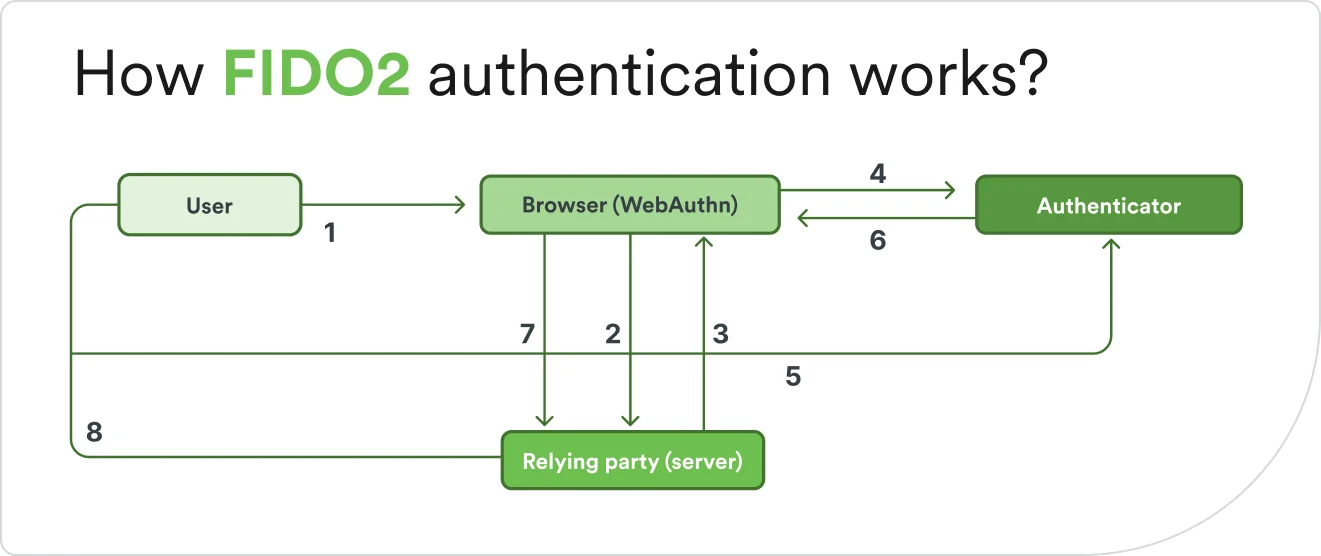
FIDO2 authentication uses public key cryptography to verify identity without transmitting secrets. During setup, the user's device creates a unique key pair for each service. The public key goes to the server while the private key stays on the device, protected by secure hardware. During login, the server sends a challenge, the device signs it with the private key, and the server verifies the signature with the stored public key.
Two components make up FIDO2 authentication:
The relying party is the website or application requesting authentication.
The WebAuthn API is the browser interface that handles communication between the relying party and the user's authenticator.
Registration steps create a pair of keys
Registration happens once per service:
The user visits a website or app that supports FIDO2.
The relying party requests registration through the WebAuthn API.
The user's device or security key generates a unique public-private key pair for that specific service.
The user verifies their identity using biometrics, a PIN, or device unlock.
The public key is sent to the service and stored in its database.
The private key remains on the user's device or security key, never transmitted.
Where FIDO2 stores your data
Component | Stored on user's device | Stored on server |
|---|---|---|
Private key | ✓ Never leaves device | ✕ |
Public key | ✕ | ✓ Used to verify signatures |
Biometric data | ✓ Never transmitted | ✕ |
Authentication steps play out with each login
After registration, every login follows a challenge-response pattern:
The user attempts to log in to the service.
The relying party sends a challenge: a unique, random piece of data.
The user's authenticator receives the challenge through WebAuthn.
The user verifies their identity (biometrics, PIN, or device pattern).
The authenticator signs the challenge with the private key.
The signed response is sent back to the service.
The service verifies the signature using the stored public key.
Access is granted if verification succeeds.
No passwords or secrets are transmitted during this process. The challenge-response model ensures each login attempt is unique, preventing replay attacks where an attacker tries to reuse a captured authentication exchange.
What are FIDO2 authenticators and passkeys?
FIDO2 authentication requires an authenticator, which is a device or platform feature that stores the cryptographic keys and verifies the user's identity.
Passkeys are the modern term for FIDO2 credentials that enable passwordless login. They are built on FIDO2 specifications and can be stored on either type of authenticator.
What are platform authenticators?
Platform authenticators are built-in authentication features on devices the user already owns. They are sometimes called embedded or bound authenticators.
Windows Hello: facial recognition, fingerprint, or PIN on Windows devices.
Touch ID / Face ID: Apple's biometric authentication on iPhones, iPads, and Macs.
Android biometric unlock: fingerprint or face unlock on Android devices.
Platform authenticators are convenient because they require no additional hardware. Passkeys stored on platform authenticators can sync across a user's devices through encrypted cloud services like iCloud Keychain or Google Password Manager, which means a passkey created on an iPhone is available on a Mac without re-registering.
What are roaming authenticators?
Roaming authenticators are external, portable security devices that work across multiple devices. They are also called cross-platform or external authenticators. When someone says "FIDO security key" or "FIDO token," they typically mean a roaming authenticator.
USB security keys: physical keys that plug into computers (YubiKey, Google Titan Security Key).
NFC security keys: keys that tap against smartphones or NFC-enabled devices.
Bluetooth security keys: wireless keys that connect via the wireless protocol.
Roaming authenticators do not sync and must be physically present for authentication. This makes them ideal for high-security use cases or users who work across many different devices, including shared workstations.
| Platform authenticators | Roaming authenticators |
|---|---|---|
Examples | Windows Hello, Touch ID, Face ID | YubiKey, Titan Security Key |
Portability | Built into specific devices | Portable across any device |
Sync capability | Can sync via encrypted cloud | Device-bound, no sync |
Best for | Everyday convenience | High security, shared devices |
Why is FIDO2 phishing-resistant?
Phishing is one of the most common attack methods in cybersecurity. Attackers frequently create fake login pages that trick users to enter their credentials. FIDO2 is designed to block these attacks, even if the user clicks a malicious link. Three features built into the protocol make this possible.
Domain-bound keys
During registration, each FIDO2 key pair is bound to the specific domain of the legitimate service. When the user authenticates, the browser checks the domain automatically. If the domain doesn't match the one registered, the authenticator refuses to respond. A passkey created for "bank.com" will not work on "bankk.com" or "bank-login.com," no matter how convincing the fake site looks. This happens without any action from the user.
Public-private key model
FIDO2 uses asymmetric cryptography where the private key never leaves the user's device. Even if an attacker intercepts the communication between the user and the service, they see only the public key and signed challenges—neither of which can be used to impersonate the user. Passwords, by contrast, can be stolen and reused the moment they are intercepted.
No shared secrets
Traditional authentication relies on shared secrets—passwords that both the user and server know. With FIDO2, there is no shared secret. The server stores only the public key, which is useless without the corresponding private key on the user's device. If the service's database is breached, attackers cannot use the stolen public keys to access accounts. Biometric data (fingerprints, face scans, for example) never leaves the device either, so there is nothing sensitive for attackers to steal from the server side.
These three features combined mean that attackers who steal FIDO2 credentials in a phishing scheme still cannot access the account they are targeting.
Is FIDO2 considered MFA?
Yes. FIDO2 can function as multi-factor authentication, and in most implementations, it inherently provides multi-factor security in a single step.
Multi-factor authentication requires two or more verification factors from different categories:
Something you have: your smartphone, laptop, or security key.
Something you are: your fingerprint, face, or other biometric.
Something you know: your device PIN or password.
When a user unlocks a FIDO2 authenticator with a fingerprint and the authenticator signs a challenge, two factors are satisfied in one action: something you have (the device) and something you are (the biometric). No password needed.
FIDO2 can be deployed in different configurations depending on the organization's security requirements:
Passwordless MFA: combines device possession with biometric or PIN verification. The most common deployment and the strongest option.
Second-factor authentication (2FA): used after a password as an additional verification layer. Common during transitions away from passwords.
Single-factor passwordless: device unlock only, without biometric or PIN. Less common and lower security.
FIDO2's phishing resistance makes it stronger than traditional MFA methods like SMS codes or authenticator apps, which can still be intercepted or entered on fake sites.
How can my organization implement FIDO2?
FIDO2 implementation requires planning, integration with existing systems, and user education.
1. Integrate with existing IAM systems
FIDO2 works through an organization's identity and access management (IAM) platform. The first step is confirming that the platform supports FIDO2 and WebAuthn natively.
Modern IAM platforms, including Cisco Duo, support FIDO2 through standard protocols.
Once confirmed:
Assess the applications and services that would benefit from FIDO2 authentication. Prioritize high-risk applications first—such as admin accounts, financial systems, and sensitive data access.
Determine whether to implement FIDO2 as passwordless or as a second factor alongside passwords during the transition.
2. Enroll users and conduct pilots
User enrollment is the process of registering authenticators for each employee. Start with a pilot:
Select a small group of tech-savvy users or a specific department.
Provide clear instructions and support for registering authenticators.
Gather feedback on the experience and any technical issues.
Offer multiple authenticator options to accommodate users' different preferences and devices. Platform authenticators work well for everyday convenience while roaming authenticators cover high-security users and shared workstations. Many organizations deploy both.
3. Plan for account recovery
Users will lose devices and security keys, so the recovery plan needs to be as secure as the authentication method it restores. Implement these safeguards:
Multiple registered authenticators: require users to register both a primary and a backup authenticator during enrollment.
Recovery codes: one-time codes stored securely that can restore access.
IT help desk verification: apply manual identity verification by IT staff for account reset.
Avoid recovery methods that undermine FIDO2's security gains, like falling back to SMS codes or security questions. These reintroduce the vulnerabilities that FIDO2 was deployed to eliminate.
Phase | Actions | Duration |
|---|---|---|
Planning | Assess IAM compatibility, select pilot group | 2–4 weeks |
Pilot | Enroll users, gather feedback, troubleshoot pain points | 4–8 weeks |
Rollout | Expand to all users, provide training | 8–12 weeks |
Optimization | Refine recovery processes, monitor adoption | Ongoing |
What happens if you lose a FIDO2 device?
Losing a device or security key does not mean losing access to accounts permanently. FIDO2 systems are designed with recovery mechanisms, though the specific process depends on how the service or organization implemented FIDO2.
A lost device can also be a security risk. FIDO2 authenticators require user verification (a fingerprint, face scan, or PIN) before they respond, which limits what a stranger can do with a found security key or locked laptop. But a stolen laptop may have active sessions, cached credentials, and saved passwords beyond just the FIDO2 authenticator. Teams should deregister the lost authenticator from all services immediately and revoke any active sessions tied to it.
Account recovery methods include:
Backup authenticators: if the user registered multiple devices or security keys, any of them can be used to sign in.
Account recovery codes: some services provide one-time recovery codes during setup that can restore access.
Alternative authentication: services may allow temporary fallback to another verified method (email verification, trusted device, for example) while the user registers a new authenticator.
Backup authenticators
The strongest protection against device loss is registering multiple authenticators during initial setup. Here are three examples of backup authenticators in practice:
For individuals: register a phone as the primary authenticator and a USB security key as backup. Store the backup key in a secure location.
For organizations: issue each user a primary and backup security key. Maintain a secure inventory.
For synced passkeys: ensure multiple devices are connected to the user's account. Synced passkeys automatically replicate across devices, providing built-in redundancy.
For device-bound authenticators like hardware security keys, physical backups are essential because credentials do not sync. Duo's lifecycle management tools make it easy to track registered authenticators and remove lost or retired devices.
What are FIDO2 benefits for security, privacy, and user experience?
FIDO2 delivers improvements across three areas that organizations and users both care about.
FIDO2 strengthens an organization's identity security by:
Blocking phishing attempts: domain-bound credentials only work on the site with which they were registered.
Eliminating password breaches: servers store only public keys, which are useless without the private key on the user's device.
Preventing credential stuffing: each service gets a unique key pair, so a breach at one site doesn't unlock another.
Using modern cryptography: ECDSA and RSA signatures protect every authentication exchange.
FIDO2 protects user privacy by:
Keeping biometrics local: fingerprints and face scans never leave the device.
Avoiding cross-site tracking: each service gets a unique key pair, preventing tracking across sites.
Limiting data exposure: only public keys and metadata are shared with services.
FIDO2 streamlines the login experience by:
Replacing passwords with biometrics: a fingerprint or face scan is faster than typing a password.
Eliminating password fatigue: no passwords to create, remember, or reset.
Syncing passkeys across devices: credentials travel with users through iCloud Keychain, Google Password Manager, or similar services.
Reducing IT support burden: fewer password reset tickets for help desks to handle.
How does FIDO2 compare to older FIDO standards?
FIDO2 is the latest evolution in the FIDO standards family. The earlier standards, FIDO U2F and FIDO UAF, each solved part of the password problem but had limitations that FIDO2 addresses.
Standard | Authentication type | Key limitation |
|---|---|---|
FIDO U2F (2014) | Required passwords | |
FIDO UAF (2014) | Passwordless (device-bound) | Limited to specific apps |
FIDO2 (2018) | Passwordless + MFA | Current standard |
What FIDO2 adds over earlier standards:
Universal browser support: works in Chrome, Safari, Firefox, and Edge without plugins.
Passwordless authentication: full password replacement, not just a second factor.
Synced credentials: passkeys can sync across devices. U2F keys were device-bound only.
Broader device support: both platform authenticators (biometrics) and roaming authenticators (hardware keys).
How can my business strengthen security with FIDO2 standards?
FIDO2 provides the technical foundation for passwordless, phishing-resistant authentication. The identity platform you choose determines how smoothly that foundation is deployed, managed, and integrated with the rest of your security strategy.
Organizations benefit most when FIDO2 is part of a broader identity and access management strategy that includes adaptive authentication, device trust, and continuous monitoring. Platforms like Duo combine phishing-resistant MFA—including native FIDO2 support—with device trust and adaptive policies to provide comprehensive protection without sacrificing user experience.
What to look for in a FIDO2-enabled IAM platform:
Native FIDO2 support: built-in WebAuthn integration without third-party tools.
Multiple authenticator options: support for both platform and roaming authenticators.
Flexible deployment: passwordless or MFA modes to fit your security requirements.
User-friendly enrollment: simple registration process for end users.
Comprehensive management: centralized dashboard to track and manage authenticators.
Recovery workflows: built-in account recovery and backup authenticator management.
Where is FIDO2 authentication headed?
Passkeys are rapidly becoming the default authentication method for both consumer and enterprise environments. According to a 2024 FIDO Alliance survey of executives at companies with 500 or more employees, 87% have either successfully deployed or are currently deploying enterprise passkeys, up 14 percentage points from prior years. FIDO2 is the standard making that shift possible.
For enterprises, the trajectory points toward full passwordless enforcement rather than optional adoption. Organizations are moving from offering passwordless as an alternative to requiring it as the baseline—using granular enrollment policies to define which authenticator types are permitted for specific roles, devices, and access levels.
Duo Directory supports this shift by enabling administrators to enforce passwordless authentication policies and control which FIDO2 authenticators are allowed across the organization—whether platform authenticators, roaming security keys, or both. As passkeys mature into the mainstream default, the organizations best positioned are those that establish authenticator governance now rather than retrofitting it later.
See for yourself how Duo can strengthen your organization's security with a free 30-day trial.