

How remote access security is changing
The workplace has changed for good. For many organizations, hybrid and remote work are now the norm, with users logging in from home networks, coworking spaces, airports, coffee shops, and everywhere else.
For years, organizations relied on a perimeter-based “castle and moat” model, where a virtual private network (VPN) acted as the drawbridge. Once inside, users had free rein. This worked when most people worked in offices and critical resources lived in on-prem data centers, but today, cloud adoption and global workforces have made the moat too wide and the drawbridge too risky, leading to the rise of the zero trust framework.
Imagine giving every contractor a master key to your entire office building just to access a single conference room. That’s essentially what a traditional VPN does. If the key is lost or stolen, every door is at risk.
Keep reading to compare zero trust vs VPN approaches so you can secure access without slowing down your teams.
What is a virtual private network (VPN)?
A virtual private network is an infrastructure tool that creates a secure tunnel between a user’s device and an organization’s internal network. It encrypts internet traffic and routes it through a centralized gateway so that the user appears to be “inside” the network, no matter where they are.
Here’s how the VPN model works:
It encrypts data in transit so sensitive information can’t be intercepted.
It grants access based on a user’s network location rather than their verified identity.
It often requires users to install and launch a VPN client before they can reach corporate resources.
The drawbacks of relying on a VPN
VPNs are great for encrypting traffic, connecting remote users, and providing access to internal resources. However, compared to a combined VPN and zero trust approach, they have notable security and operational drawbacks:
What is zero trust network access, and how does it work?
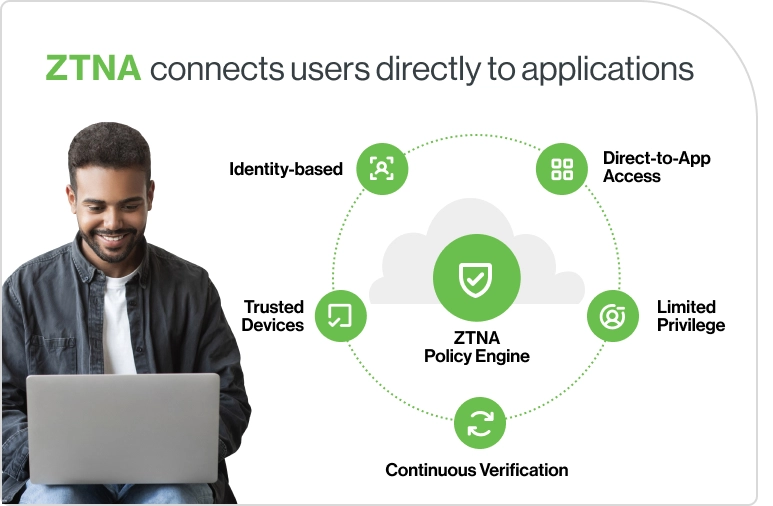
Zero trust network access (ZTNA) is a security framework that shifts access decisions from location-based trust to identity- and context-based verification. Instead of assuming that anyone inside the corporate network is safe, ZTNA follows the principle of “never trust, always verify.”
When comparing zero trust network access vs vpn, the distinction lies in ZTNA’s identity- and context-based controls versus VPN’s location-based trust.
The core components of zero trust network access include:
If a VPN is a master key to the whole building, ZTNA is a lock that opens only the specific rooms the user is authorized for, only when they meet security requirements.
VPN or ZTNA: What’s the difference?
While both VPN and ZTNA aim to provide secure remote access, they take fundamentally different approaches to protect your organization.
Feature | VPN | VPN Business Impact | ZTNA | ZTNA Business Impact |
|---|---|---|---|---|
Access Model | Broad network access | Larger attack surface, higher lateral movement risk | Application-specific | Broad network access |
Security Approach | Location-based trust | More vulnerable if credentials are compromised | Identity + context-based trust | Location-based trust |
User Experience | Requires client connection | Slower start, more friction for end users | Direct to app, often seamless | Requires client connection |
Management Complexity | Higher, centralized bottleneck | More administrative overhead | Granular policy controls | Higher, centralized bottleneck |
Cloud Compatibility | Limited | Slower adoption of cloud/SaaS tools | Cloud-native | Supports hybrid/multi-cloud environments |
Zero Trust vs VPN: hybrid work use cases
While discussions often frame VPN and ZTNA as competing tools, in practice, they represent different approaches to access management.
The ZTNA framework offers finer-grained, identity-based controls, but VPNs can still serve certain access needs, especially for legacy systems or specific network-level requirements.
By looking at how each technology handles real-world access management challenges, you can better decide which model aligns with your hybrid workforce.

Is it always ZTNA vs VPN, or can you use both?
In most organizations, VPN vs zero trust isn’t a clean either/or decision, at least not right away. Think of VPN as a tool you deploy, and ZTNA as a security framework you apply. Most organizations find value in using both during transition periods.
ZTNA may handle most application access needs, but VPNs can still play a role for specific scenarios like network-level access or legacy system support. Many companies adopt a dual approach, gradually shifting workloads from VPN to ZTNA.
A thoughtful migration strategy minimizes disruption and allows IT teams to fine-tune policies before full adoption. This phased approach also helps uncover integration needs, address user adoption challenges, and manage costs.
Key transition considerations include:
5 tips for evaluating ZTNA VPN solutions
Choosing the right solution means balancing your organization’s current needs with its long-term security strategy. Here’s what to look for when comparing a ZTNA framework vs. VPN tools:
1. Integration with existing IAM
Your ZTNA framework will work best when it integrates with your existing identity providers, ensuring consistent authentication across all applications.
Duo Security’s solutions are designed to plug into leading IAM platforms without heavy configuration, reducing deployment time and complexity.
Always confirm compatibility with your current and planned identity sources.
2. MFA and phishing-resistant authentication
Strong authentication is at the heart of any zero trust model, but not all MFA is created equal. Many VPNs support MFA, yet it’s typically a single checkpoint at login, leaving sessions vulnerable if credentials are stolen or compromised.
Duo goes further. With phishing-resistant MFA methods like FIDO2 security keys and platform biometrics, Duo enforces stronger identity assurance and applies MFA adaptively throughout a session when risk signals change. This aligns with ZTNA principles, ensuring users and devices are continuously verified, not just once when logging in.
By contrast, competitors that rely on traditional one-time passcodes can’t deliver the same level of resilience against phishing or lateral movement, leaving gaps in both VPN and ZTNA framework deployments.
3. Visibility and reporting capabilities
ZTNA isn’t supposed to only grant or deny access; it should give IT teams detailed insight into every interaction, including:
Who is accessing (the specific user identity)
What they’re accessing (applications, files, or systems)
When they connect (timestamps, duration, unusual login times)
Where they’re coming from (device type, location, network)
This level of detail makes it easier to spot suspicious behavior quickly and generate the compliance reports SMBs often need.
Imagine a small accounting firm with a mix of remote employees and contractors. With VPN access, IT might only see that “a connection” was established. With a ZTNA approach, they can confirm that Jane, using her company laptop, accessed the payroll app from Minneapolis at 10 a.m. If, later that afternoon, someone using her credentials tries to log in from an unrecognized device in another country, the system can flag or block the attempt immediately.
4. Device posture and risk assessments
The ZTNA framework is designed to continuously check the device's health before and during access. That means examining factors such as whether the operating system is up to date, whether security patches are applied, and whether endpoint protection is running. If a device doesn’t meet these requirements, access can be blocked or limited until it’s remediated.
VPNs, by contrast, usually only verify whether the VPN client is installed and configured correctly when the connection is first set up. They don’t reassess device health after that, which leaves room for risk if the device becomes outdated or compromised.
For remote and hybrid teams, especially those using personal devices for work, these posture checks give IT a way to enforce baseline security without rolling out full device management (MDM). That’s a major advantage for SMBs that want to protect business data without intruding on employees’ personal devices. Still, organizations handling highly sensitive or regulated data may need to combine ZTNA checks with stricter device management to close any remaining gaps.
5. Scalability and licensing
A ZTNA approach is designed for cloud-scale deployment, enabling organizations to expand capacity quickly without investing in more VPN concentrators or network hardware. Licensing models often align with user counts rather than network capacity, simplifying cost planning.
Over time, ZTNA can reduce the operational overhead and total cost of ownership (TCO) compared to scaling VPN infrastructure.

What to expect when transitioning from VPN to ZTNA
While adopting a zero trust approach alongside existing VPN strategies can strengthen security, moving away from a VPN-first model isn’t without its challenges.
Anticipating potential hurdles and having a plan to address them can make the adoption smoother and more successful.
Ready to move beyond VPN? Start with Duo
Duo helps lay the groundwork for a zero trust approach without roadblocks.
From streamlining integration with your existing identity providers to extending protection to legacy applications through secure gateways, Duo makes it easier to move past a VPN-first model without bogging down your IT team.
With strong authentication, continuous risk evaluation, and a smooth user experience, you can strengthen security today while setting the stage for scalable, secure access in the future. Try Duo for free!