
Hanging Up on Telephony: How to move from SMS and phone to stronger MFA


When it comes to multi-factor authentication (MFA), not all methods provide the same level of protection. Telephony-based MFA, including SMS passcodes and phone callback verification, was once considered a reliable and accessible option. Today, evolving security standards and an increase in sophisticated cyberattacks has rendered these methods increasingly vulnerable, and many organizations are replacing SMS MFA with stronger alternatives like Duo Push notifications, security keys, and biometric authentication.
This blog post explains why telephony-based MFA is no longer sufficient, what stronger MFA options are available, and how to migrate your organization away from telephony methods step by step. Whether you are just starting to evaluate the change or ready to execute, this guide gives you a clear path forward.
Explore the versatility of Duo’s authentication methods and how they support a modern security strategy.
Why telephony-based MFA is no longer sufficient
Phone call and SMS-based MFA methods are vulnerable to several well-documented attack techniques. These include:
SIM swapping: Attackers convince a carrier to transfer a phone number to a new SIM card, intercepting all SMS codes sent to that number.
Phishing: Fake websites trick users into entering one-time passcodes, which attackers capture and use in real time.
Social engineering: Phone scams manipulate users or carrier support staff into revealing information or approving fraudulent requests.
Message interception: Attackers exploit weaknesses in telecommunications protocols to intercept SMS messages in transit.
These are not theoretical risks. While the National Institute of Standards and Technology (NIST) encourages organizations to adopt phishing-resistant authentication methods, Duo specifically recommends moving away from telephony-based MFA such as SMS and phone calls due to vulnerabilities like SIM swapping and message interception. Federal cybersecurity guidance and many cyber insurance policies increasingly require stronger, phishing-resistant MFA to protect critical systems and data.
Beyond security, telephony-based MFA carries ongoing costs. Every phone call and SMS message used for authentication incurs a per-transaction fee. For organizations with large user populations, these costs add up quickly compared to push-based or token-based methods that do not rely on telephony infrastructure.
User experience is another factor. Missed calls, delayed SMS codes, and poor cellular reception create friction that frustrates users and increases help desk ticket volume. Is two-factor authentication with SMS still safe enough for your organization? For most, the answer is no.
What stronger MFA options look like
Cisco Duo offers several authentication methods that provide better security, lower cost, and a smoother user experience than phone call and SMS. Understanding the types of multi-factor authentication available helps you choose the right fit for your organization.
Duo Push and Verified Duo Push
Duo Push sends a login request directly to the Duo Mobile app on a user's smartphone, and the user taps to approve or deny. Verified Duo Push adds a verification step by requiring the user to enter a code displayed on the login screen, which helps prevent accidental approvals. Push-based authentication eliminates the SMS channel entirely, removing the risk of SIM swapping and message interception.
Security keys and FIDO2/WebAuthn
Hardware security keys use cryptographic authentication that is bound to the specific website requesting it. This makes them phishing-resistant by design because the key will not respond to a fraudulent site. FIDO2 and WebAuthn are the open standards behind this technology
Biometric authentication
Fingerprint and facial recognition verify identity using something the user is, rather than something they know or receive. Biometric methods are fast, convenient, and difficult to replicate remotely.
Hardware tokens
Hardware tokens generate one-time passcodes without relying on a phone or network connection. While they carry an upfront cost, they eliminate the ongoing per-transaction fees associated with telephony.
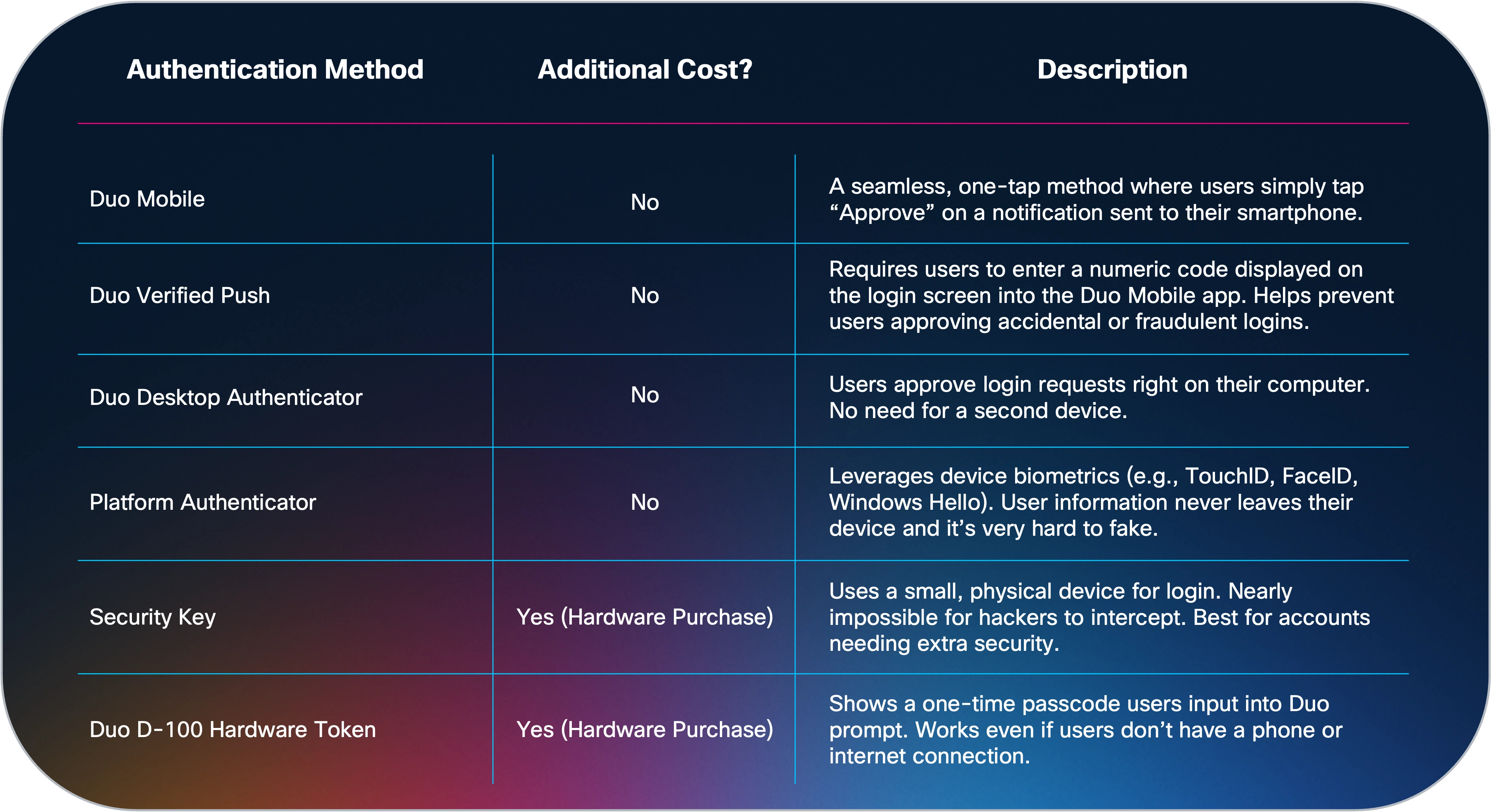
The benefits of MFA improve significantly when organizations move from telephony to these stronger methods. Push-based and phishing-resistant options reduce risk while also reducing friction for users and costs for the organization.
How to migrate your organization away from telephony-based MFA
This section walks you through the process for retiring phone call and SMS authentication in your Cisco Duo environment. These six steps are based on real-world experiences supporting organizations navigate this transition successfully. Each step includes the rationale behind it and guidance for executing it in your Duo Admin Panel.
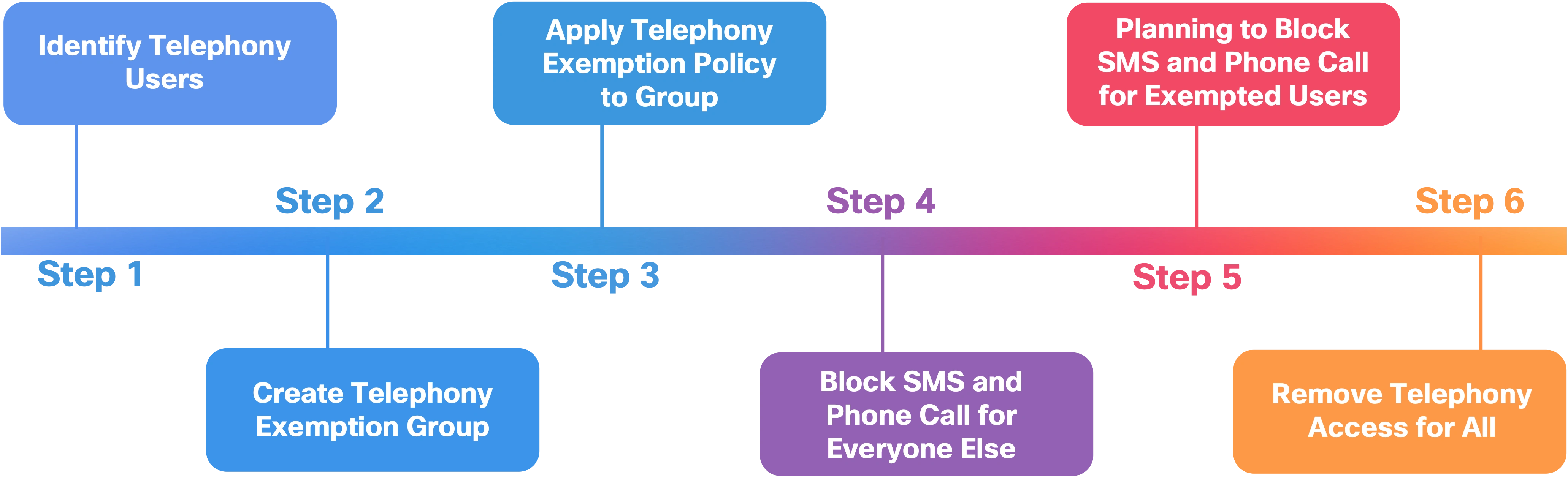
A note before you begin: Every organization is different. Use these steps as a framework and adapt the details to fit your user population, directory configuration, and support capacity.
Step 1: Identify users relying on phone call and SMS
Before making any policy changes, you need a clear picture of who is currently authenticating with telephony methods. This allows you to scope the migration accurately and avoid surprising users with unexpected changes.
Use the Authentication Log in your Duo Admin Panel to identify these users:
Navigate to Reports and open the Authentication Log.
Set filters for two-factor authentication (2FA) methods, selecting Phone Call and SMS Passcode.
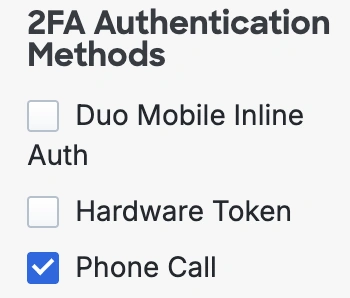
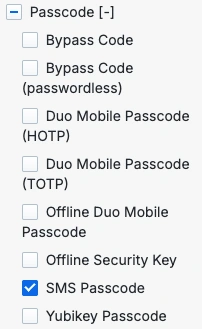
Adjust the time range to capture as many unique users as possible. A 30 to 90 day window is a good starting point.
Export the filtered log to compile your list of unique telephony users.
Step 2: Create an exemption group for telephony users
Group your identified telephony users together so you can manage their transition incrementally. This exemption group allows these users to continue using phone call and SMS while you work through the migration, without affecting users who already use stronger methods.
If your users are managed directly in Duo, create a new user group in the Users section of the Duo Admin Panel.
If your organization syncs a directory to Duo, create the group in your directory.
Add all telephony users identified in Step 1 to this exemption group.
Step 3: Allow phone call and SMS for the exemption group only
Before you disable telephony methods globally, you need to make sure users in the exemption group can still authenticate. Create a custom policy that allows phone call and SMS and apply it to the exemption group.
Create a new policy: Navigate to Policies, select Add Policy, and give it a clear name such as "Telephony Exemption Policy."
In the Authentication Methods section, enable Phone Callback and SMS Passcodes along with any other methods your organization allows.
Save the policy.
Apply the policy to the exemption group: Navigate to Policies, locate the new policy, select Actions, and then Apply. Choose the exemption group and reorder policies as needed for your configuration.
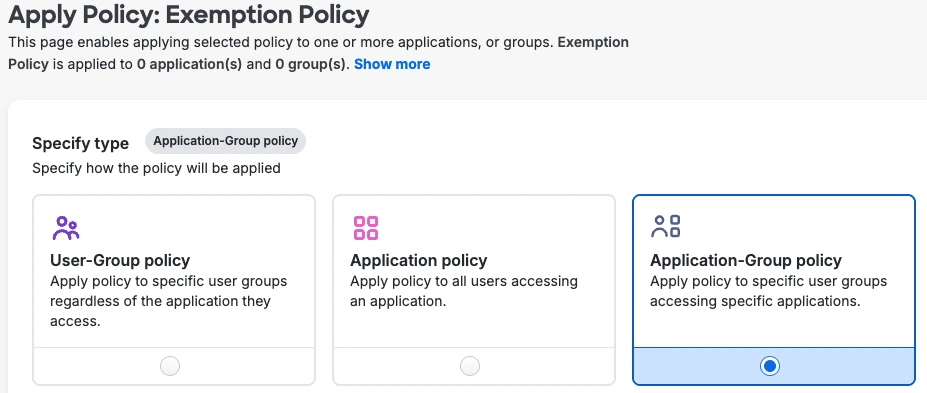
Step 4: Disable phone call and SMS for everyone else
Now disable telephony methods in the Global Policy. This change will have minimal impact because the users affected are already authenticating with non-telephony methods. It also prevents anyone from migrating backward to telephony during the transition.
Navigate to Policies and open the Global Policy editor.
Under Authentication Methods, uncheck SMS Passcode and Phone Callback.
Save the policy.
Communicate before you save. Even though this change primarily affects users who do not rely on telephony, it removes the option from their login screens. Let affected users know in advance using Duo's prepared communication templates for policy enforcement changes.
Step 5: Plan and communicate the transition for telephony users
This step is the most people-focused step. Map out how and when you will migrate the exemption group to stronger authentication methods.
Decide on your approach. You can migrate all remaining telephony users at once or in phases. Consider the following factors:
How many users are in the exemption group
What devices your users have access to (smartphones, security keys, hardware tokens)
How much help desk capacity you have during the transition period
Whether certain teams or departments should migrate before others
A phased approach gives you room to communicate effectively, help users adjust, and catch issues before they affect the entire group. A simultaneous cutoff can work for smaller groups but risks higher help desk volume and user frustration if problems arise.
Set clear deadlines. Define when phone call and SMS will be disabled for telephony users and communicate those dates early and often.
Draft your communications. Include the following in your messages to affected users:
What is changing and why
Instructions for switching to a stronger method like Duo Mobile
How to obtain a security key or hardware token if applicable
The transition timeline with specific dates
Where to get help
Duo provides a "Promoting Duo Push" knowledge base article with additional resources to support this campaign.
Step 6: Complete the migration and remove telephony access
As users in the exemption group switch to stronger authentication methods, remove them from the group. When project deadlines arrive, remove any remaining users.
Monitor the exemption group and remove users as they confirm successful enrollment in a new method.
Once the group is empty and all users are authenticating with non-telephony methods, delete the custom exemption policy. The Global Policy now applies to everyone.
Review the Authentication Log after the final cutoff for any login issues related to the change.
How to communicate this change to your end users
The technical migration is only half the work. Clear, empathetic communication makes the difference between a smooth transition and a flood of help desk tickets.
Keep these MFA best practices in mind when communicating with end users:
Lead with the why. Help users understand that this change protects them and the organization, not just that IT decided to change something.
Use plain language. Not every user knows what SIM swapping or phishing-resistant MFA means. Explain the change in terms they relate to.
Give them time. Announce the change well before deadlines so users can transition at their own pace.
Make it easy. Provide step-by-step instructions for enrolling in Duo Push or setting up a security key. Link directly to the resources they need.
Offer support channels. Tell users exactly where to go if they need help, whether that is a help desk ticket, a Slack channel, or a dedicated FAQ page.
Duo provides communication templates you can customize for your organization.
Support and resources for your migration
Moving away from telephony-based MFA is a significant project, and you do not have to do it alone. Duo Care is Duo's dedicated support program designed to help your team through every stage of your security journey, including migrations like this one.
With Duo Care, your organization gets:
Personalized planning and guidance from a dedicated team that understands your environment and helps you build a migration plan tailored to your users, applications, and goals.
Access to experienced security professionals who provide best practices, answer technical questions, and help troubleshoot challenges throughout the project.
Proactive health checks that review your Duo account regularly, helping you identify potential issues before they affect users and keeping you informed about new features and recommendations.
Reduced disruption and faster adoption through expert-guided deployment, which minimizes help desk tickets and user frustration.
Training and enablement resources so everyone in your organization, from IT administrators to end users, feels confident and prepared.
Get started with Duo Care to plan your telephony migration.