
How to build IdP failover with backup and split strategies

In a previous post, we explored why depending on a single Identity Provider (IdP) creates concentration risk that can affect availability, security, vendor leverage, and business continuity. Now we want to walk through the practical strategies for addressing that risk.
If your organization has assessed its IdP concentration risk and determined that a mitigation strategy is necessary, this post provides two proven approaches you can implement. For a comprehensive framework to evaluate identity providers and directory strategies, download the IAM Evaluation Guide.
Two approaches to IdP resilience
We believe organizations operating critical infrastructure must implement a practical mitigation strategy for identity concentration risk. Two approaches have proven effective:
Backup IdP: Maintain a secondary IdP that you fail over to during disruptions to your primary provider.
Split IdP: Run two IdPs concurrently with your user base distributed across both providers.
Each approach has distinct advantages depending on your organization's size, complexity, and operational maturity. The following sections walk through both in detail.
Derisking with a backup IdP
This strategy involves failing over to a backup IdP to reduce the potential impact of an outage at your primary provider. The operating model works as follows:
During normal operations, users authenticate through Single Sign-On (SSO) with your primary IdP.
During an IdP outage, you change the SSO configuration of your applications to switch authentication to the backup IdP.
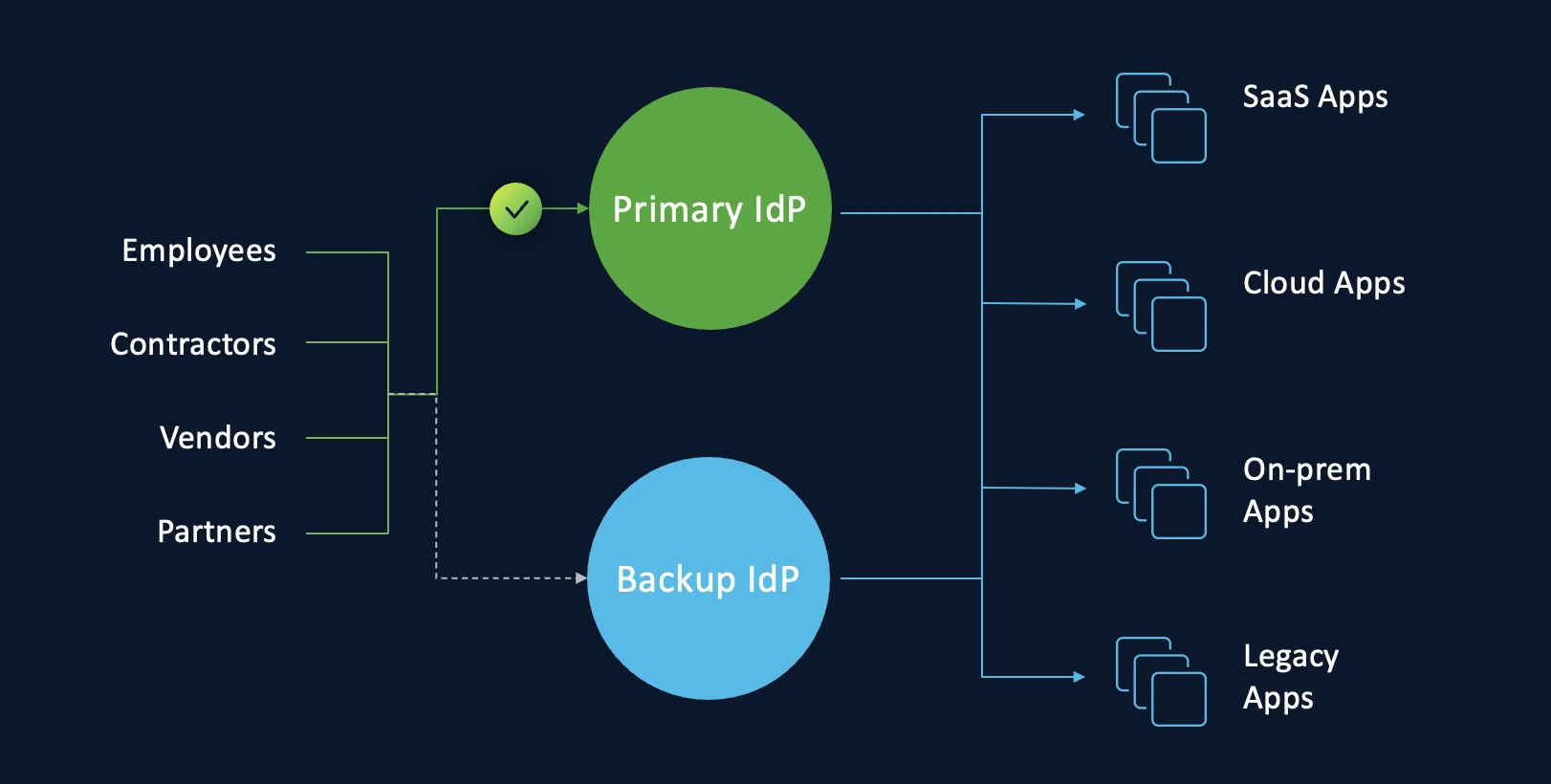
To execute this strategy successfully, follow these five principles.
Choose your backup IdP from a different vendor. Operational diversity is the foundation of this approach. If your backup IdP runs on the same vendor infrastructure as your primary IdP, a single vendor-level disruption can take down both providers simultaneously. Select a backup provider that operates on independent infrastructure.
Match the configuration of your primary IdP. When you create a backup IdP, replicate the configuration of your primary IdP as closely as possible. This includes Multi-Factor Authentication (MFA) policies, conditional access rules, group memberships, and attribute mappings. Configuration parity ensures that users experience consistent security enforcement regardless of which IdP handles authentication.
Hydrate the backup IdP with your current user base. Your backup IdP must contain an up-to-date copy of your primary IdP's user directory. This ensures that every user can authenticate and access the required applications and services when you activate the backup. Most organizations have moved from manual provisioning to automation that integrates Human Resources Management Systems (HRMS) with the IdP. Establishing this synchronization with a second IdP is usually a one-time setup using connectors provided by the new provider.
Prepare Security Assertion Markup Language (SAML) and OpenID Connect (OIDC) profiles in advance. Most systems and applications allow you to create multiple SAML and OIDC profiles, with each profile referring to a different IdP. To minimize the work required during a failover event, prepare these profiles before you need them:
Create separate SAML and OIDC profiles for your primary IdP and your backup IdP
Configure SSO to use only the primary IdP profile during normal operations
When an outage occurs, modify the SSO configuration to use the backup IdP profile
This preparation reduces your failover from a complex reconfiguration exercise to a profile switch.
Prepare the backup IdP to handle production load. When you activate the backup IdP, it must handle all of the authentication requests that your primary IdP normally processes. When you size your backup deployment, account for two key factors:
The number of users in your organization who authenticate through SSO
The configured session length in your applications, which determines how frequently users are redirected to the IdP for reauthentication
For example, if your session length is between eight and 24 hours, authentication requests typically spike during morning hours when employees begin their workday. Size your backup IdP to handle these peak loads, not just average traffic.
Consider reusing an existing on-premises IdP
You may not need to provision an entirely new IdP to serve as your backup. Many organizations still operate an on-premises IdP that could fill this role. For example, your organization might use Active Directory as its authoritative source for identities and Active Directory Federation Services (AD FS) for SSO. In this scenario, AD FS could serve as the backup IdP.
This reuse approach helps you limit both cost and maintenance overhead. Before committing to a new provider, audit your existing infrastructure for an IdP that already has access to your user directory and supports SAML or OIDC federation.
Test your failover procedure periodically
A backup IdP that has never been tested is not a reliable backup. To ensure your SSO failover process works when you need it, verify the process on a regular schedule:
Select one or more applications and manually switch their SSO profile assignment to the backup IdP
Verify that SSO with the backup IdP authenticates users as expected
Confirm that signing certificates are current and valid
Document the time required to complete the switchover
Identify any steps that caused delays or confusion and refine the process
Treat failover testing the same way you treat disaster recovery testing for other critical systems. A documented, rehearsed process executes faster under pressure than one your team performs for the first time during an actual outage.
Derisking with split IdPs
This strategy involves running two IdPs concurrently and distributing your user base across both providers. Unlike the backup approach, both IdPs are active during normal operations. The operating model works as follows:
One segment of your users authenticates through SSO with IdP 1
Another segment authenticates through a second SSO configuration with IdP 2
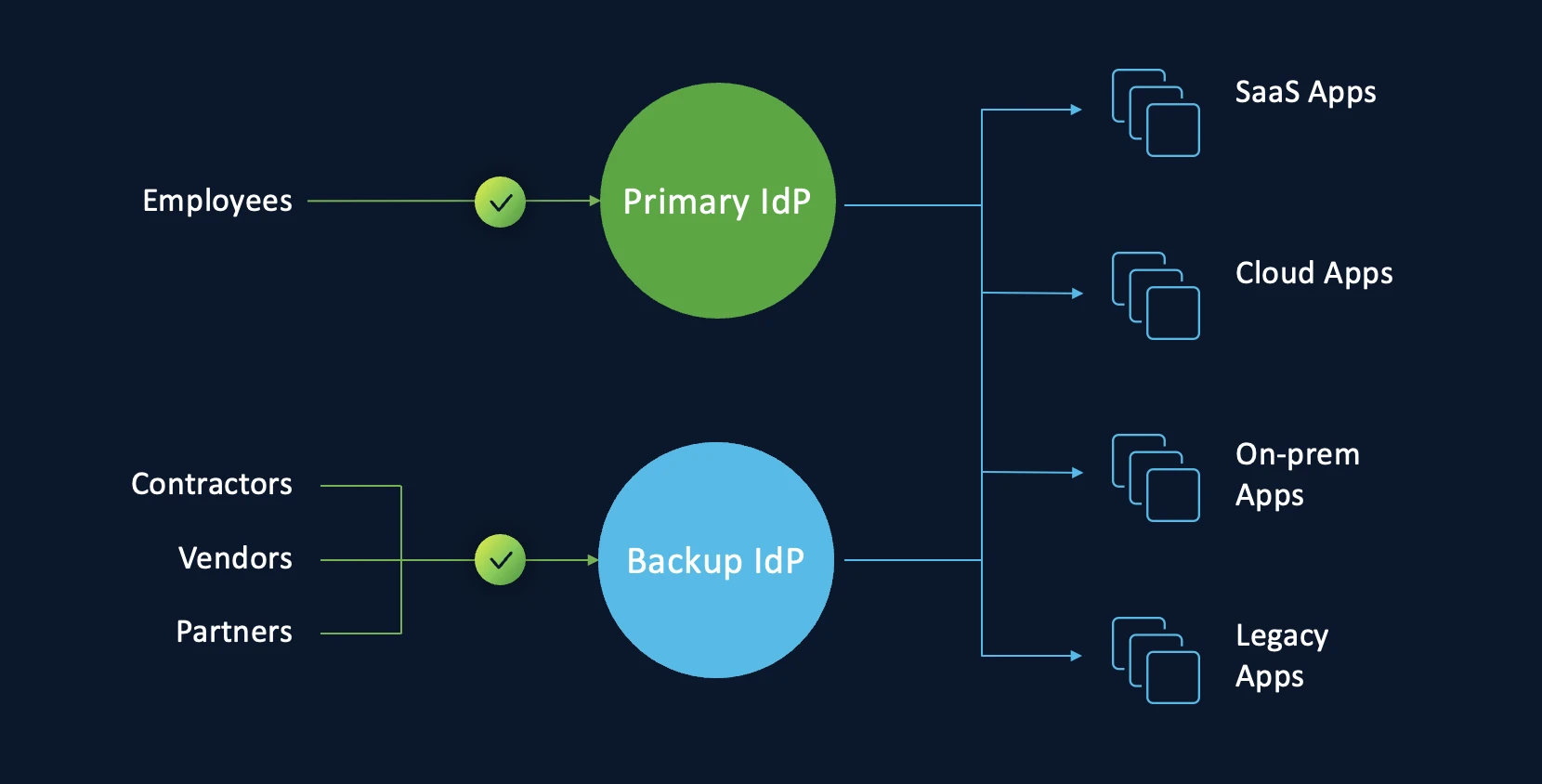
Choosing how to split your user base. Organizations can segment users across IdPs in several ways:
By user type: First-party users such as employees and interns authenticate through one IdP, while third-party users such as vendors and contractors authenticate through the other (as shown in the image above)
By business function: Critical business units use one IdP, and non-critical units use the other
By geographic location: Primary office locations use one IdP, and secondary locations use the other (this is our recommended approach as it provides the cleanest operational separation)
Why split IdPs offer advantages over backup IdPs
The split approach provides several operational benefits compared to maintaining a standby backup:
Avoids complete identity failure. Because both IdPs are always active, an outage at one provider only affects the user segment assigned to that provider. The other segment continues to authenticate normally. Your organization never experiences a total identity blackout.
Eliminates switchover complexity during outages. With a backup IdP strategy, your team must execute a failover procedure under pressure during an outage. With split IdPs, the SSO configurations for both providers are already active. The incremental effort during a disruption is limited to reassigning the SSO profile for the affected user segment to the functioning IdP.
Ensuring success with split IdPs
To implement the split approach effectively:
Choose IdPs from different vendors to maintain operational diversity, just as with the backup approach
Hydrate all users to both IdPs so that either provider can authenticate any user when needed, not just the segment currently assigned to it
Assign the correct users and groups to the correct IdP in each of your applications
Have users set up their authentication credentials across both IdPs so they can authenticate through either provider without delays during a reassignment
Your IdP resilience checklist
Whether you choose the backup approach or the split approach, start with these three steps:
Audit your blast radius. If your primary IdP went offline for four hours, which mission-critical systems would remain accessible? Map every federated application to understand your full exposure.
Evaluate your N+1 options. Do you have an existing on-premises IdP or a secondary cloud provider that could serve as a failover? Assess what you already have before investing in new infrastructure.
Practice the switch. Ensure your team knows exactly how to execute a SAML profile switchover before a crisis forces them to learn on the fly. Document the procedure, assign roles, and rehearse it.
For a step-by-step framework to evaluate IdP providers and directory strategies as part of your resilience plan, download the IAM Evaluation Guide.
Identity controls access to every application, every dataset, and every workflow your organization depends on. We do not accept single points of failure in our power grids, our databases, or our networks. It is time we apply the same standard to our identity systems.
Ready to explore how Cisco Duo can strengthen your identity resilience strategy? Talk to a security expert.