
How Duo Directory automates user lifecycle management

Three ways to keep identities accurate, secure, and compliant from day one to day last
User lifecycle management is the process of creating, updating, and removing user access to applications and systems as employees, contractors, and partners join, change roles, or leave an organization. Done well, it protects the business without slowing people down. Done manually, it introduces errors, delays, and orphaned accounts that attackers can exploit.
Organizations no longer deal with a simple, centralized workforce logging in from a single corporate office. Today’s IT environments are hybrid, user populations are highly diverse, and the perimeter has dissolved into a network of cloud applications, remote endpoints, and third-party integrations.
To secure this dynamic environment, you need comprehensive identity lifecycle management.
In a recent episode of our Duo 3 in 30 webinar series, I sat down with Cisco Customer Solutions Engineer Reetam Mandal to explore three Duo features that automate identity lifecycle management from onboarding to departure: Duo Directory, Directory Sync, and Custom Attributes.
If you missed the live session, this post provides a deep dive into the three pillars covered in the webinar 3 in 30: Identity Lifecycle Management, Duo Directory, Directory Sync, and Custom Attributes.
Pillar 1: Duo Directory as the foundation for identity management
Duo Directory is a cloud-based user directory that stores and manages user identities for authentication and policy enforcement.
Identity management can quickly become a tangled web, especially if your organization operates within a hybrid environment or relies on a mix of internal employees, contractors, and partners. Duo Directory cuts through this complexity by offering incredible flexibility, acting as the foundational component for managing your user identities.
It centralizes the user information relevant to Duo’s authentication and policy enforcement, giving IT and security teams a unified pane of glass to view and control exactly who accesses corporate resources. During the webinar, we covered three primary deployment scenarios:
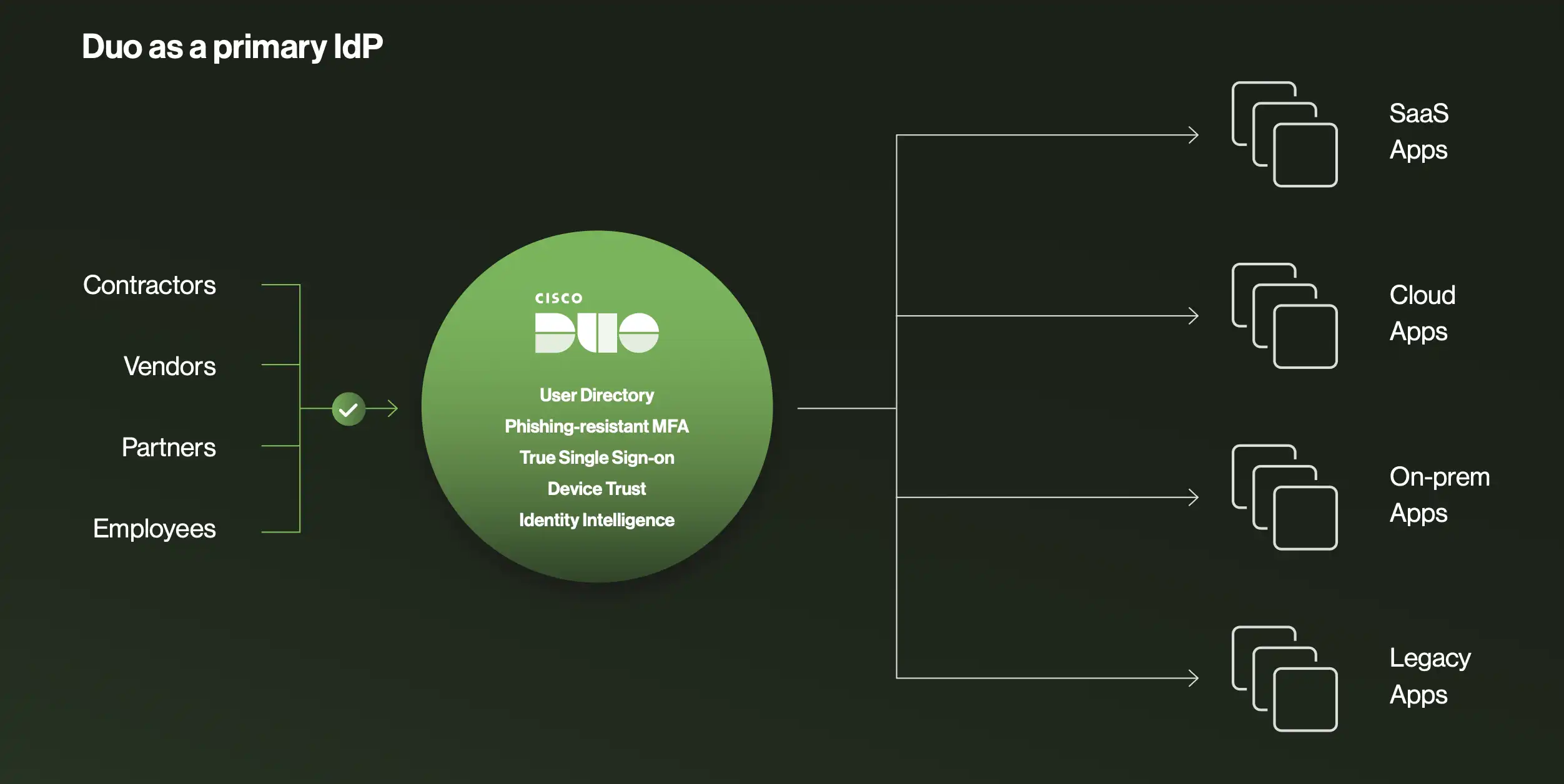
1. A simple, standalone identity store
Not every organization needs a massive Active Directory (AD) environment or a heavy-duty identity provider (IdP). For small-to-medium businesses, startups, or organizations adopting a strict cloud-first strategy, Duo Directory can serve as your primary, standalone identity store.
Administrators can create, manage, and configure users directly within the Duo Admin Panel. You can set required password options, manage credentials, and enforce enrollment policies without routing through an external ID source. When users enroll in Duo for the first time, they can be prompted to set a password, allowing Duo to handle the entire authentication lifecycle. This provides a simple, agile, and scalable option for securing access without the overhead of additional infrastructure.
2. The intelligent identity broker
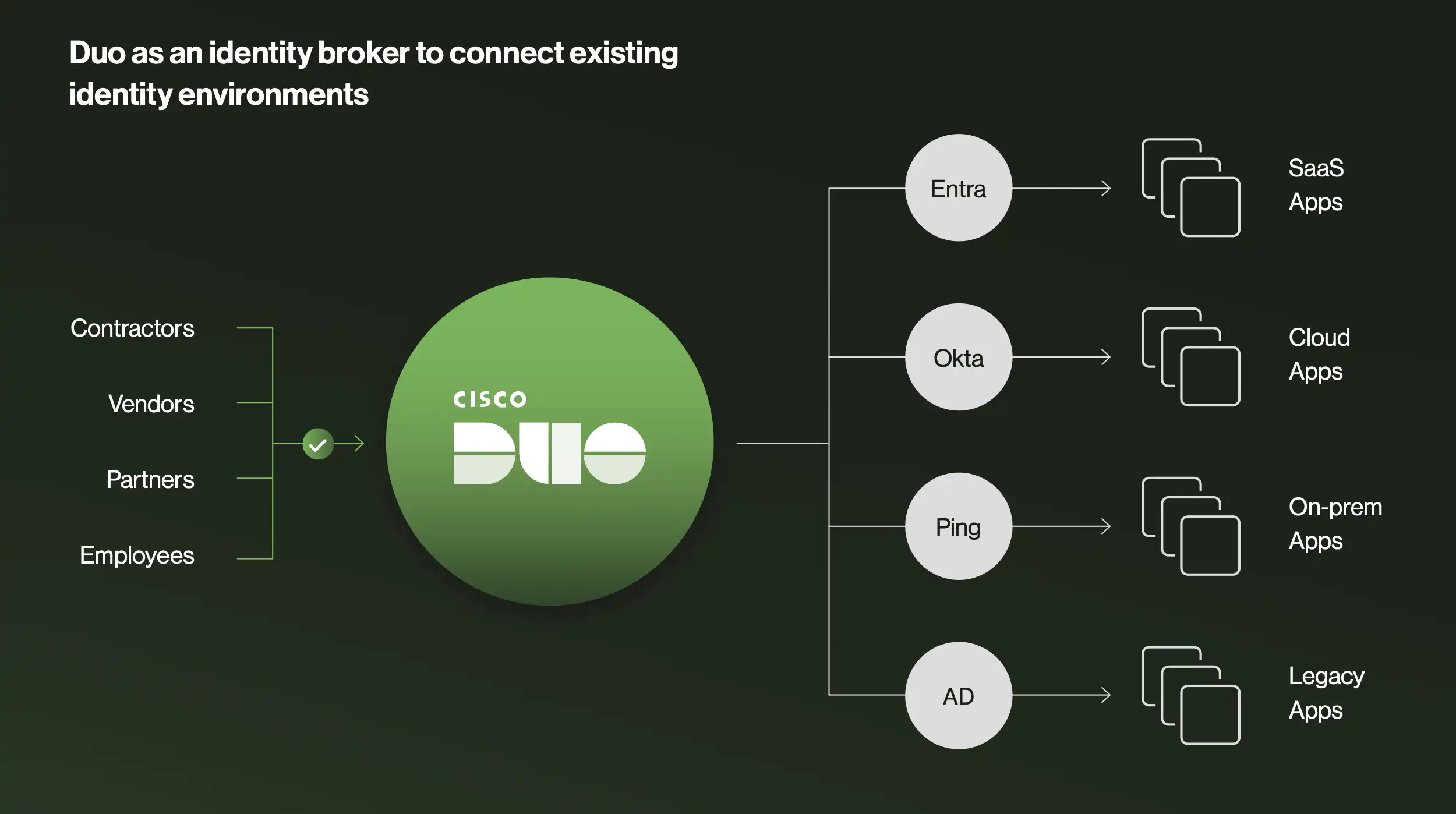
For larger enterprises that have heavily invested in existing IdPs like Active Directory, Microsoft Entra ID, or Okta, Duo Directory doesn't force you to rip and replace. Instead, it acts as an intelligent identity broker.
In this setup, Duo Directory sits in front of your existing identity providers. It mediates authentication requests, applies Duo's phishing-resistant multi-factor authentication (MFA) and adaptive access policies, and then passes the authenticated user back to your primary IdP. This allows you to maximize existing infrastructure investments while layering on advanced security. Every login is protected by strong authentication and context-aware policies.
To manage multiple directories seamlessly, Duo utilizes routing rules. An admin can create custom rules dictating how different users are processed. For example, if a user attempts to log into Duo Central, Duo’s single sign-on portal, and their email originates from a subsidiary’s domain, their request is automatically routed to Active Directory. A default fallback rule ensures that anyone not matching custom criteria is still securely authenticated.
3. Secure management of external users
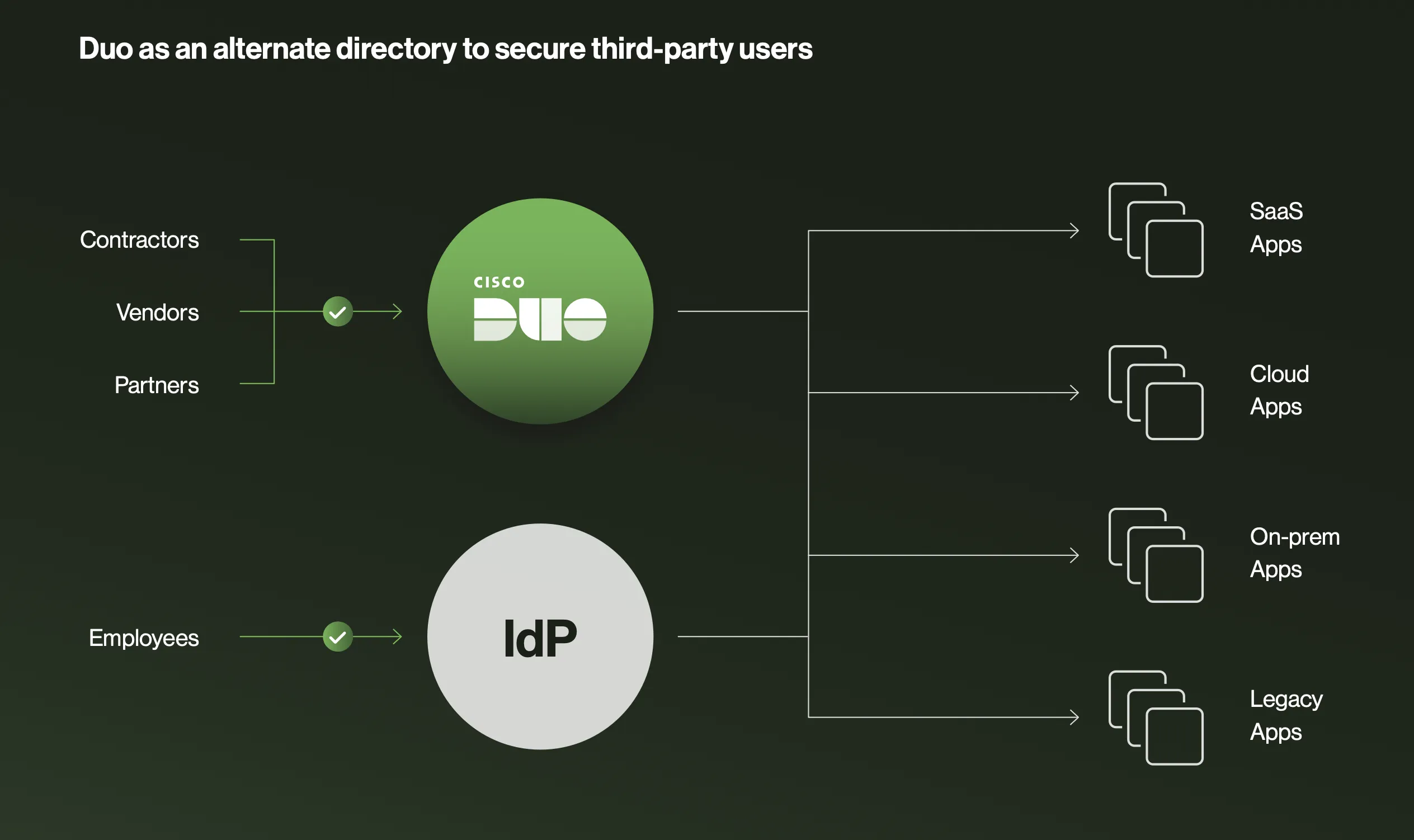
One of the most common headaches for IT administrators is managing access for external users—contractors, vendors, partners, or temporary interns. These individuals need access to specific corporate resources, but adding them to your primary corporate directory clutters your environment and introduces significant security risks.
Duo Directory offers a practical approach. You can run Duo Directory side-by-side with your existing IdP. This allows you to create and manage third-party users directly within Duo, keeping them completely segregated from your main identity store. You maintain strict, granular control over what these external users can access, apply specific security policies to them, and keep your core directory clean and secure.
Pillar 2: Directory Sync for automated user onboarding and offboarding
Directory Sync is an automated process that synchronizes users and groups from external identity stores (Microsoft Entra ID, Active Directory, Google Workspace, OpenLDAP, Okta) into Duo Directory.
Having a robust directory is only the first step. The real challenge lies in keeping that directory accurate as your workforce constantly changes. Employees are hired, promoted, transferred, and eventually leave the organization. Managing these state changes manually is slow, error-prone, and creates security gaps.
This is where Directory Sync comes in. Working hand-in-hand with Duo Directory, Directory Sync automates user onboarding and offboarding by synchronizing users and groups from your existing external directories directly into Duo. Currently, Duo supports seamless synchronization with Microsoft Entra ID, Active Directory, Google Workspace, OpenLDAP, and Okta.
Let’s explore the three major operational and security benefits of implementing Directory Sync:
1. Significantly reduce manual IT workloads
Manual user provisioning is tedious, time-consuming, and highly prone to human error. When a new batch of employees starts, IT teams often scramble to manually create accounts across dozens of applications.
Directory Sync eliminates this friction. Administrators can set synchronization schedules—for instance, automatically syncing with Active Directory every 12 hours. When a new employee is added to your primary directory, they are automatically provisioned in Duo. You can even automate the onboarding process by configuring Duo to automatically send enrollment emails to newly synced users. By removing these tedious administrative tasks, your IT team is freed up to focus on strategic, high-value security initiatives.
2. Enhance security posture through timely deprovisioning
While onboarding is important for productivity, offboarding is critical for security. One of the most severe security vulnerabilities an organization can face is the "orphaned account"—an active account belonging to an employee who has already left the company. These dormant accounts are prime targets for threat actors.
Directory Sync drastically reduces this window of vulnerability. When a user is deactivated, terminated, or removed from your master directory, Directory Sync ensures their access to all Duo-protected applications is immediately revoked. In the Duo Admin Panel, administrators can clearly see a user's status change to "Pending Deletion" the moment they are deprovisioned. This automated, immediate revocation prevents potential data breaches and strengthens your overall security posture.
3. Maintain data accuracy and regulatory compliance
Effective security policies rely on accurate data. If your identity system thinks a user is in the marketing department, but they transferred to finance three months ago, your access policies are fundamentally broken.
Directory Sync ensures that the user and group information within Duo is always a true, accurate reflection of your primary authoritative identity source. During the setup process, administrators have granular control over exactly what gets imported. You can define specific groups (e.g., fetching only the "Interns" or "UX Team" groups) and map exact user attributes like usernames, email addresses, and display names.
By automating this synchronization, you eliminate data discrepancies. This is not only crucial for ensuring context-aware security policies function correctly; it is also a strict requirement for many regulatory compliance frameworks that demand up-to-date, auditable user records.
Pillar 3: Custom attributes for granular access control
Custom Attributes are user-specific tags that extend the default user schema, enabling context-aware access policies based on role, clearance, department, or status.
With your directories established and your synchronization automated, you have a solid identity foundation. However, modern Zero Trust security requires more than just knowing who a user is; you need to understand their context.
Standard user data, such as basic group membership, is often insufficient for today’s complex access requirements. This brings us to the third feature highlighted in the webinar: Custom Attributes.
Custom Attributes allow administrators to go beyond the default schema and define unique, highly specific tags for users. This rich context empowers you to build intelligent, granular, context-aware access policies that drive smarter security decisions.
1. Precision access control for modern workforces
A user's role in an organization is rarely defined by a single group membership. With Custom Attributes, you can define highly specific tags that align with your unique business structure. You can tag users based on their specific department, their cost center, their employee number, their job title, or even their security clearance level.
Because managing dozens of attributes can become visually overwhelming, Duo allows administrators to group these attributes logically within the Admin Panel (e.g., grouping all project-related tags under a "Special Projects" category). By enabling these custom attributes, you can create highly precise policies that grant or deny access to applications based on exact roles and characteristics, ensuring users only have access to the resources necessary for their specific responsibilities.
2. Enforcing stricter policies for sensitive data
Not all applications are created equal. An application housing the company's cafeteria menu requires vastly different security controls than a database containing sensitive customer financial records or protected health information.
Custom Attributes allow you to tag users who handle highly sensitive data. For example, you can create a custom attribute labeled "PCI Data Access" or "HIPAA Compliant." Once these users are tagged, you can build stringent, targeted policies around them. You might require that any user with the "PCI Data Access" attribute must authenticate using a phishing-resistant MFA factor (like a biometric or FIDO2 security key) and must be logging in from a corporate-managed, trusted device before they are granted access. This allows you to apply maximum friction and security exactly where it is needed, without disrupting the workflow of users accessing low-risk applications.
3. Adaptive security for dynamic user states
User status is rarely static. Employees go on sabbatical, contractors are hired for 30-day sprints, and staff members are temporarily assigned to cross-functional teams. When a user's state changes, your security policies must adapt instantly.
Custom Attributes enable this agility. You can define attributes that reflect dynamic, temporary states. For instance, Reetam demonstrated creating a "Temporary Access" attribute in the webinar. You can build a policy that triggers when this attribute is applied, automatically limiting the user's access to a specific subset of applications for exactly 30 days.
Alternatively, you could create an "On Leave" attribute. If an employee goes on extended medical or parental leave, applying this attribute could automatically block all access to corporate resources until they return, preventing their dormant account from being compromised while they are away. This dynamic adaptability ensures your security posture evolves in real-time alongside your workforce.
Tying it all together
Identity lifecycle management is a continuous process, not a one-time project. Three Duo features work together to automate it:
Duo Directory centralizes and brokers user identities across standalone, hybrid, and third-party scenarios.
Directory Sync automates onboarding and offboarding across Microsoft Entra ID, Active Directory, Google Workspace, OpenLDAP, and Okta.
Custom attributes enforce granular, context-aware access policies based on role, clearance, or status.
Together, these three features deliver automated user lifecycle management: the right users get the right access to the right resources under the right conditions, from their first day to their last.
Want to see these features in action?
Watch the Duo 3 in 30 webinar on identity lifecycle management, available on-demand on the Duo website. We walk through the live Admin Panel configurations, and you’ll see how easy it is to implement these solutions in your own environment.