

Key takeaways
Authentication verifies a user's identity. Authorization determines what you can do with that identity. Authentication always happens first.
Every authentication method relies on one or more factors: something you know (a password), something you have (a phone or security key), or something you are (a fingerprint or face scan).
Passwords alone are the weakest form of authentication. Multi-factor authentication combines two or more factors and is the single most effective defense against credential-based attacks.
Modern authentication is moving toward passwordless methods that replace passwords entirely with biometrics, hardware keys, or device-based verification.
Define authentication: what it means and why it matters
Authentication matters because it helps prevent unauthorized users from accessing sensitive resources. Effective authentication admits legitimate users and blocks attackers. Every access decision in cybersecurity starts with the same question: is this person (or device, or application) who they claim to be? If the answer is wrong, everything that follows is compromised.
88% of web application data breaches begin with stolen or weak credentials (Verizon, Data Breach Investigations Report, 2025). An attacker who obtains a valid username and password appears legitimate with the same access as the user they impersonate. Effective authentication controls this initial access with stronger methods like multi-factor authentication making it harder for attackers to impersonate legitimate users.
What role does authentication play in modern network security?
Authentication protects sensitive data by only allowing users who prove their identity to access networks hosting confidential information—such as health records, financial accounts, or internal documents.
Compliance frameworks require strong authentication. Regulations like HIPAA, GDPR, and PCI DSS require organizations to verify user identities before granting access to protected systems.
Secure remote work relies on authentication. When employees connect from home networks, airports, and coffee shops, authentication verifies their identity regardless of location.
Zero trust architecture requires authentication at its base. In a zero trust security model, every access attempt must be verified, even from inside the network. Authentication is the mechanism that makes that verification possible.
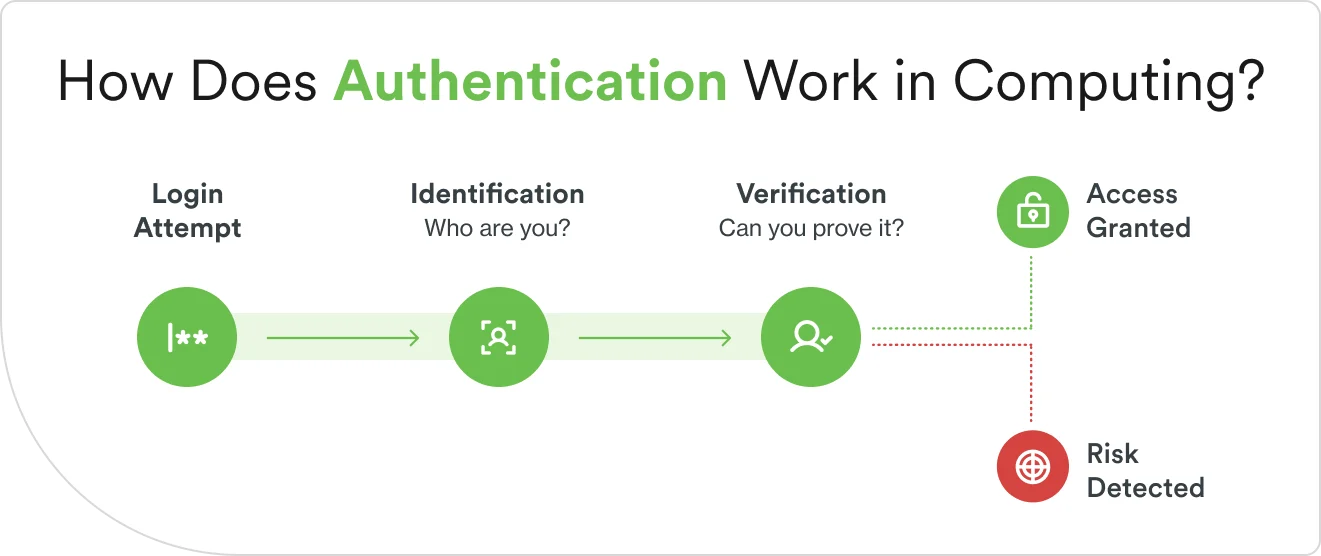
These steps are akin to showing ID at airport security. You hand over your boarding pass and your passport. These identify you as the passenger. The security agent scans the passport to ensure that it's not a forgery. They also check you against a list of prohibited travelers. That's verification. If everything lines up, you proceed. If it doesn't, you're stopped.
The same pattern plays out every time you log in to a website, unlock your phone, or connect to a company network.
The proof a user provides falls into one of three categories, called authentication factors:
Something you know. A password, PIN, or security question answer.
Something you have. A phone, hardware security key, or smart card.
Something you are. A fingerprint, face scan, or voice pattern.
These three factors are the building blocks of every authentication method covered in the next section. Using one factor is single-factor authentication. Using two or more from different categories is multi-factor authentication (MFA), which is significantly harder for an attacker to defeat.
One detail worth noting: authentication isn't just about users verifying themselves to systems. It also works in the other direction. When you visit a website and your browser checks that the site's security certificate is valid, that's the site authenticating itself to you. This mutual authentication helps prevent you from entering your credentials on a fake website.
What are the key methods of authentication?
Authentication methods range from simple passwords to advanced biometric scans. Each method uses one or more of them, and each comes with trade-offs between security, convenience, and cost. Organizations often use a combination of authentication methods to strengthen their cybersecurity protection.
Password-based sign-in
Password-based authentication is the most familiar authentication method. The user creates a secret word or phrase during account setup, and the system stores a hashed version of it. Each time the user logs in, they re-enter the password, and the system checks it against the stored hash.
The simplicity of password-based authentication is a strength and a weakness. Passwords are easy to implement, and everyone understands how they work. But they're also among the most exploited authentication methods in cybersecurity. Users often choose weak passwords, reuse them across accounts, fall for phishing emails that trick them into entering credentials on fake sites, and forget them constantly. If an attacker obtains a user's password through a data breach, they can log in as that user.
Biometric verification
Biometric authentication uses unique physical characteristics to verify identity—such as fingerprints, facial features, iris patterns, or voice. During enrollment, the system captures a reference template (a mathematical representation of the biometric, not a photograph). During login, it captures a new sample and compares it against the template.
Biometrics are convenient because users don't have to remember anything or carry anything. They're also difficult for attackers to replicate. The trade-off is that biometric data can't be changed. In addition, some individuals may not suit these systems due to physical differences. As a result, biometric verification systems must offer alternative authentication and a degree of flexibility for these users.
Certificate-based authentication
Certificate-based authentication uses digital certificates—electronic documents issued by a trusted authority—to verify identity. A certificate contains a public key and identity information, and it's signed by the issuing authority so the system can verify it hasn't been tampered with. Think of it as a digital ID card issued by a trusted organization.
This method is common in enterprise environments where organizations issue certificates to employee devices. The trade-off is complexity. Certificates must be managed across every device and require dedicated infrastructure to issue, renew, and revoke at scale.
Token and one-time password approaches
Token-based authentication generates temporary, time-sensitive codes that verify identity.
One-time passwords (OTPs) are the most common form. They add a layer of security beyond passwords, because even if an attacker has stolen the user's password they also need the temporary code, which changes constantly and expires quickly.
Multi-factor and passwordless methods
Multi-factor authentication (MFA) combines two or more authentication factors from different categories. A password (something you know) plus a push notification to a phone (something you have) is an example of MFA. A fingerprint (something you are) plus a hardware key (something you have) is also an example of MFA. The principle is simple: compromising one factor shouldn't be enough to break in.
Passwordless authentication takes a different approach. Instead of adding factors on top of a password, it eliminates the password entirely. Users authenticate with biometrics, hardware security keys, or device-based verification. This means no password to steal, phish, or forget.
Modern identity security platforms offer both phishing-resistant MFA and passwordless options. Phishing-resistant methods—such as hardware security keys and biometric verification—are designed so that even if an attacker tricks a user into visiting a fake site, the authentication ceremony itself can't be intercepted or replayed.
Authentication vs. authorization: what is the difference between?
Authentication and authorization are different steps in identity security that work together. Authentication verifies who you are. Authorization determines what you're allowed to do.
Aspect | Authentication | Authorization |
|---|---|---|
Purpose | Verifies identity | Grants permissions |
Question answered | Who are you? | What can you access? |
Example | Logging in with a password and fingerprint | Accessing admin settings after login |
When it happens | First | After authentication |
If it fails | Access denied entirely | Limited access granted |
User visibility | Visible (login screen, biometric prompt) | Usually invisible (permissions enforced silently) |
In practice, both happen together. A user logs in (authentication), and the system checks their role and permissions to decide what they can see and do (authorization). Authentication without authorization lets everyone in with the same access. Authorization without authentication means the system grants permissions without knowing who it's granting them to.
What are some common challenges and best practices for authentication?
Authentication protects every access point in an organization, but it also introduces friction, adds complexity, and increases the attack surface. The following practices address the most common challenges.
1. Enforce multi-factor authentication at every login
Single-factor authentication, typically a password alone, is the weakest link in most organizations. Passwords can be stolen through phishing, guessed through brute force, or harvested from data breaches. Once an attacker has a valid password, single-factor authentication offers no additional barrier.
Best practice: require at least two authentication factors from different categories for every login. Common combinations include:
Password + authenticator app code
Biometric scan + hardware security key
Push notification to a verified device + device health check
Even if one factor is compromised, the attacker can't authenticate without the second. Phishing-resistant MFA methods—like those built into modern identity security platforms—go further by ensuring the authentication itself can't be intercepted even when a user clicks a malicious link.
2. Strengthen password policies
Weak, reused, and default passwords remain one of the most exploited vulnerabilities. Users gravitate toward simple, memorable passwords and reuse them across personal and work accounts.
Best practice: set minimum requirements that make passwords harder to crack. Good policies include:
Minimum 12 characters
Mix of uppercase, lowercase, numbers, and symbols
Flag and ban words surfaced in previous breaches
Unique password for each account
Password managers help. They generate strong, unique passwords for every account and store them securely, removing the burden from the user's memory. Organizations should encourage or mandate their use.
3. Use risk-based controls
Not every login attempt carries the same risk. An employee logging in from their usual laptop at the office is a routine event. The same employee logging in from a new device in a foreign country at 3 a.m. is not. Treating both the same wastes security resources on low-risk events and under-protects against high-risk events.
Deploying adaptive authentication that adjusts requirements based on context is a good best practice. When the risk is low (known device, expected location, or normal hours, for example), the user experiences minimal friction. When the risk is elevated (new device, unusual location, or sensitive resource, for example), the system asks for additional verification.
Modern identity platforms use identity intelligence to assess risk signals in real time—including device health, IP reputation, geographic location, and behavioral patterns. This lets organizations balance security and usability instead of choosing one over the other.
4. Monitor and audit regularly
Authentication systems can be misconfigured, and compromised credentials may go undetected for weeks or months. Without visibility into authentication activity, organizations can't catch problems until after a breach.
Monitoring authentication logs continuously and auditing user access on a regular schedule are good best practices to follow. Signals worth watching include:
Multiple failed login attempts from the same account
Successful logins from unexpected geographic locations
Access to sensitive resources outside normal working hours
Dormant accounts that suddenly become active
Early detection of these anomalies prevents breaches from escalating. Regular audits ensure that users retain only the access they currently need, not the access they needed two jobs ago.
How can my business move forward with secure authentication?
Authentication is the foundation of every security decision an organization makes. The strength of your identity verification determines how much trust the organization can place in every session, transaction, and permission that follows. Combining strong methods with operational practices creates an authentication strategy that protects against modern threats.
Authentication also doesn't work alone. It operates alongside authorization, encryption, and access policies as part of a broader identity security strategy.
Cisco Duo simplifies strong authentication management capabilities in a single platform, including:
Phishing-resistant MFA. Duo supports hardware security keys, biometrics, and Duo Push with verified notifications, providing multi-factor authentication that resists phishing and man-in-the-middle attacks.
Passwordless authentication. Duo enables users to log in with biometrics and device-based verification, eliminating passwords and the vulnerabilities that come with them.
Adaptive access policies. Duo evaluates risk in real time, adjusting authentication requirements based on device health, location, and user behavior.
Single sign-on. Duo provides SSO so users authenticate once and access all their applications without repeated prompts.
Device trust. Duo checks the security posture of every device at the point of authentication, verifying that endpoints meet organizational security requirements.
Broad integration. Duo works with cloud applications, on-premises systems, VPNs, and custom-built tools, protecting every access point in the organization.
Want to strengthen your organization's authentication security? Start your free trial today.