

Key takeaways
AAA is a foundational security model used across enterprise networks, data centers, and cloud environments. It is implemented through a client-server architecture where AAA servers centrally manage access control for every user and device.
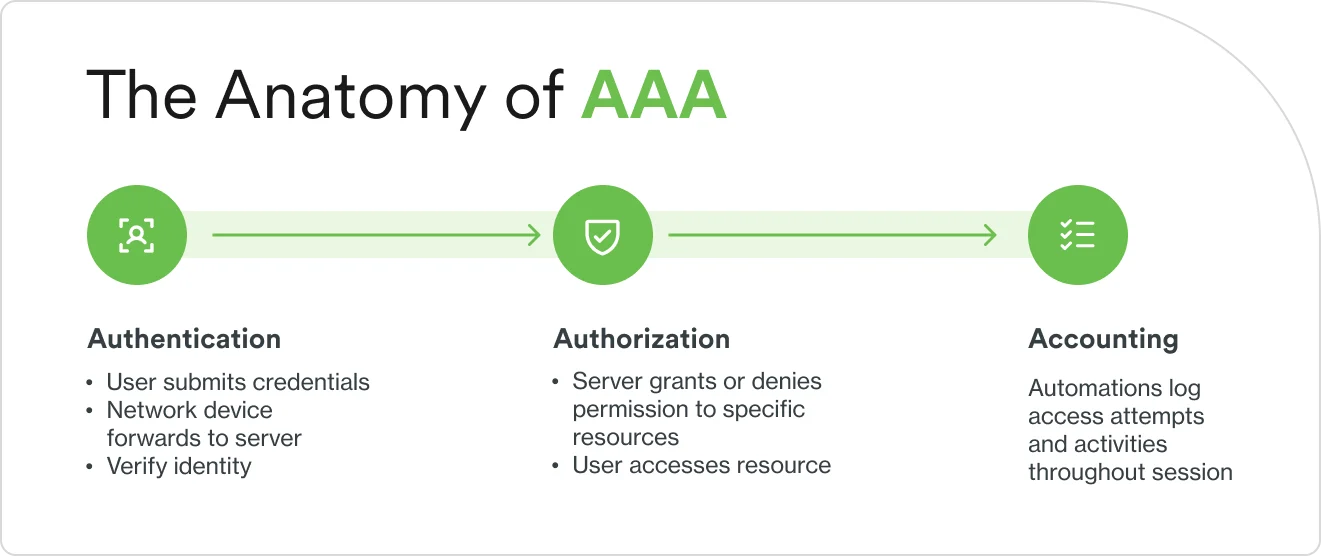
The three components work sequentially. Authentication verifies identity through credentials like passwords, certificates, or biometrics. Authorization enforces what that identity is allowed to access. Accounting logs everything that happens during the session for auditing and compliance.
Three protocols implement AAA in practice: RADIUS for wireless and VPN access, TACACS+ for network device administration, and Diameter for telecommunications and mobile networks. Most organizations use more than one.
Modern AAA implementations integrate with identity security platforms that add adaptive authentication, device trust, and risk-based access decisions on top of the traditional framework.
Why is the AAA framework important in network security?
The AAA framework matters because it helps organizations systematically and effectively secure access to networks and resources. It does so by shaping decisions around who enters the network, what they can reach, and what they can do, as well as monitoring and reporting on what they did. Without AAA, teams make access decisions in isolation, with no central authority that verifies identity, enforces permissions, or records activity.
Think of AAA as a building security system. Authentication is the ID badge check at the front door. Authorization determines which floors and rooms that badge opens. Accounting is the access log that records every door opened and every room entered. Without all three working together, the building has no way to know who is inside, where they went, or what they did.
The AAA framework addresses several network security problems at once:
Prevents unauthorized access. Every user and device must prove their identity before reaching network resources. Stolen or guessed credentials alone are not enough when AAA enforces multi-factor authentication.
Enforces least privilege. Users access only the resources their role requires. A sales representative reaches the CRM but not the engineering source code. A contractor accesses a project folder but not the payroll system.
Creates accountability. Comprehensive logging deters malicious behavior and enables forensic investigation. When something goes wrong, the accounting trail shows who did what and when.
Supports compliance. Regulations like GDPR, HIPAA, SOX, and PCI DSS require organizations to demonstrate access controls and maintain audit trails. AAA provides both.
Centralizes access management. A single point of control simplifies administration across networks with hundreds or thousands of users and devices.
These capabilities have become more important as networks have grown more complex. Remote work, cloud adoption, and the proliferation of connected devices have expanded the attack surface beyond the traditional perimeter. AAA cybersecurity practices give organizations a consistent framework for controlling access regardless of where users connect from or what resources they need to reach.
How do authentication, authorization, and accounting work?
The three components of AAA run in sequence, and each depends on the one before it. After all, a user who fails authentication never reaches authorization, while even a user who is denied authorization still generates an accounting record of the attempt.
Authentication
Authentication answers one question: who are you? It is the first step in the AAA process, and it works by comparing the credentials a user provides against a stored identity database.
It works as an exchange. When a user wishes to access a protected resource like a network, application, or file, they submit credentials to a network device, such as a VPN gateway or wireless access point. That device forwards the credentials to a server. The server checks them against its identity database, such as Active Directory, LDAP, or its own local store. If the credentials match, access is granted. If they do not, the attempt is rejected.
Common authentication methods include:
Password-based authentication. The most familiar method. A username and password combination verified against a stored record.
Multi-factor authentication (MFA). Combines two or more verification methods which fall into three categories: something you know (a password or personal information), something you have (a mobile device or hardware token), and something you are (a fingerprint or facial scan).
Certificate-based authentication. Uses digital certificates issued to devices or users, verified through public key infrastructure. Common for machine authentication on corporate networks.
Biometric authentication. Fingerprint scanners, facial recognition, or iris scans that verify a physical characteristic unique to the user.
Here's a real-world example: An employee initiates a VPN connection from home. The VPN gateway forwards their username and password to a RADIUS server. The server verifies the credentials against Active Directory (AD) and sends a push notification to the employee's phone for a second factor. Once both factors are confirmed, the employee is authenticated and the VPN tunnel is established.
Authorization
Authorization answers the next question: what are you allowed to do? After authentication confirms a user's identity, authorization determines which resources, commands, and actions that identity can access.
The AAA server checks the user's permissions against a set of predefined policies. These policies are typically based on roles, groups, or attributes assigned to the user in the identity database. The server then communicates the allowed permissions back to the network device, which enforces them for the duration of the session.
Common authorization models include:
Role-based access control (RBAC). Permissions are assigned to roles, and users inherit the permissions of the roles they belong to. For example, a "network administrator" role can configure routers, while a "help desk" role can reset passwords but not modify network settings.
Attribute-based access control (ABAC). Access decisions consider multiple attributes: user role, department, device type, location, time of day. It is more granular than RBAC and better suited to complex environments.
Command authorization. Granular control over the specific commands a user can execute on a network device. A junior engineer can run show commands to view configurations but cannot run configuration commands to change them.
The distinction between authentication and authorization is important: authentication proves identity while authorization determines privileges. Authentication is showing your driver's license. Authorization determines whether that license qualifies you to rent a particular vehicle.
A real-world example: after authenticating to the network, a network administrator is authorized to secure shell (SSH) into routers and switches and execute configuration commands. A marketing employee, authenticated with the same level of identity verification, is authorized to access email and file shares but cannot reach network infrastructure at all.
Accounting
Accounting answers the final question: what did you do? It tracks and logs user activities, resource consumption, and session details for every authenticated session.
Accounting data typically includes:
Session start and end times.
Data transmitted and received.
Commands executed.
Resources accessed.
Connection duration and source IP address.
This data serves four purposes:
Compliance and auditing. Accounting logs create the audit trails that regulations like GDPR, HIPAA, and SOX require. They demonstrate who accessed what data, when, and for how long. See also: IAM Compliance: Why it matters?
Security monitoring. Unusual patterns in accounting data, such as logins at odd hours, large data transfers, or access to resources outside a user's normal scope, can indicate a compromised account or insider threat.
Capacity planning. Session data and resource utilization records help IT teams plan infrastructure investments based on actual usage.
Billing and cost allocation. In service provider environments, accounting records document usage for billing. In enterprises, they support chargeback models between departments.
Accounting and auditing are related but distinct. Accounting is the automated process of recording what happens. Auditing is the human process of reviewing those records to find problems, verify compliance, or investigate incidents.
Consider an accounting log that shows that a user authenticated to the VPN at 9:03 AM, accessed the finance share drive at 9:15 AM, downloaded 340 MB of files over 22 minutes, and disconnected at 10:47 AM. These records were collected automatically and sit on a server. If those files were later found to be sensitive, the log provides the complete activity trail for auditing.
What are the key AAA protocols and how do they work?
AAA is implemented through standardized protocols that enable communication between network devices (clients) and the servers that facilitate AAA. Organizations choose protocols based on their security requirements, network infrastructure, and specific use cases.
Remote Authentication Dial-In User Service (RADIUS)
RADIUS is still important, and is the most widely deployed AAA protocol. It was originally designed for dial-up networks, but is now the standard for wireless access, VPN authentication, and network access control. When a user connects to a network device, that device forwards the user's credentials to the RADIUS server. The server authenticates against its user database and responds with an accept, reject, or challenge. Accounting data is sent to the server during and after the session.
RADIUS uses UDP for transport (ports 1812 and 1813), which makes it lightweight, but less reliable than TCP-based alternatives. It encrypts passwords in transit but not in the entire packet. It combines authentication and authorization into a single exchange, which simplifies implementation but limits granularity.
RADIUS is supported by virtually every network device on the market, making it the default choice for most wireless and VPN deployments.
Terminal Access Controller Access-Control System Plus (TACACS+)
TACACS+ was developed by Cisco for network device administration. It provides more granular control than RADIUS, particularly for managing routers, switches, and firewalls.
The key difference is separation. TACACS+ treats authentication, authorization, and accounting as three independent processes. Each can use a different server or database. This separation enables per-command authorization, so an administrator can be allowed to run show commands but blocked from running configuration commands on the same device.
TACACS+ uses TCP for transport (port 49), providing reliable delivery. It encrypts the entire packet payload, not just the password. These characteristics make it the preferred protocol for environments where network engineers and administrators need tiered levels of access to infrastructure devices.
Diameter
Diameter was designed as the successor to RADIUS, addressing its limitations for modern networking. It uses a peer-to-peer architecture rather than strict client-server, supports more authentication methods, and provides enhanced reliability and error handling.
Diameter uses TCP or SCTP for transport (port 3868) and supports IPsec and TLS for encryption. It is extensible, allowing custom attributes and applications for specific use cases. In practice, Diameter is primarily deployed in telecommunications environments: 4G and 5G networks, IP Multimedia Subsystem (IMS), and mobile roaming. While technically superior to RADIUS, it has not displaced RADIUS in enterprise networking due to the large installed base of RADIUS-compatible equipment.
Protocol comparison:
Feature | RADIUS | TACACS+ | Diameter |
|---|---|---|---|
Transport | UDP | TCP | TCP/SCTP |
Encryption | Password only | Full packet | Full (IPsec/TLS) |
AAA Separation | Combined auth/authz | Fully separated | Separated |
Command Authorization | Limited | Granular per-command | Moderate |
Primary Use Case | Wireless, VPN access | Device administration | Telecom, mobile |
Port(s) | 1812/1813 | 49 | 3868 |
Device Support | Universal | Cisco-focused | Telecom-focused |
Most organizations deploy more than one protocol. For example, RADIUS may handle wireless and VPN access for end users while TACACS+ manages administrative access to network infrastructure and Diameter deals with environments with mobile or telecom infrastructure. The AAA server coordinates all three.
What are the common use cases for AAA in networking?
AAA frameworks secure different types of access across different network environments. These three use cases represent where most organizations deploy AAA first.
VPN access and remote users
AAA secures remote access by verifying employee identity before establishing a VPN connection, typically through a RADIUS server with MFA. Authorization policies control which internal resources the user can reach based on their role, and accounting logs the full session for compliance and security review.
Wireless and LAN authentication
802.1X port-based network access control uses RADIUS to authenticate devices and users when they connect to wireless access points or network switches. After authentication, the network applies appropriate policies: placing employees on the corporate VLAN with full access or placing guests on a restricted network with internet-only connectivity.
Device administration
Network engineers managing routers, switches, and firewalls often authenticate through TACACS+. Its per-command authorization controls what each administrator can do on each device, from viewing configurations to making changes. Every command is logged, creating an audit trail of who changed what on which device.
What are the steps to implementing authentication, authorization, and accounting?
Implementing AAA requires planning that balances security with usability. The specific configuration depends on the protocols and infrastructure involved, but these phases apply to most deployments.
1. Assess requirements
Start by identifying what needs to be protected and who needs access. Inventory every access point that requires authentication: VPNs, wireless networks, network devices, applications. Define the user types (employees, contractors, guests, administrators) and the level of access each requires. Review compliance requirements to determine what audit trails and access controls regulations mandate. This assessment will define the scope of the AAA deployment and guide protocol selection.
2. Select the right protocols
Match protocols to use cases. RADIUS is typically the right choice for wireless and VPN access because of its broad device support. TACACS+ is better for network device administration because it offers granular command authorization and full packet encryption. Diameter fits telecommunications and mobile environments. Many organizations deploy both RADIUS and TACACS+ to cover different access scenarios. Protocol choice may also be influenced by existing equipment: Cisco-heavy environments often favor TACACS+ for device management, while multi-vendor networks rely on RADIUS for compatibility.
3. Configure the AAA server
Deploy and configure the AAA server that will handle requests from network devices. Connect it to your identity source, whether that is Active Directory, LDAP, or another user database. Define authorization policies based on the user roles and access levels established during assessment. Add network devices as AAA clients with shared secrets for secure communication. Configure accounting to capture the session data needed for compliance and security monitoring. Deploy at least two AAA servers for redundancy so that a server failure does not lock users out of the network.
4. Enforce MFA and strengthen logging
Modern AAA deployments should require multi-factor authentication for at least VPN access, administrative access, and any connection that reaches sensitive resources. Integrate the AAA server with an MFA platform that provides push notifications, one-time passwords, or hardware key verification. Prioritize phishing-resistant methods like FIDO2 security keys for privileged accounts.
For logging, centralize accounting data in a SIEM system where it can be correlated with other security signals. Define retention policies based on compliance requirements. Configure alerts for suspicious patterns: repeated failed authentication attempts, access outside normal hours, or unusual data transfer volumes. Establish a regular review cadence so accounting logs are examined weekly, not only after an incident.
5. Maintain and audit regularly
Review configurations and policies periodically. Remove accounts for users who have left the organization. Adjust authorization policies when roles change. Test failover to confirm redundant servers work as expected. Audit accounting logs for anomalies and compliance gaps. Encrypt all AAA communications: use TACACS+ where full packet encryption is needed, and add IPsec or TLS to RADIUS and Diameter deployments where possible.
How can I put AAA into practice in my company?
AAA provides the foundational framework for access control. Modern identity security platforms build on that framework by adding layers of intelligence and real-time risk assessment that traditional AAA servers were not designed to provide.
Traditional AAA verifies credentials and enforces static policies. Modern identity platforms extend this with device trust, behavioral analytics, and adaptive authentication that adjusts requirements based on context. The combination creates defense-in-depth that responds to threats as they emerge rather than relying solely on predefined rules.
Cisco Duo integrates with existing AAA infrastructure to strengthen the authentication layer while preserving the authorization and accounting functions already in place:
Phishing-resistant MFA adds a strong second factor to AAA authentication, protecting VPN, wireless, and administrative access with push notifications, hardware keys, or biometric verification.
Device trust verifies that the device connecting to the network meets security requirements before access is granted, adding a signal that traditional AAA servers do not evaluate.
Adaptive authentication adjusts authentication requirements based on risk context: location, device health, time of day, and user behavior patterns.
Single sign-on (SSO) extends AAA principles to cloud and SaaS applications with unified access control, so users authenticate once and carry verified identity across applications.
Identity intelligence analyzes authentication patterns to detect compromised credentials and anomalous access, feeding risk signals back into access decisions.
This approach strengthens AAA without replacing existing infrastructure. RADIUS and TACACS+ servers continue to handle authorization and accounting. Duo layers on top to make authentication stronger, smarter, and more responsive to real-time risk.
Ready to strengthen your AAA security framework with phishing-resistant MFA, device trust, and more? Try Duo for free.