

Key takeaways
Lightweight Directory Access Protocol (LDAP) is an open, vendor-neutral protocol for querying and managing directory information. Active Directory is a Microsoft directory service that uses LDAP as one of its underlying protocols. Commonly confused as parts of the same system, these terms actually refer to closely related, but distinct technologies.
The two are not competitors. Many organizations use LDAP to connect to Active Directory, and the technologies work together in most enterprise environments.
LDAP handles communication with directories. Active Directory uses LDAP for that communication, and adds user management, device management, security policies, and access control—all in one package.
Cloud-based directory platforms support both LDAP and Active Directory connections, so organizations can consolidate identity management into a single service without reworking how their existing applications authenticate.
What is Lightweight Directory Access Protocol?
Lightweight Directory Access Protocol (LDAP) is a protocol—a set of rules that software follows to communicate—for accessing and managing user directory services over a network. The directory service it speaks to? That’s a central system that stores user information, like their name, department, access levels, and device info.
LDAP gives business applications like a CRM, HR portal, or accounting software a standard way to search that database and retrieve information. This helps applications verify who someone is and retrieve details like which systems they’re allowed to use. The meaning of LDAP starts with its name. As the internet as we know it began to take shape, LDAP was created in 1993 as a simpler, faster alternative to an older protocol called the Directory Access Protocol (DAP). That legacy protocol required heavy computing resources and a specific type of network connection. LDAP stripped away that complexity so applications could access directory information using TCP/IP, the same protocols that power the web.
It’s also platform-agnostic, and works with Linux, Windows, macOS, and virtually any system that supports TCP/IP. Because it’s an open standard maintained by the Internet Engineering Task Force (IETF), no single company owns it. Organizations can use LDAP with a range of directory products, including OpenLDAP (a free, open-source directory), Apache Directory Server, and Microsoft Active Directory—which is where the two technologies start to overlap.
How does LDAP authentication work?
When we talk about “LDAP authentication,” we’re really talking about authenticating over LDAP. When someone logs in to an application, they seek to prove their identity and permission to access based on information stored in a directory. That’s authentication, facilitated by a user authentication solution.
How LDAP authentication exchanges information
This connection from app to directory server is called a bind operation. During this handshake, the app presents the identity the user gave it and asks the directory to verify it. What gets exchanged depends on how the organization runs security. It could be a username and password, a device ID and certificate, an API key, or a service account token.
Regardless of the method, the app is asking two questions: Is this entity who they say they are? And are they allowed access? The directory checks what’s called the entity’s distinguished name—its unique record in the directory—and responds with a yes or a no.
There are two ways this exchange can happen:
A simple bind sends the credentials directly, usually over an encrypted connection so they can’t be intercepted in transit.
A Simple Authentication and Security Layer (SASL) bind skips sending credentials altogether. Instead, it uses a separate verification method, like a Kerberos ticket or a certificate, to prove identity without the credentials ever crossing the network.
Either way, LDAP is doing the communicating, not the authenticating. It carries the request to the directory and delivers the answer back. The directory on the other end—whether that’s Active Directory or another compatible system like OpenLDAP—contains the rules for access.
For step-by-step guidance on adding multi-factor authentication to LDAP-based applications, see the Duo LDAP integration guide.
What is Active Directory?
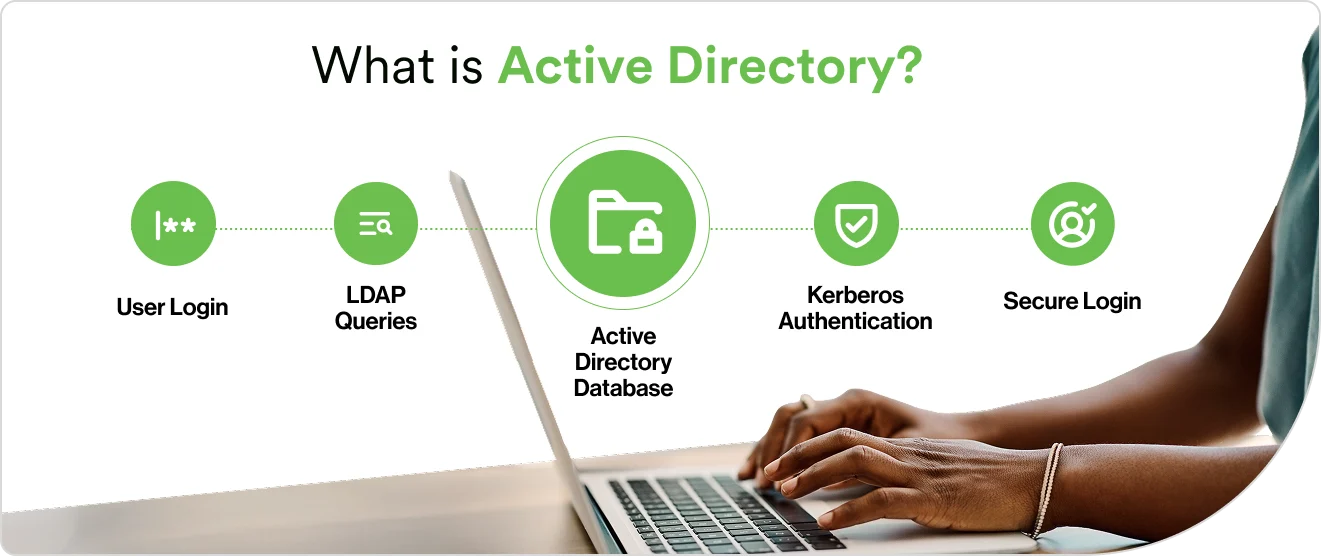
Active Directory (AD) is a directory service developed by Microsoft for managing users, devices, and resources across a network. A directory service, in short, stores user details like personal information, job title, contact methods, seniority, and app access levels. Companies use directories to enforce security policies across every connected computer.
How does AD authentication work?
Active Directory authentication works by passing proof of identity between an app and AD via a protocol. Its default protocol is called Kerberos, which works through encrypted tickets instead of sending a username and password each time.
The user logs in and reaches a domain controller, the server running AD that handles login requests.
The controller issues an encrypted ticket via Kerberos called a Ticket-Granting Ticket (TGT). That ticket is the user’s proof of identity for the rest of the session.
From then on, the user doesn’t type their password again. When they open their email client, access a shared drive, or launch an internal app, Kerberos presents the ticket on their behalf. The app checks the ticket, confirms it’s valid, and grants access.
That authentication flow is an example of single sign-on (SSO), where one login grants access to everything the directory says you’re allowed to use.
Not everything on the network speaks Kerberos, though. Linux servers, VPN appliances, and older applications often authenticate against AD using LDAP instead. That’s why LDAP is important. AD supports multiple methods of user authentication and user authentication techniques: Kerberos for Windows-native resources, LDAP for everything else, all pointing at the same directory.
This is where the confusion between LDAP and Active Directory starts. AD uses LDAP as one of its communication protocols. Applications can talk to AD over LDAP. But AD also speaks Kerberos, DNS, and other protocols.
Key differences between LDAP and Active Directory
LDAP is a protocol. Active Directory is a service that uses that protocol. Comparing them directly is like comparing HTTP (the language web browsers use) with a web server (the product that delivers web pages). They operate at different layers of the same system. That said, IT teams often need to decide whether to deploy a standalone directory like OpenLDAP, Active Directory, a cloud-based identity platform, or some combination. Here’s where they differ.
You may ask | LDAP | Active Directory |
|---|---|---|
What is it? | Open protocol (a set of communication rules) | Proprietary directory service (a product) |
Who owns it? | Open standard maintained by the IETF; no single owner | Developed and maintained by Microsoft |
Where does it run? | Platform-agnostic: Linux, macOS, Windows, any TCP/IP system | Designed for Windows; limited native support elsewhere |
How does it verify identity? | Simple bind and SASL bind operations | Kerberos (primary), LDAP bind, NT Lan Manager (legacy) |
What does it do? | Queries, searches, and modifies directory data | Full identity management: authentication, authorization, Group Policy, domain trusts, certificate services |
What’s it best for? | Optimized for high-volume reads across very large datasets (millions of records) | Optimized for distributed enterprises organized into domains and forests |
How much does it cost? | Free implementations available (OpenLDAP, 389 Directory Server) | Requires Windows Server licensing |
When is LDAP the right choice?
LDAP is one of the most common protocols for connecting non-Microsoft systems to a directory. Your business may run large-scale applications that need to authenticate millions of users. Or your company’s users may run Windows but rely on Google Workspace and certain legacy platforms. LDAP could carry the authentication request between those applications and the directory. Telecommunications companies, internet service providers, and SaaS platforms have historically used LDAP because the protocol is optimized for fast reads across massive datasets.
LDAP also excels when flexibility matters more than built-in management features. IT teams can choose from multiple directory implementations, customize the data schema, and integrate with applications across different operating systems without vendor lock-in. Meanwhile, some directories like Apache Directory Server and OpenLDAP only support LDAP protocols. The trade-off: these directories don’t include the policy management, device control, or single sign-on capabilities that come packaged with Active Directory and solutions from other vendors. Teams will need to add those separately or layer a cloud-based solution to fill these gaps.
When is Active Directory the right choice?
Active Directory is the natural fit for organizations that run primarily on Windows. If the environment includes Windows workstations, Windows servers, Microsoft 365, and applications that rely on Kerberos, AD provides a tightly integrated management layer that would be difficult to replicate with other directory services.
AD’s features combine to form a complete user security suite and identity management system. It defines users and permissions, encloses these users in a trusted network, and communicates their access levels to the apps they use. It allows admins to push security rules and software configurations to thousands of computers simultaneously.
Even organizations that rely on Active Directory probably use additional tools and protocols for systems beyond their Windows ecosystem. Additional tools, including LDAP, extend their directory to these systems.
How do LDAP and Active Directory work together?
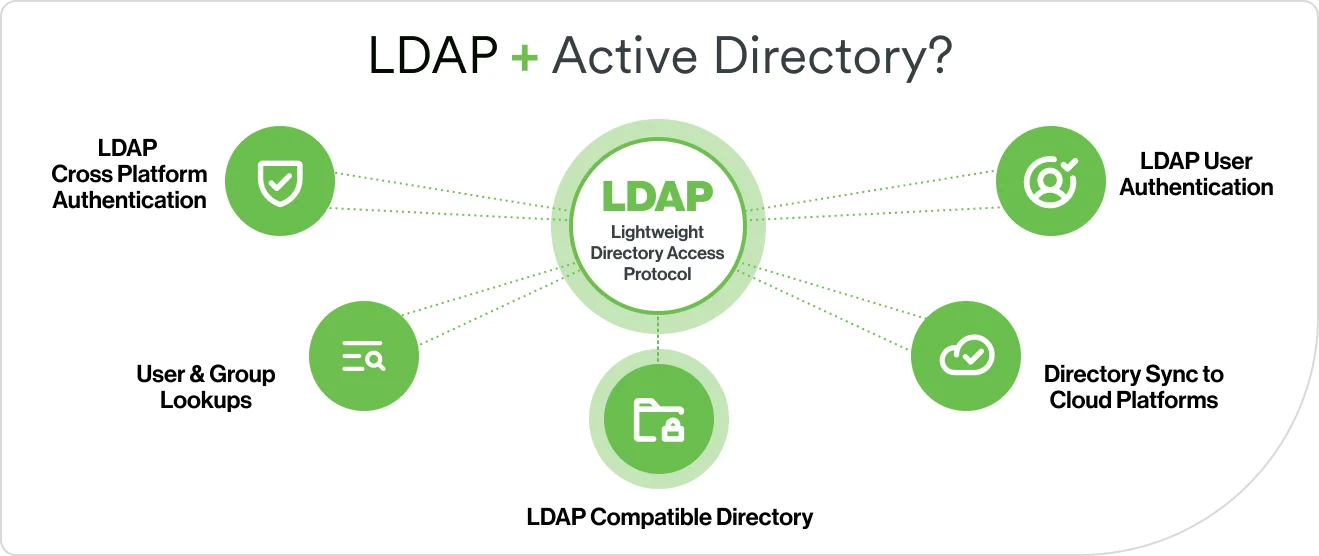
In many enterprise networks, LDAP and Active Directory work together every day. Active Directory is an LDAP-compatible directory, which means any application that speaks LDAP can check AD for user information, authenticate users against it, and retrieve attributes like group memberships and email addresses.
Here are the most common user authentication solutions that connect the two:
Cross-platform authentication. Linux servers, VPN appliances, network devices, and legacy applications use LDAP to authenticate users against AD because they don’t speak Kerberos.
User and group lookups. Applications query AD over LDAP to retrieve details like email addresses, group memberships, and access levels.
Non-human identity verification. Service accounts, API keys, AI agents, and automation bots use LDAP to authenticate against AD. These non-human identities now outnumber human users in most organizations.
Directory sync to cloud platforms. Organizations sync users and groups from AD into cloud-based identity platforms over LDAP, extending their directory’s reach without rebuilding it. See the Duo directory sync documentation for details.
The future of directory services and identity management
The relationship between LDAP and Active Directory has shaped enterprise IT for decades. That relationship is evolving as organizations move identity management to the cloud. Here’s what IT teams should be watching — and preparing for.
Cloud-based directories are reducing the infrastructure burden
On-premises directory servers—whether they run Active Directory or a standalone directory like OpenLDAP—require hardware, patching, replication management, and disaster recovery planning. A cloud identity platform can handle all of that as a managed service. They provide user storage, authentication, and single sign-on, without the overhead of running local servers. Gartner forecasts that over 70% of enterprises will use industry cloud platforms to accelerate business initiatives by 2027. Identity management is a central part of that migration.
Adaptive authentication and continuous verification are replacing static rules
Modern identity platforms use machine learning—algorithms that learn patterns from data—to understand what normal behavior looks like for each user.
Non-human identities are growing faster than human ones
Service accounts, API keys, AI agents, and automation bots all need verified identities. They now outnumber human users in most organizations. Gartner estimates the ratio is 45 to 1. Directory services are evolving to manage these non-human identities with the same lifecycle controls that apply to people.
Identity orchestration is simplifying multi-directory environments
Many organizations manage several directories: on-premises Active Directory, a cloud identity provider, a separate store for contractors, and application-specific user databases. Identity orchestration coordinates authentication across all of them from a single control point. Instead of maintaining parallel directories, organizations define routing rules that send each login request to the right source automatically.
How Duo Directory fits in
Duo Directory is Cisco Duo’s cloud-based identity platform, designed for the ways organizations increasingly manage and secure user identities.
What is the best application for Duo Directory vs. Active Directory?
When comparing Duo Directory vs. Active Directory, the distinction isn't about choosing one over the other. It's about what each one is built to do. Duo Directory can serve as a standalone directory with no additional identity store required, or work alongside existing Active Directory deployments through directory sync.
Duo Directory supports passwordless authentication. It can automate the process of adding, updating, and removing user accounts using the SCIM 2.0 standard. Duo also supports dynamic routing rules for managing multiple authentication sources. Organizations can bring their existing on-premises directories with them and add cloud-based identity management on top, without a full infrastructure replacement.