

Key takeaways
Simplified authentication: Single sign-on (SSO) lets users access multiple applications with one secure login, reducing password fatigue and human error.
Improved security: Centralized authentication enables stronger protections like multi-factor authentication (MFA) and limits credential reuse.
Operational efficiency: Fewer password resets mean less downtime and lower IT support costs.
Compliance and visibility: SSO provides unified access logs and audit trails to simplify reporting and strengthen governance.
Why does single sign-on matter for businesses?
Picture a typical workday: employees bounce between their email accounts, HR portals, project tools, and customer systems, and each platform likely has its own password.
Due to password fatigue, your employees may start reusing credentials, jotting them down on sticky notes, or resetting them on a weekly basis. While this way of managing credentials is inconvenient at best, it can quickly become a security risk at worst.
Password fatigue leads to risky behavior and weak credential hygiene, leaving organizations vulnerable to security breaches. According to the Verizon Data Breach Investigations Report, more than 80% of breaches involve weak or stolen credentials.
Single sign-on (SSO) challenges password fatigue directly by allowing employees to securely access all their applications through one trusted login, reducing the attack surface while improving efficiency. With fewer logins and stronger centralized authentication, businesses save time, lower IT costs, and create a smoother, more secure user experience.
What is single sign-on?
Single sign-on (SSO) is an authentication method that lets users access multiple applications using one set of login credentials. Instead of remembering dozens of passwords, employees can sign in once and securely access every approved business tool they need.
Unlike a password manager, which stores many different passwords, SSO eliminates them altogether by centralizing authentication through a single trusted identity provider.
Behind the scenes, SSO verifies a user’s identity, establishes a secure session, and shares authentication data with connected applications so users don’t have to re-enter their credentials.
SSO is a foundational element of identity and access management (IAM). It helps businesses control who can access what, reduce password-related risks, and improve the overall login experience.
How does SSO work? A step-by-step guide
How does SSO work? SSO can be boiled down to a single concept: authentication happens once, and access extends across all connected applications.
Here’s how that process unfolds on the backend:
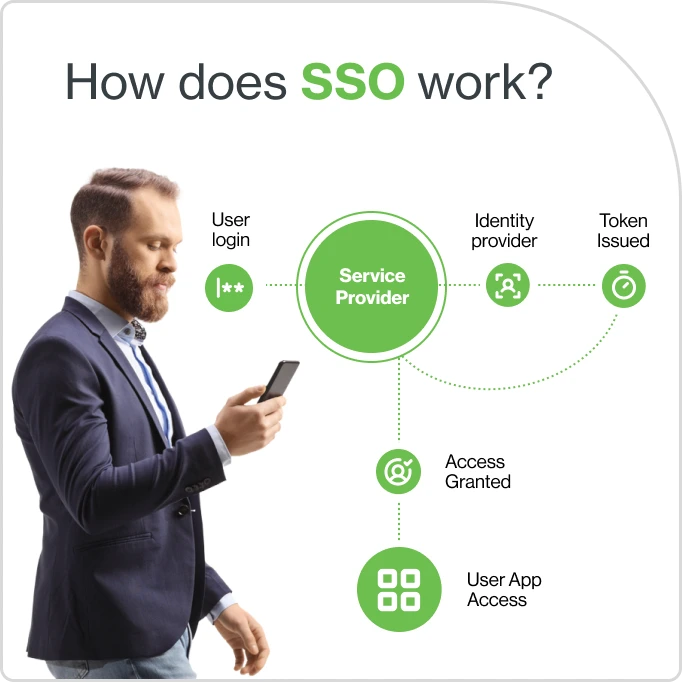
Understanding SSO tokens and protocols
Every single sign-on solution relies on secure tokens and standardized communication protocols to verify identity and share authentication data between systems. These tokens act as digital “proof” that a user has been verified, while protocols define how that proof is exchanged safely between an identity provider and the applications being accessed.
In simple terms:
Authentication verifies who you are.
Authorization determines what you can access.
Federation allows users to access resources across different domains or organizations using SSO, extending trust beyond a single system or network.
The protocols below power how SSO works in different environments, from enterprise systems to modern cloud applications:
Protocol Name | Best Used For | Key Features | Common Applications |
|---|---|---|---|
SAML | Enterprise web applications | XML-based, supports federation | HR, CRM, ERP systems |
OpenID Connect | Modern web/mobile apps | Built on OAuth 2.0, JSON tokens | Google, Microsoft 365 |
OAuth 2.0 | Authorization delegation | Access tokens, API access | Third-party integrations |
Key differences
Security Assertion Markup Language (SAML) is best for enterprise SSO and supports federated identity.
OpenID Connect is ideal for modern cloud and mobile apps.
OAuth 2.0 is mainly for granting access to APIs, not direct authentication.
Together, these protocols form the foundation of how SSO works, ensuring authentication is both seamless and secure across every platform.
Why you should consider SSO for your business
Single sign-on transforms how your organization manages access and security. Whether you’re a small team or a global enterprise, SSO delivers measurable benefits that reach every corner of the business.
According to a 2023 Gartner study, organizations that adopt SSO can reduce password-related helpdesk calls by up to 50%. For small businesses, that means easier management with fewer tools to maintain, while larger enterprises gain scalability, consistency, and stronger security oversight.
Is SSO always secure?
Single sign-on (SSO) uses secure, industry-standard protocols and tokens to protect user credentials and sessions. By centralizing authentication, SSO actually reduces the number of attack points. However, like any security tool, it must be implemented correctly.
Potential vulnerabilities, such as token theft or a single point of failure, can arise if controls aren’t configured properly. However, these risks are mitigated through strong encryption, multi-factor authentication (MFA), and strict session management.
Compared to managing multiple passwords, SSO greatly reduces the risk of password reuse and phishing attacks by minimizing how often credentials are entered or stored.
Best practices for SSO security
Always enable MFA alongside SSO for layered protection
Regularly audit access logs to detect unusual activity.
Use strong, unique credentials for the SSO identity provider to protect the authentication source.
Cisco Duo supports SSO security with phishing-resistant authentication, adaptive access policies, and device trust, ensuring only verified users on secure devices can access your business applications.
What challenges does SSO solve for businesses?
Even though SSO simplifies authentication, it must be implemented thoughtfully to deliver its full benefits. Here are some of the most common authentication challenges businesses face, and how SSO helps solve them:
By combining these best practices, organizations can strengthen the usability and security of their authentication systems, protecting users without slowing them down.
How to implement SSO in any environment
Deploying single sign-on doesn’t have to be a complex process. With the right plan and tools, organizations can integrate SSO into their existing workflows, whether they’re cloud-first, hybrid, or still managing some on-prem systems.
1. Plan the integration
Start by identifying which applications and systems should be connected through SSO. This step ensures your rollout targets the tools that matter most and avoids unnecessary complexity.
Inventory all apps and systems that require authentication.
Identify key stakeholders across IT, security, and business units.
Define security, compliance, and user experience goals before setup begins.
2. Configure the identity provider
Your identity provider (IdP) is the backbone of your SSO strategy. Choose one that aligns with your infrastructure and offers strong security features, scalability, and modern protocol support. Cisco Duo can serve as both your IdP and your SSO platform, reducing the need for multiple providers and simplifying management.
Once you’ve selected your IdP, you’ll want to:
Set up the IdP and configure authentication methods.
Connect the IdP to your existing directory or user database.
Apply consistent access and MFA policies for all users.
Use strong administrator credentials and enable MFA for IdP access to prevent unauthorized configuration changes.
Cisco Duo offers a streamlined setup process with built-in security controls that make it easy to deploy SSO securely.
3. Connect cloud applications
Use pre-built integrations for common cloud tools, or configure custom SAML or OpenID Connect connections where needed.
Test each connection carefully to ensure seamless authentication.
Validate that MFA and adaptive access policies are functioning as intended.
Duo’s application catalog simplifies this process by providing preconfigured integrations for popular business platforms so most setups can be completed with just a few clicks.
4. Pilot and roll out gradually
Before launching organization-wide, start with a small group of users. A limited rollout helps identify usability or policy issues early without disrupting everyone’s workflow.
Communicate upcoming changes clearly and provide short training resources.
Gather feedback to refine the rollout and monitor for unexpected access issues.
A phased approach builds user confidence and helps IT teams fine-tune configurations for a smoother full deployment.
Where SSO fits in identity and access management
Single sign-on is one piece of a larger framework known as identity and access management (IAM): the set of policies, technologies, and processes that control how users access digital resources.
Within IAM, SSO works alongside multi-factor authentication (MFA), access policies, and provisioning to ensure users are securely identified and granted only the access they need.
SSO supports a zero trust approach within IAM by ensuring that identity verification and access decisions happen continuously, not just at login. In a Zero Trust framework, access is granted based on contextual factors, like user role, device health, and location, rather than assumed trust. By integrating with these IAM controls, SSO helps organizations enforce least privilege and maintain secure access across all systems.
Cisco Duo strengthens your organization’s zero trust framework by integrating SSO with device trust, adaptive authentication, and policy enforcement, giving organizations complete visibility and control over who accesses their systems and from where.

Move forward with stronger access security
Single sign-on (SSO) simplifies authentication, strengthens security, and boosts productivity for businesses of every size. By consolidating multiple logins into one secure authentication point, SSO reduces friction for users while helping IT teams maintain tighter control over access.
If you’re ready to take the next step, start by assessing your current authentication setup, identifying which applications would benefit most from SSO, and choosing a trusted identity provider that aligns with your security and compliance goals.
Cisco Duo makes SSO deployment simple with robust integrations and built-in security features designed for modern businesses. Duo stands out with phishing-resistant MFA, adaptive access policies, and seamless cloud integrations, which work together to protect your users and data without slowing business operations.
See for yourself how Duo's IAM platform with SSO can strengthen your organization's security with a free 30-day trial.