

Key takeaways
PAM protects your highest-risk accounts: Privileged access management secures the administrator, service, and infrastructure accounts that provide elevated access to critical systems and sensitive data.
Credential theft targets privileged accounts first: stolen credentials were the initial access vector in 22% of confirmed breaches (2025 Data Breach Investigations Report, Verizon), and attackers disproportionately target accounts with elevated permissions because they unlock the most valuable resources.
Five core controls define how PAM works: discovery, credential vaulting, just-in-time access, session monitoring, and credential rotation work together to enforce the principle of least privilege across the environment.
PAM and identity security are complementary: identity security platforms like Duo Security verify who the user is before PAM grants what they can do, creating layered defense for privileged access.
Why does privileged access management matter?
Privileged access management matters because privileged accounts are the most valuable targets in any IT environment. These accounts include domain administrators, cloud infrastructure owners, database administrators, and service accounts. They have elevated permissions that give them access to critical systems and sensitive data. When an attacker compromises a privileged account, they gain the same access, often without triggering any alarms.
If a contractor who left your organization six months ago still has active administrator credentials for your cloud infrastructure, or a service account password embedded in an automation script has not been changed in two years, this is a real-world path to a breach.
These breaches happen. According to the 2025 Data Breach Investigations Report (Verizon), credential abuse was the initial access vector in 22% of confirmed breaches, and ransomware was present in 44% of breaches. Meanwhile, the 2024 Year in Review found that identity-based attacks appeared in 60% (Cisco Talos) of all incident response cases. Privileged accounts are the primary target in these attacks because they provide the broadest access with the least effort.
How do security teams define privileged access management?
Privileged access management (PAM) is a cybersecurity strategy and set of technologies that control, monitor, and secure access to privileged accounts. It enforces the principle of least privilege: ensuring that users and systems only receive the minimum access they need for a specific task, and only for as long as they need it.
Think of privileged accounts as master keys. Most employees get a key that opens their office and the front door. A domain administrator gets a master key that opens every door: server rooms, databases, cloud infrastructure, and security tools. PAM controls who gets a master key, requires them to check it out from a secure location, tracks everywhere they go while they have it, and takes it back when they are done.
While identity and access management (IAM) governs all user access broadly, PAM focuses specifically on elevated accounts because they pose the highest security risk if compromised. The next section covers what those accounts look like in practice.
What are common types of privileged accounts?
Privileged accounts exist across every layer of an IT environment. Understanding the types helps organizations identify what needs protection. Here are the most common categories.
Account type | Access level | Common examples | Key risks |
|---|---|---|---|
Domain administrator | Enterprise-wide | Active Directory administrators | Complete network compromise |
Local administrator | Single system | Workstation administrators | Lateral movement |
Service account | Application/system | Database service accounts | Persistent backdoor access |
Emergency access | Break-glass | Disaster recovery accounts | Abuse during crises |
Application administrator | Business application | Customer relationship management administrator | Access to sensitive business data and configurations |
Cloud administrator | Cloud environment | AWS root or Azure owner account | Broad control over cloud infrastructure and data |
Database administrator | Production database | Database administrator account | Direct access to sensitive records |
Non-human credentials | System-to-system | Secure Shell keys and API credentials | Untracked credentials embedded in code or configuration |
How does privileged access management work?
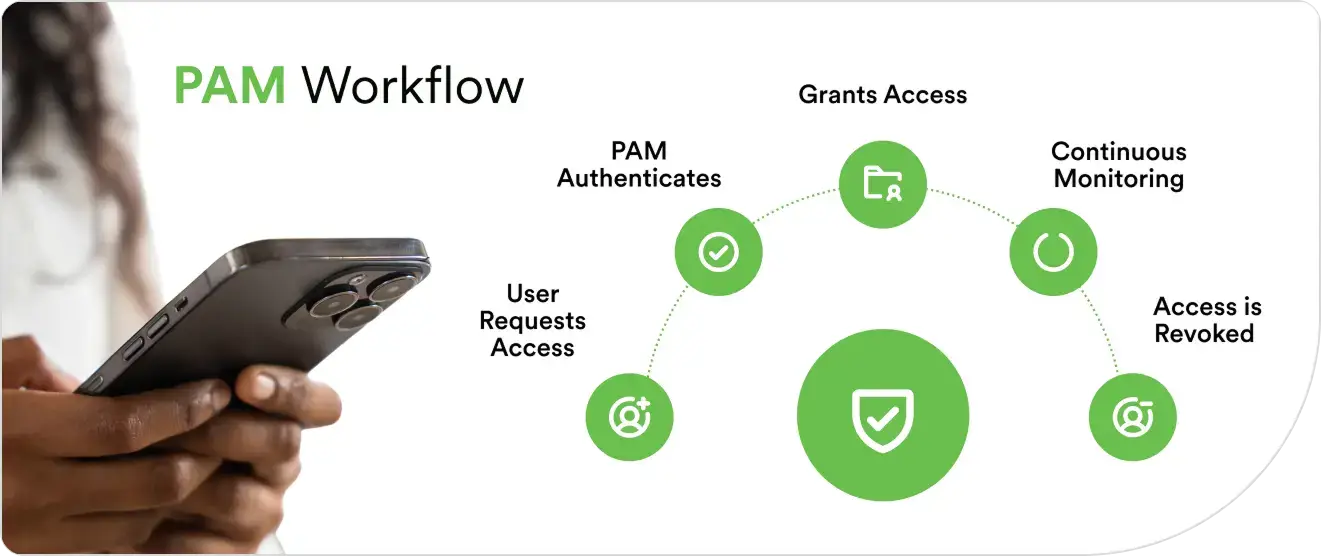
Privileged access management (PAM) works by combining five core controls that protect privileged accounts throughout their lifecycle: discovery, vaulting, access elevation, session monitoring, and credential rotation. Here is how each one operates.
Discovery and inventory
PAM tools automatically scan the IT environment to identify every privileged account across on-premises systems, cloud platforms, and applications. Many organizations are surprised to find significantly more privileged accounts than they expected, discovering dormant accounts, orphaned service credentials, and shared admin passwords that were never formally tracked.Credential vaulting
Discovered credentials are stored in an encrypted digital vault. The vault eliminates shared passwords, removes hard-coded credentials from scripts, and ensures that no user needs to know the actual password. Users authenticate the vault, and the vault handles the connection to the target system.Just-in-time access
Rather than granting permanent elevated permissions (known as standing privileges), the PAM system provides temporary access for specific tasks. A user requests access; the system evaluates the request against predefined policies, and if approved, grants the minimum permissions needed. Access expires automatically when the task is complete, or the time window closes.Session monitoring
Every privileged session is recorded and monitored. The PAM system captures commands executed, files accessed, configuration changes, and other activity. Automated alerts flag suspicious behavior including unusual login locations, privilege escalation attempts, or access outside normal hours, routing them to the security team for investigation.Credential rotation
The PAM automatically changes security keys after each use or on a defined schedule, without human intervention. This limits the window of exposure if a credential is compromised and eliminates the risk of long-lived static passwords.
These five controls, working together, enforce the principle of least privilege across the organization.
What are the key features of an effective privileged access management system?
These features describe what to expect from a mature privileged access management platform once it is in place. Modern privileged access management platforms deliver these controls through five core capabilities.
PAM Control | What it does | Key capabilities |
|---|---|---|
Credential vaulting | Stores privileged passwords, SSH keys, and API credentials in an encrypted repository—no user ever sees the actual password | Eliminates shared credentials, removes hard-coded passwords from scripts, provides temporary session access without exposing credentials |
Just-in-time access | Grants temporary elevated permissions for a specific task and time window, then revokes them automatically | Replaces standing privileges, enforces least privilege, supports approval workflows and time-based expiration |
Session monitoring | Records and monitors all activity during privileged sessions in real time | Captures keystrokes, commands, file transfers, and configuration changes; alerts on suspicious behavior; provides audit trails for compliance |
Credential rotation | Automatically changes passwords and keys after each use or on a schedule | Limits exposure window if credentials are compromised, eliminates long-lived static passwords, runs without human intervention |
Dynamic access control | Makes context-aware access decisions based on user identity, device health, location, and risk level | Adaptive policies, MFA step-up for high-risk requests, integration with threat intelligence feeds and SIEM platforms |
What are the main challenges in PAM security?
PAM deployments face predictable friction points that have less to do with the technology itself and more to do with organizational scale and complexity.
Scope underestimation is the most common early obstacle. Automated discovery routinely surfaces two to three times more privileged accounts than IT teams expect: dormant service accounts, shared admin credentials, SSH keys embedded in scripts from years-old projects. Securing accounts that were never formally tracked requires effort that initial project timelines rarely account for.
Operational resistance slows adoption. Just-in-time access and approval workflows add steps to processes that administrators previously handled with standing credentials. Without clear policy rationale and well-designed request flows, privileged users find workarounds, and adoption stalls.
Hybrid and multi-cloud environments create integration complexity. On-premises systems, cloud platforms, and SaaS applications each have different native credential formats and administrative interfaces. A PAM solution must work consistently across all of them, and integrating those controls into a unified policy framework requires significant configuration work upfront.
Legacy-system compatibility can limit coverage. Older and custom-built systems may not support modern PAM connectors or authentication methods. Teams may need phased integration, custom connectors, or tightly scoped access policies to bring these systems under PAM controls without interrupting operations.
Policy maintenance is ongoing rather than one-time. Access policies go stale as teams grow, roles change, and new systems are added. Without automated reviews and alerting, privilege creep accumulates quietly until the next audit surfaces it.
What are essential best practices for PAM?
Effective PAM depends on consistent practices across the account lifecycle. Start by enforcing multi-factor authentication (MFA) for privileged accounts. MFA helps prevent a stolen password alone from granting access. Next, replace standing privileges with just-in-time access so elevated permissions exist only for a specific task and expire automatically.
Session monitoring and credential rotation close the loop. Monitoring creates the audit trail that compliance frameworks require and surfaces anomalous behavior in real time. Credential rotation ensures that even if a credential is exposed, the exposure window is narrow.
These practices are covered in detail—including implementation guidance and priority sequencing—in Privileged Access Management Best Practices.

What are the implementation steps for PAM solutions?
Implementing privileged access management (PAM) works best as a phased process. These six steps help organizations secure their highest-risk accounts while limiting disruption to administrators and existing workflows.
Discover and classify privileged accounts
Identify human and non-human privileged accounts across endpoints, servers, applications, databases, and cloud environments. Include administrator accounts, service accounts, emergency accounts, Secure Shell (SSH) keys, and application programming interface (API) credentials.Prioritize the highest-risk accounts
Assess each account based on its permissions, the systems it can reach, and the sensitivity of the data it can access. Secure accounts with broad administrative control, shared credentials, or access to critical systems first.Vault credentials and enforce multi-factor authentication
Store privileged passwords, keys, and secrets in an encrypted vault instead of sharing them or embedding them in scripts. Require multi-factor authentication (MFA) to verify each user before granting privileged access.Replace standing privileges with just-in-time access
Remove permanent elevated permissions wherever possible. Grant users the minimum access required for a specific task, then revoke it automatically when the task or approved time window ends.Monitor sessions and rotate credentials
Record privileged sessions and track commands, file access, and configuration changes. Rotate credentials after use or on a defined schedule to reduce the time an exposed credential remains valid.Review access and policies continuously
Review privileged accounts, access policies, and user roles on a regular schedule. Remove dormant accounts, update permissions after role changes, and adjust policies as new systems and risks emerge.
How does identity security strengthen privileged access management?
PAM controls what privileged users can do. Identity security verifies who they are before they get there. The two work as complementary layers. Before a PAM system grants just-in-time access, the identity layer must be in place to verify that the person requesting it is who they claim to be, that their device is secure, and that the request makes sense given the context.
Identity security platforms like Duo Security are purpose-built for this layer. Duo’s phishing-resistant MFA verifies the user through authentication methods that cannot be intercepted through social engineering.
Duo’s device trust verifies that the endpoint meets security requirements before granting access.
Duo’s adaptive authentication adjusts verification requirements based on risk context—a familiar device on a trusted network passes through standard checks, while a high-risk request for privileged access triggers additional verification.
Duo's Duo Directory handles identity orchestration—syncing user identities across directories, automating lifecycle management, and giving administrators a centralized control point for the identity layer that PAM depends on.
Together, identity security and PAM create layered defense for privileged access. The identity layer confirms the user. The PAM layer controls the permissions. Neither is complete without the other.
Cisco Duo integrates with leading PAM platforms to add identity verification at the point of privileged access request.
How should organizations evaluate a PAM solution?
The right PAM platform should match the organization’s infrastructure, account types, operating model, and security requirements. Evaluate each option against the following criteria.
Environment coverage: confirm that the platform supports on-premises systems, cloud platforms, software-as-a-service applications, and non-human credentials used in your environment.
Integration support: check compatibility with existing identity providers, multi-factor authentication, security monitoring, ticketing, and incident-response tools.
Access workflows: review how the platform handles approvals, just-in-time access, emergency access, and automatic revocation.
Deployment and administration: assess implementation effort, policy management, administrator workflows, and support for legacy systems.
Reporting and auditability: confirm that the platform records privileged sessions and provides reports suitable for security reviews and audits.
Scale and resilience: verify that the platform can support additional users, systems, accounts, and environments as the organization grows.
How can my organization start securing privileged access?
This article started with a problem: privileged accounts provide the broadest access to the most critical systems, and attackers know it. Privileged access management closes that gap by discovering every privileged account, vaulting credentials, granting just-in-time access, monitoring sessions, and rotating credentials automatically.
But PAM only secures permissions. The identity layer secures the people. Duo Security protects that identity layer by verifying users, validating devices, and adapting authentication based on risk context before privileged access is ever granted.
Ready to strengthen your privileged access security? Start your free trial of Duo Security today.