

Key takeaways
Phishing exploits trust, not technology: Attackers impersonate trusted sources to trick people into revealing credentials, transferring money, installing malware, or conducting other non-intended actions. No firewall stops a user who willingly hands over their password.
Phishing comes in many forms: Email phishing, spear phishing, smishing, vishing, and quishing use different channels and tactics but share the same warning signs.
A successful phish rarely ends there: Stolen credentials become the entry point for account takeovers, ransomware, and lateral movement across an organization.
Prevention combines technology with awareness: Multi-factor authentication, email filtering, security training, and access controls address a different layer of the phishing threat.
What is phishing?
Phishing is a cyberattack in which an attacker impersonates a trusted source—a bank, employer, government agency, or popular service—to trick someone into revealing sensitive information, transferring money, or installing malicious software.
The term comes from “fishing”: attackers cast a lure and wait for someone to take the bait. Phishing attacks are delivered through email, text messages, phone calls, social media and application messaging, and, increasingly, through QR codes and video conferencing tools.
Here’s an example. An employee receives an email that appears to come from a company's IT department. It asks them to verify their credentials before a system update. The login page looks identical to the real one. The employee enters their username and password, which the attacker logs and uses to access company resources.
Attackers use phishing to accomplish three things:
Steal credentials, like usernames and passwords
Commit financial fraud, for example, tricking victims into transferring money or providing payment information by acting as someone they trust
Install malware which may spy on activity, encrypt files for ransom, or provide persistent access to a device
A single successful phish can enable all three.
Phishing attacks may land in broad, untargeted blasts, think millions of identical emails sent to random addresses. Or, they could be precisely crafted messages aimed at a single individual.
Why does phishing matter?
Phishing matters because it is the most reported cybercrime in the United States and a leading cause of data breaches. It’s also important because no amount of technical security stops an attack that succeeds by convincing a person to cooperate.
According to a 2024 Internet Crime Report, phishing and spoofing were the top complaint category, with 193,407 reports (FBI)—more than double the next most common crime type. Another 2024 report showed that identity-based attacks accounted for 60% (Cisco Talos) of their incident response cases.
Phishing always appears as communication from a trusted person or organization. It does not exploit a software vulnerability that can be patched. It exploits the gap between how legitimate communications look and how people evaluate them under time pressure.
What are the common types of phishing attacks?
Phishing takes different forms depending on the channel an attacker uses and how specifically they target their victim. Understanding the types helps with recognition, since each one has distinct tactics.

Email phishing impersonates a trusted source
Phishing attackers send fraudulent messages to large numbers of recipients, impersonating well-known companies like banks, shipping carriers, or technology providers.
Their strategy is to use volume, because a success campaign requires only a small percentage of recipients to click the link.
A typical example is an email claiming that an account has been suspended, prompting the recipient to click a link and verify their payment information. The link leads to a fake login page that captures their credentials.
Spear phishing adds research and personal specificity
Spear phishing is a targeted version of email phishing aimed at a specific individual or organization. Attackers research their target first using LinkedIn, company websites, and social media to gather details about their role, colleagues, and recent activities. A well-researched spear phishing message is personalized and harder to dismiss as generic spam. A finance employee might receive an email that appears to come from their CFO, using the right name, title, and tone, requesting an urgent wire transfer to an unfamiliar account.
The ability of AI tools to summarize large amounts of information has made this type of attack more serious in recent years. In one experiment AI recently outperformed humans for the first time.
Whaling is spear phishing aimed at senior leaders
Executives like CEOs and CFOs are targeted in whaling attacks because they have financial authority, access to sensitive data, and the ability to approve transactions that lower-level employees cannot.
A whaling attack might take the form of a fake legal subpoena, a fraudulent board communication, or a message appearing to come from a regulator. These attacks tend to be highly sophisticated and are often months in the making.
Smishing brings phishing to your text messages
Smishing is phishing delivered via SMS text message. Text messages carry an implicit sense of urgency and familiarity that email does not, and mobile screens make it harder to scrutinize sender details and URLs before acting.
A smishing message might claim the recipient has a package waiting for delivery, that their bank account has been flagged, or that they are late on a payment or fine—with a link to a malicious site. The phishing text message format exploits the trust people extend to their phones.
Vishing impersonates a trusted source via phone calls
Attackers may call victims on their phones while impersonating banks, tech support teams, government agencies, or internal IT departments, using this implied authority to pressure people into revealing account credentials, approving transactions, or granting remote access to their device.
Caller ID spoofing makes calls appear to originate from legitimate numbers. Some attackers now use voice-changing technology or AI-generated voices to further the deception.
Quishing uses QR codes to target mobile devices
Quishing attackers place malicious QR codes in physical locations (fake parking violation notices, replacement restaurant menus, tampered payment terminals) or in digital communications. The victim scans the QR code and gets sent to a URL, but they cannot see where the code points before scanning it. Once scanned, the code directs the victim to a malicious site or triggers a malware download. Quishing is an emerging threat as QR code use has become routine.
These six attack types share common warning signals regardless of the channel they use. Recognizing those signals is what the next section covers.
How do you spot a phishing email or message?
Phishing messages share common warning signs regardless of whether they arrive by email, text, or phone. Look for signs that the person or company contacting you is not who they claim to be.
The sender details don’t match the claimed source
Look for misspellings in email addresses, domains that are close but not exact (support@amaz0n.com instead of support@amazon.com), or phone numbers that do not match official contact listings. In smishing attacks, the sender is often a string of random digits rather than a recognizable number.
Urgency or threats
Phrases like “Act now,” “Your account will be closed in 24 hours,” or “Immediate action required” are designed to bypass careful thinking. Legitimate organizations rarely demand immediate action through an unsolicited message.
Requests for sensitive information
Banks, employers, and legitimate services do not ask for passwords, Social Security numbers, or full payment card details through email or text. Any message requesting this information is a red flag regardless of how official it looks.
Suspicious links or attachments
Hover over any link before clicking to see the actual destination URL. Be especially cautious with shortened URLs (which hide the destination) and QR codes (which hide it entirely). Do not open unexpected email attachments—particularly .exe, .zip, or .scr files.
Spelling, grammar, or formatting errors
Professional organizations proofread communications. Errors in official-looking messages suggest the message did not originate from the organization it claims to represent.
When a message triggers any of these signals, verify by contacting the organization directly using contact information from their official website. Do not use any contact information in the suspicious message itself.
What happens after a phishing attack succeeds?
When phishing succeeds, the attack is not over. The stolen credentials or installed malware become the entry point for a larger incident. Victims should take steps to protect themselves as soon as they recognize they’ve been tricked.
For example, stolen credentials could give an attacker authenticated access to an account, which security tools treat as legitimate activity. From there, the attacker maps what the compromised account can reach, for example, email archives, shared drives, connected applications, or internal systems. Then they can move laterally through the environment using the permissions the account already has, often for days or weeks before detection.
In many ransomware incidents, phishing is the initial access vector. Once inside, attackers escalate privileges, using the foothold from the phished account to reach accounts with broader permissions. Ultimately, they may try to encrypt it for ransom.
Business email compromise (BEC), a targeted phishing variant in which attackers impersonate executives or trusted partners to authorize fraudulent transfers, resulted in more than $2.77 billion in losses (FBI) being reported to the FBI in 2024 alone. Those losses represent cases where the phish succeeded and the escalation was financial. Next, we’ll cover how organizations and individuals can prevent phishing attacks and what to do when one is successful.
What can organizations do to prevent phishing attacks?
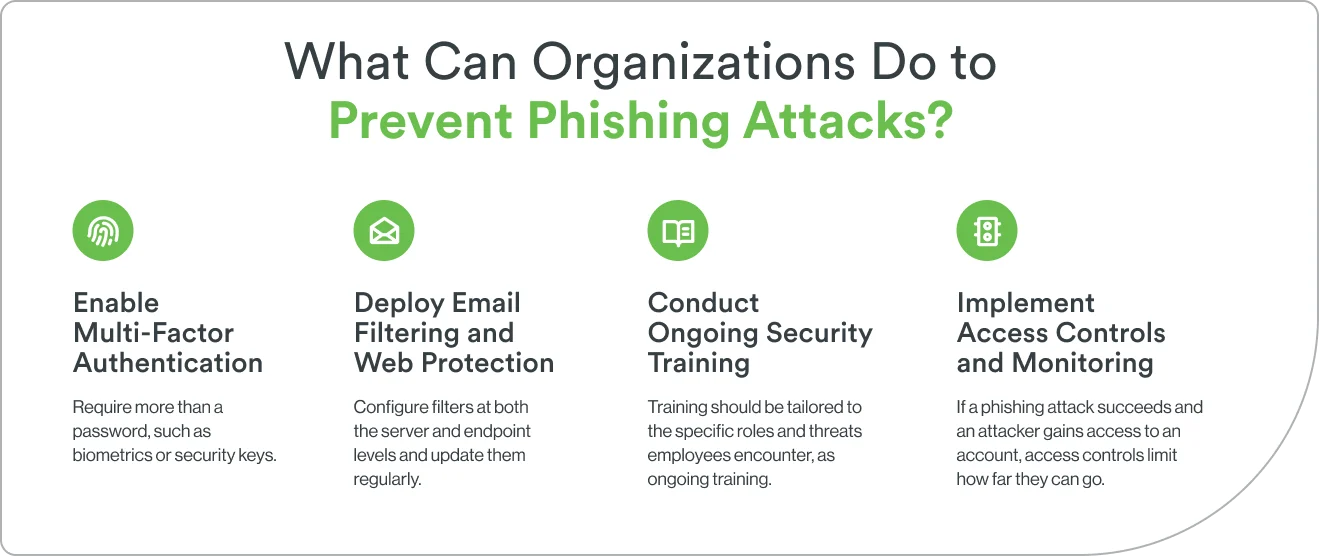
Effective phishing prevention combines technology, process, and awareness. These four steps address the different stages of the phishing chain described above.
1. Enable multi-factor authentication
Multi-factor authentication (MFA) requires more than a password to access an account. Access may also require a fingerprint, face scan, or a code on a separate device. Even if an attacker steals credentials through phishing, MFA prevents them from using those credentials alone to gain access.
Not all MFA is equally resistant to phishing. SMS-based codes can be intercepted through SIM swapping or adversary-in-the-middle attacks.
Phishing-resistant MFA methods include hardware security keys and biometric authentication that are cryptographically bound to the legitimate site. These cannot be captured by a fake login page. Enable this level of MFA on every account with access to sensitive systems or data.
2. Deploy email filtering and web protection
Email filters and web security tools reduce the number of phishing attempts that actually reach users. Email filters scan incoming messages for phishing indicators like suspicious links, known malicious domains, and spoofed sender addresses. The tool can quarantine or flag messages before they reach the inbox. Web filters block access to known phishing sites and display warnings when users attempt to visit suspicious URLs.
These controls are a first line of defense, not a complete solution. Sophisticated phishing campaigns use newly registered domains and techniques that evade signature-based detection. Configure filters at both the server and endpoint levels and update them regularly.
3. Conduct ongoing security awareness training
Employees are the last line of defense against phishing attacks that bypass technical controls. Effective training covers the warning signs described in the recognition section above, current tactics and trends, and clear procedures for reporting suspicious messages.
Simulated phishing exercises reinforce training between formal sessions and identify individuals who need additional support.
Training should be tailored to the specific roles and threats employees encounter and treated as ongoing rather than one-time controls. Tracking click rates on simulated phishing campaigns provides a measurable indicator of progress and remaining risk.
4. Implement access controls and monitoring
If a phishing attack succeeds and an attacker gains access to an account, The right access controls limit how far a successful phishing attack can penetrate your systems. The principle of least privilege ensures each account has only the permissions required for its specific function, restricting a compromised account to only what it is authorized to access. This directly limits the lateral movement and escalation described in the previous section.
Monitoring tools detect suspicious activity after access is granted. These may include logins from unrecognized locations or devices, access at unusual hours, bulk file downloads, or privilege escalation attempts. Security Information and Event Management (SIEM) platforms aggregate these signals across accounts and systems, enabling security teams to detect and respond to phishing-related compromises faster than manual review allows. Identity security platforms complement access controls by continuously evaluating whether each access attempt is consistent with established patterns and by flagging anomalies in real time.
With prevention in place, the final question is what to do when a phishing attack gets through anyway.
What should you do if you have been phished?
Even with strong prevention measures in place, phishing attacks succeed. Quick action after a suspected phishing incident limits the damage.
1. Disconnect and secure the device
If you clicked a suspicious link or downloaded an unexpected file, disconnect the device from the network immediately—both Wi-Fi and ethernet. This prevents malware from communicating with attacker-controlled servers or spreading to other systems. Run a full antivirus and anti-malware scan before reconnecting. If the device is work-owned, contact the IT or security team before taking any further action.
2. Change compromised passwords
Change the password for any account where you entered credentials on a suspicious site. Do this from a different device, one you are confident is uncompromised. If you reuse passwords across multiple accounts, change those as well. Enable MFA on any account where it is not already active. Use a password manager to generate and store strong, unique passwords going forward.
3. Report the attack
Report the phishing attempt to your organization’s IT or security team if it involved a work account or device. Forward phishing emails to the organization being impersonated using their official abuse or security address, and report them to your email provider through its built-in reporting mechanism.
For broader reporting, the FBI’s Internet Crime Complaint Center (IC3) accepts phishing reports at ic3.gov, and the Anti-Phishing Working Group accepts forwarded phishing emails at reportphishing@apwg.org. Reporting phishing emails helps organizations block future attacks and assists law enforcement in tracking patterns.
4. Monitor accounts for suspicious activity
After a phishing incident, monitor financial accounts, email, and any sensitive accounts closely for unauthorized activity. Look for unrecognized transactions, password reset requests you did not initiate, new devices in account activity logs, or changes to account settings or recovery information.
Enable transaction and login alerts wherever available. If financial information was compromised, contact your bank to freeze accounts or issue new cards. If a Social Security number or extensive personal data was exposed, place a fraud alert or credit freeze with the major credit bureaus.
How does Duo Security protect against phishing?
Phishing primarily targets credentials. Once an attacker has a valid username and password, the identity layer of authentication and access control is the last line of defense before they reach the systems behind those credentials. This is where Duo Security operates.
Duo’s phishing-resistant MFA uses authentication methods that are cryptographically bound to the legitimate application. A fake login page cannot capture a hardware security key response or a biometric that is tied to the real site’s certificate.
Even if an attacker steals a password through phishing, they cannot complete the authentication without the second factor.
Duo’s device trust verifies that the device requesting access meets the organization’s security requirements before access is granted, blocking compromised endpoints that may have received malware through a phishing attachment.
Duo’s adaptive authentication adjusts verification requirements based on risk context. This means that an access attempt from an unrecognized device, an unusual location, or outside normal hours triggers additional verification rather than passing through automatically. This addresses the escalation path described earlier: even if a credential is compromised, the behavioral anomaly of an attacker using it from an unexpected location surfaces as a risk signal that blocks or delays access.
Together, these capabilities address phishing at the point where it most often succeeds: the moment an attacker tries to use stolen credentials to get in.
Protect your organization with simple, effective identity security
Phishing succeeds because it targets people, and people make decisions under pressure, time constraints, and imperfect information. No single control stops every phishing attempt, but layered defenses can address each stage of the attack chain, from initial delivery to post-compromise escalation.
Duo Security protects the identity layer at the center of that chain. Start your free trial today.