

Key takeaways
SSH replaced insecure protocols, like Telnet, by encrypting all data that travels between your computer and a remote server, including passwords, commands, and file transfers.
Every SSH connection starts with a cryptographic handshake that creates unique encryption keys for that session, so even if someone intercepts the traffic, they cannot read it.
SSH keys provide stronger security than passwords because they use a pair of mathematically linked codes—one public, one private—that are virtually impossible to guess or brute-force.
Adding multi-factor authentication to SSH closes the gap that stolen keys or credentials leave open, giving organizations layered protection for their most critical systems.
What is secure shell (SSH)?
SSH is a network protocol that lets two devices exchange data securely. What sets SSH apart is its cryptographic structure. It securely transmits data across connections using codes that are extremely difficult to intercept and read. SSH rules ensure that everything you send and receive is encrypted, meaning it gets converted into unreadable code that only the intended recipient can decode. This is especially important over less-secure connections like public internet networks.
The name “Secure Shell” shows what the protocol protects: a shell, which is the command-line interface you use to interact with an operating system. Before SSH, system administrators relied on tools like Telnet, FTP, and rsh (remote shell) to access servers remotely. These older protocols transmitted everything, including passwords, in plain text, which meant anyone monitoring the network could read the data as it passed by.
That weakness prompted its creation. In 1995, Finnish researcher Tatu Ylönen at the Helsinki University of Technology developed the first version of the protocol after a password-sniffing attack on his university’s network. Within months, more than 20,000 users in 50 countries had adopted it.
SSH operates on TCP port 22 by default. This numbered channel directs network traffic to the SSH service on a server. The Internet Assigned Numbers Authority (IANA) registered port 22 for SSH, positioning it between FTP (port 21) and Telnet (port 23).
What protocols did SSH replace, and why?
Telnet: Transmitted passwords and commands in plaintext, making them visible to anyone on the network.
FTP: Transferred files without encryption, exposing both credentials and data.
rsh/rlogin: Offered minimal security controls and relied on IP-based trust, which attackers could easily spoof.
How does SSH work?
SSH connections work by building a secure tunnel between your computer and a remote server. Everything passing through it—commands, files, and passwords—is encrypted, so even intercepted data cannot be read.
The SSH communication protocol establishes this tunnel through three phases:
Key exchange
Port negotiation
Session establishment
1. Key exchange and encryption
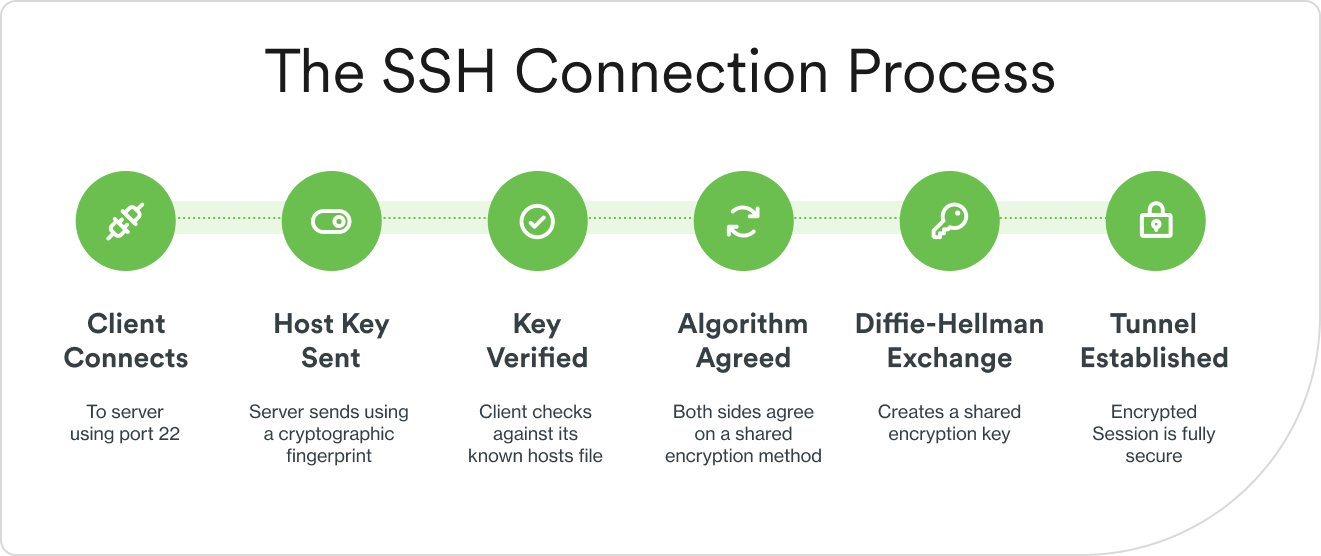
Before any meaningful data is transmitted, the client and server must agree on how to encrypt their conversation. This is the handshake, and it unfolds in a specific sequence:
First, the client connects to the server on port 22 (or whatever port the administrator has configured). The server responds by sending its host key—a unique cryptographic fingerprint that identifies it. The client checks this fingerprint against a stored record to confirm the server’s identity.
Next, both sides negotiate which encryption algorithms to use. Then they perform a Diffie-Hellman key exchange—a method for creating a shared secret key without transmitting that key over the network. The result is a set of session keys that will encrypt all subsequent traffic.
Each SSH session generates unique keys. Even if an attacker records today’s encrypted session and later compromises a key, they cannot decrypt past sessions—a property called perfect forward secrecy.
Common encryption algorithms in SSH:
Algorithm | Key size | Common use |
|---|---|---|
AES-256-GCM | 256-bit | Default in most modern SSH implementations |
ChaCha20-Poly1305 | 256-bit | Optimized for mobile and low-power devices |
3DES (deprecated) | 168-bit | Legacy systems only; removed from OpenSSH 10.0 |
2. Port negotiation
In networking, a port is a numbered channel that directs traffic to a specific service running on a machine. What role does Port 22 play? SSH uses TCP port 22 by default. This port is one of the first things firewalls and security teams control when managing remote access.
Port 22 matters because automated scanning tools constantly probe it. Attackers write scripts that sweep large ranges of IP addresses looking for open port 22 connections (Statistics Report on Malware Targeting Linux SSH Servers in Q4 2025, ASEC), then attempt brute-force login attacks, repeatedly guessing passwords until one works.
Some administrators change the default port to a non-standard number to reduce noise from these automated scans. While this adds a layer of obscurity, it is not a substitute for strong authentication. Any attacker running a thorough port scan will find the service regardless of which port it runs on.
3. Session establishment and verification
Once the encrypted tunnel is in place, the authentication phase begins (covered in detail in the next section). After the server verifies the user’s identity, an interactive shell session or command execution starts.
Throughout the session, SSH maintains data integrity using message authentication codes (MACs), which are cryptographic checksums attached to each message that verify the contents have not been altered in transit. When either side ends the connection, the session keys are discarded, ensuring they cannot be reused.
What does SSH do and why use it?
Imagine you are a system administrator, and you need to configure a server in a data center on the other side of the country. Without SSH, you would either need to be physically present or rely on insecure methods that expose your credentials to anyone monitoring the network. SSH solves this by providing secure remote access. This gives you the ability to control a distant machine as if you were sitting in front of it, with all traffic encrypted.
Here are the primary ways organizations use SSH:
Remote server administration: Manage Linux and Unix servers, network devices, and cloud infrastructure from any location.
Secure file transfers: Replace insecure FTP with SFTP (SSH File Transfer Protocol) or SCP (Secure Copy Protocol) to move files safely.
Automated tasks: Run scripts and commands on remote servers for DevOps workflows, deployments, and maintenance.
Port forwarding and tunneling: Route network traffic through an encrypted SSH connection to reach services behind firewalls.
Git operations: Clone, push, and pull code repositories securely using SSH authentication.
Database administration: Connect to remote databases over encrypted channels instead of exposing them directly to the network.
These use cases extend beyond human operators. Service accounts, automation scripts, and machine-to-machine workflows all rely on SSH to authenticate and transfer data—making SSH a critical part of how non-human identities interact across infrastructure.
What are the SSH authentication methods and best practices?
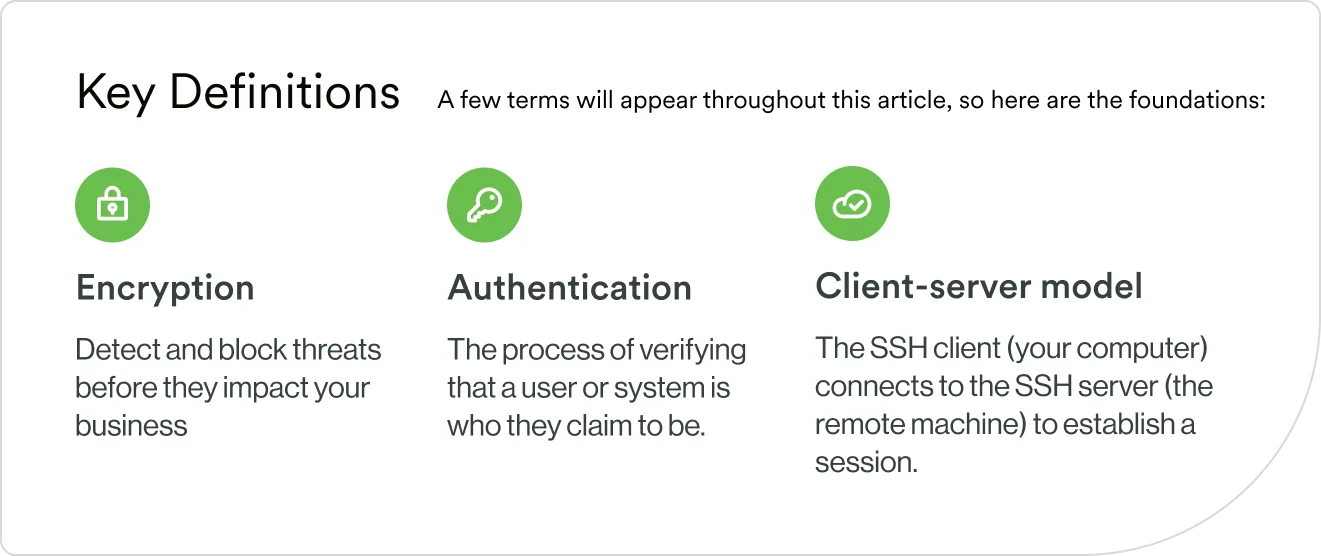
Authentication, the process of verifying that a user is who they claim to be, happens after the encrypted connection is already in place. The SSH client (the software on your local computer) sends credentials to the SSH server (the software running on the remote machine). Because the tunnel is already encrypted at this point, the credentials are protected during transmission.
Password authentication vs. key-based authentication
SSH supports two primary methods for proving identity, and the choice between them significantly affects security.
Password authentication works the way most people expect: you type a password, SSH encrypts it, and the server checks it against stored credentials.
The risk: Brute-force attacks. These automated tools try thousands of password combinations per minute. If the password is weak, it is only a matter of time before an attacker guesses it.
Key-based authentication uses public-key cryptography—a system built on two mathematically linked keys. You generate a key pair on your local machine: a public key (which you share with the server) and a private key (which never leaves your computer). When you connect, the server issues a challenge that only someone holding the private key can answer. The private key is never transmitted over the network.
Feature | Password authentication | Key-based authentication |
|---|---|---|
Security | Moderate; depends on password strength | High; 4096-bit RSA or Ed25519 standard |
Brute-force risk | High if password is weak | Minimal; keys are computationally infeasible to crack |
User experience | Enter password each login | Passwordless after initial setup (optional passphrase) |
Generate and manage SSH keys securely
The ssh-keygen command is the standard tool for creating SSH key pairs. When you run it, it generates both the public and private keys and stores them in your “.ssh” directory.
SSH key types you’ll encounter:
RSA: The traditional choice, widely supported across all SSH implementations. Use a minimum of 4096 bits for strong security.
Ed25519: A modern algorithm based on elliptic curve cryptography. It produces smaller, faster keys with equivalent or better security than RSA. Most security professionals now recommend Ed25519 for new key generation.
ECDSA: Another elliptic curve option that balances security and performance, though some practitioners prefer Ed25519 for its simpler, more auditable design.
Secure your private keys. Set strict file permissions so only your user account can read them and add a passphrase that must be entered before the key can be used. For managing multiple keys across different servers, the ssh-agent utility keeps keys loaded in memory during your session so you do not have to enter the passphrase repeatedly.
Avoid common authentication mistakes
Even strong key-based authentication can be undermined by poor key management. Here are practices that significantly reduce risk:
Disable password authentication on the server after setting up key-based access. This eliminates the brute-force attack surface entirely.
Use strong passphrases to protect private keys, especially for keys that access production systems.
Rotate keys regularly, particularly for service accounts and automated processes where keys often outlive the people who created them.
Remove unused keys from authorized_keys files. Every forgotten key is a potential backdoor.
Use separate keys for different systems and purposes, so compromising one key does not grant access to everything.
What are SSH security features and common vulnerabilities?
SSH is secure by design, but misconfigurations and outdated implementations create gaps that attackers actively exploit. Understanding both the built-in protections and the common weaknesses helps you maintain a strong security posture.
SSH uses built-in encryption and integrity protection
SSH layers multiple security mechanisms together:
Symmetric encryption handles the bulk data transfer using the session keys created during the handshake. Algorithms like AES-256 encrypt and decrypt data quickly.
Asymmetric encryption secures the key exchange itself and handles authentication. It uses key pairs (public and private) that are mathematically related but computationally impractical to reverse.
Message authentication codes (MACs) are cryptographic checksums attached to every message. If even one bit changes in transit, the MAC check fails and SSH drops the connection.
Perfect forward secrecy (PFS) ensures that if a long-term key is compromised in the future, past session keys—and the sessions they protected—remain secure.
These protections work together to defend against common attacks. Host key verification prevents man-in-the-middle attacks. Encryption stops eavesdropping. Sequence numbers and timestamps block replay attacks.
These common misconfigurations can weaken security
Default port 22 exposure: Leaving SSH on port 22 without additional controls makes servers easy targets for automated scanning and brute-force attempts.
Root login enabled: Allowing direct root access means an attacker who cracks the password gains the highest-privilege account immediately.
Weak or outdated ciphers: Legacy algorithms like 3DES and SHA-1 have known vulnerabilities. OpenSSH 8.8 (2021) disabled SHA-1-based RSA signatures by default, and OpenSSH 10.0 removed DSA support entirely (OpenSSH Release Notes, 2026).
No rate limiting: Without connection throttling, attackers can attempt thousands of password guesses per minute.
Overly permissive authorized_keys: Keys stored without IP restrictions or command limitations give blanket access when they should be scoped.
Monitor and audit your SSH access
Visibility into who connects, when, and what they do is essential for both security and compliance. Organizations should log successful and failed login attempts, commands executed during sessions, file transfers, and port forwarding activity.
On Linux systems, SSH logs typically live in /var/log/auth.log. For centralized control, many organizations route SSH connections through a bastion host (also called a jump server)—a hardened intermediary that acts as the single entry point to internal systems. Every connection passes through it, making monitoring and access control far simpler.
Modern identity security platforms can layer additional authentication and visibility on top of SSH without requiring changes to every individual server.
Why SSH security matters: the numbers
Identity-based attacks, where adversaries use stolen credentials rather than software exploits, are now the dominant way attackers break into organizations.
Source 1: 2025 Data Breach Investigations Report (Verizon); Source 2: 2025 Year in Review (Cisco Talos)
How does SSH compare to other remote access protocols?
Protocol | Primary use | Encryption and authentication |
|---|---|---|
SSH (port 22) | Remote shell access and file transfers | Strong encryption (AES, ChaCha20); keys or passwords |
Telnet (port 23) | Legacy remote access (deprecated) | None; plaintext passwords only |
RDP (port 3389) | Windows graphical remote desktop | TLS-based; passwords and smart cards |
VPN (varies) | Network-level encrypted access | Various (IPsec, WireGuard); certificates, passwords |
HTTPS (port 443) | Web traffic and APIs | TLS/SSL; various authentication methods |
SSH vs. Telnet: Telnet transmits everything in plaintext. SSH completely replaced it for remote access by encrypting the entire session. There is no scenario in a modern environment where Telnet is the right choice.
SSH vs. SSL/TLS: These protocols solve different problems. SSH provides remote shell access and file transfers. TLS secures web traffic, email, and APIs. They use similar cryptographic concepts but operate at different layers. SSH is an application protocol, while TLS typically secures the transport layer beneath web applications.
SSH vs. VPN: A VPN creates a secure tunnel to an entire network, giving the connected device access to everything on that network as if it were physically present. SSH provides application-level access to specific servers. Organizations often use both together—a VPN to reach the network, then SSH to manage individual machines within it.
SSH port forwarding and tunneling
Port forwarding routes network traffic through an encrypted SSH connection. This creates a secure tunnel for data that would otherwise travel unprotected.
There are three types of SSH port forwarding:
Local port forwarding lets you access a remote service as if it were running on your own machine. For example, you can route a connection to a database on a remote server’s port 5432 through SSH, then connect to it locally.
Remote port forwarding works in the opposite direction: it lets someone on the remote side access a service running on your local network through the SSH tunnel.
Dynamic port forwarding creates a SOCKS proxy that can route multiple connections through the SSH tunnel, useful for securely browsing through a remote server.
Common reasons for port forwarding include reaching services behind firewalls, accessing applications that only accept connections from localhost, and securing connections to internal tools.
Secure file transfers with SFTP and SCP
SFTP (SSH File Transfer Protocol) provides full file system access over an encrypted SSH connection. It supports directory listings, file permissions, and resumed transfers, and it works with both graphical clients and command-line tools.
SCP (Secure Copy Protocol) is simpler, designed for copying individual files between machines quickly. It is faster for one-off transfers but lacks SFTP’s broader file management capabilities.
Integrating multi-factor authentication with SSH
SSH keys are strong, but they can be stolen from a compromised laptop, copied by an insider, or left unrotated on a server for years. Multi-factor authentication (MFA)—requiring two or more verification methods before granting access—adds a layer that compensates for these risks.
Common MFA methods for SSH include time-based one-time passwords (TOTP) generated by authenticator apps, hardware security tokens like YubiKey, push notifications sent to a mobile device for approval, and biometric verification.
Duo integrates with SSH to add phishing-resistant MFA without disrupting existing workflows. Administrators can enforce MFA policies across all SSH access points, gain visibility into who is accessing which systems, and support multiple authentication methods alongside existing key-based setups.
Is there a way to secure SSH access with modern identity protection?
SSH provides strong encryption and authentication, but organizations face threats that go beyond what the protocol alone can address: stolen credentials, insider access misuse, compliance mandates, and the challenge of managing SSH keys across hundreds or thousands of servers. This includes service accounts, automation scripts, and machine-to-machine connections, a growing category of non-human identities that are harder to monitor, rarely rotated, and frequently hold elevated privileges.
Modern identity security platforms complement SSH by adding layers the protocol does not provide on its own:
Phishing-resistant MFA adds verification beyond SSH keys, so even if a private key is compromised, the attacker still needs a second factor they cannot phish or replay.
Device trust verifies the security posture of the device connecting via SSH—checking for up-to-date software, disk encryption, and endpoint protection before granting access.
Adaptive authentication applies risk-based policies that consider context like location, time of day, and device health to determine whether to allow, step up, or block an SSH connection.
Centralized visibility lets security teams monitor and audit all SSH sessions across their infrastructure from a single dashboard, instead of reviewing logs on each individual server.
Single sign-on integration manages SSH access alongside every other application in the organization, reducing the number of credentials users and administrators must handle.
See how Duo Security can strengthen SSH access with phishing-resistant MFA and comprehensive identity protection. Start your free trial and secure your remote access in minutes.