
Risk-Based Device Registration
Last updated:
Overview
Account takeover often begins with an attacker registering their own device to a compromised account. Duo's Risk-Based Device Registration feature closes that gap by evaluating new authentication device registrations for risk and giving you the controls to block suspicious devices before they can be used for two-factor authentication.
Risk-Based Device Registration is part of the Duo Advantage and Duo Premier plans.
Relationship to Risk-Based Authentication
Risk-Based Device Registration complements Duo's existing Risk-Based Authentication (RBA) capabilities:
| Risk-Based Factor Selection | Risk-Based Device Registration | |
|---|---|---|
| When it applies | During authentication | During device registration |
| Default mode | Enforcement | Preview (non-enforcing) |
| User impact | Step-up to more secure authentication factors | Device quarantined pending admin review |
| Remediation | User completes secure authentication, or admin manually clears step-up. | Admin manually restores access for quarantined devices. |
| Risk patterns | Push harassment, unrealistic travel, country code mismatch, etc. | Multiple device, network, behavioral, and geographic risk signals |
Both features work together to protect your organization across the complete lifecycle of Duo device management.
How Risk-Based Device Registration Works
Risk-Based Device Registration automatically identifies and mitigates suspicious device registration attempts in Duo. When Duo detects a device registration that exhibits characteristics associated with account compromise, or when the user reports a registration activity as fraudulent, the device can be automatically quarantined. Once a device is quarantined, it cannot be used to complete any two-factor authentication until an administrator reviews and restores the device.
By default, Risk-Based Device Registration runs in Preview mode. In this mode, Duo detects and reports specific risk signals during device registration but does not enforce quarantine. You can review these detections in the Activity Log and decide whether to manually quarantine any of these devices.
When you are ready to switch to automatic enforcement, you can enable it from the configuration page and select the user groups it should apply to. Under automatic enforcement, Duo automatically quarantines a device when defined risk signals are detected. You can also choose to receive email notifications for selected administrators and end users when Duo quarantines a device. Refer to Enable Risk-Based Device Registration automatic enforcement for more configuration details.
How Risk is Assessed for Risk-Based Device Registration
When a user registers a new device, Duo evaluates the registration in real time against multiple threat detection dimensions.
The following are examples of the risk patterns evaluated by Risk-Based Device Registration:
- User marked fraudulent registration: A user reported that a device was fraudulently added to their account by clicking No, it wasn't me or Report this activity in the email or Duo Push notification (if enabled in Settings).
- Suspicious location mismatch: A device registration attempt originated from a location inconsistent with the user's authentication history, and the registration and activation locations do not match.
- Malicious device: A device with a history of known malicious activity was used to register with a Duo account.
- Suspicious device registered with multiple accounts: A device with a history of suspicious activity attempted to register with multiple Duo accounts.
- Suspicious device manufacturer: A device registration attempt was made using a device from a manufacturer with an untrusted classification.
- Suspicious authentication activity: A device registration attempt was associated with suspicious multi-factor authentication activity.
- Suspicious network: A device registration attempt was initiated from an Autonomous System Number (ASN) associated with malicious activity.
These descriptions are intentionally generalized. In practice, each detection also incorporates additional risk indicators and suppression logic to help identify malicious activity while minimizing the impact on legitimate user behavior.
Manual Admin Actions to Quarantine or Restore Access
Regardless of your organization's risk-based device registration configuration, administrators with applicable permissions can manually quarantine any phone or restore access to any quarantined phone from the device details page. All actions are immediate. We recommend verifying with your users before restoring access for any quarantined phones. Refer to manually quarantining and restoring access for a device for more details.
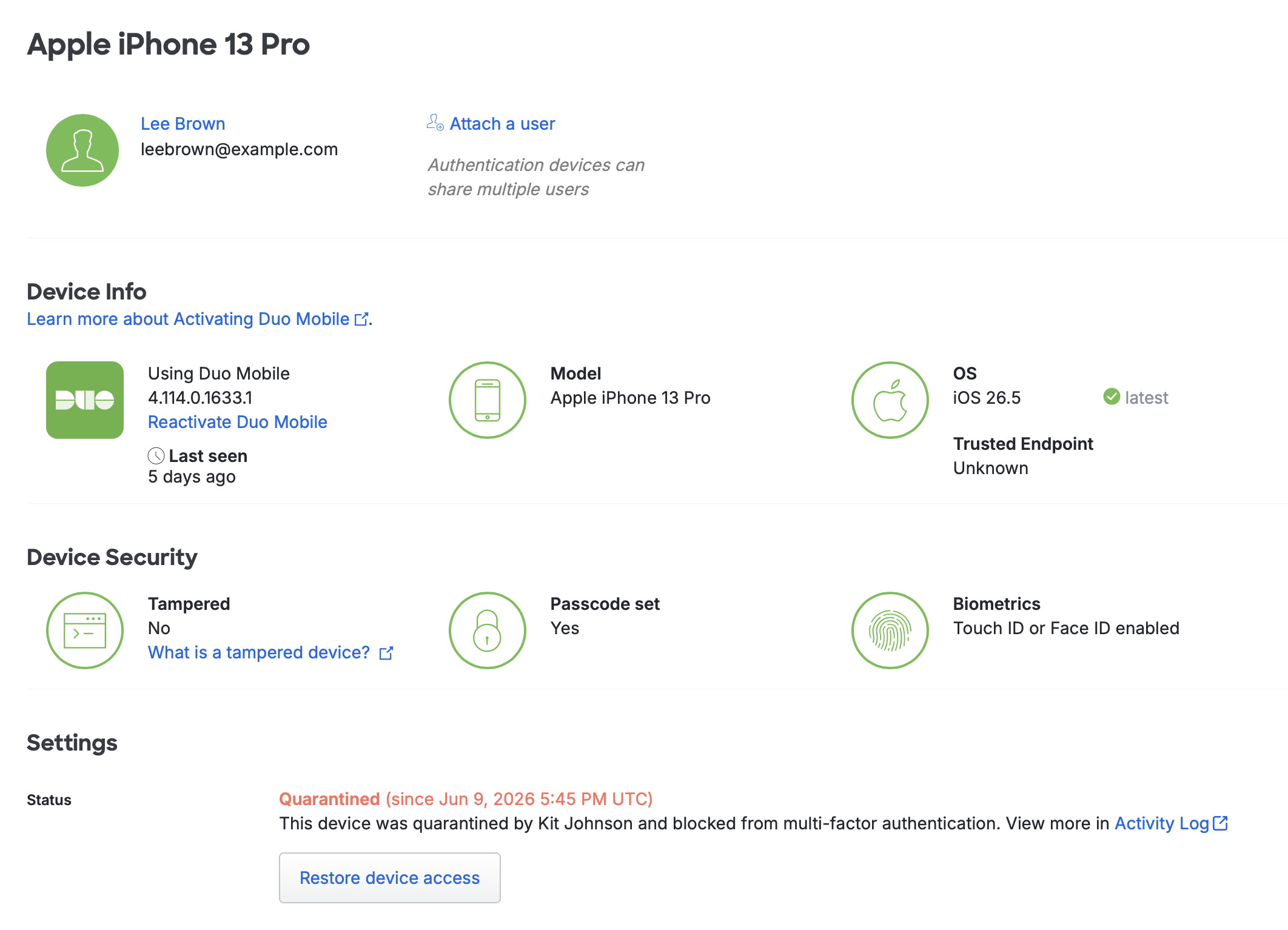
Administrators with Owner, Administrator, User Manager, Security Analyst, and Help Desk roles (or Custom Admin Roles with applicable permissions configured) can manually quarantine any phone.
Administrators with Owner, Administrator, User Manager, and Security Analyst roles (or Custom Admin Roles with applicable permissions configured) can manually restore access to any quarantined phone.
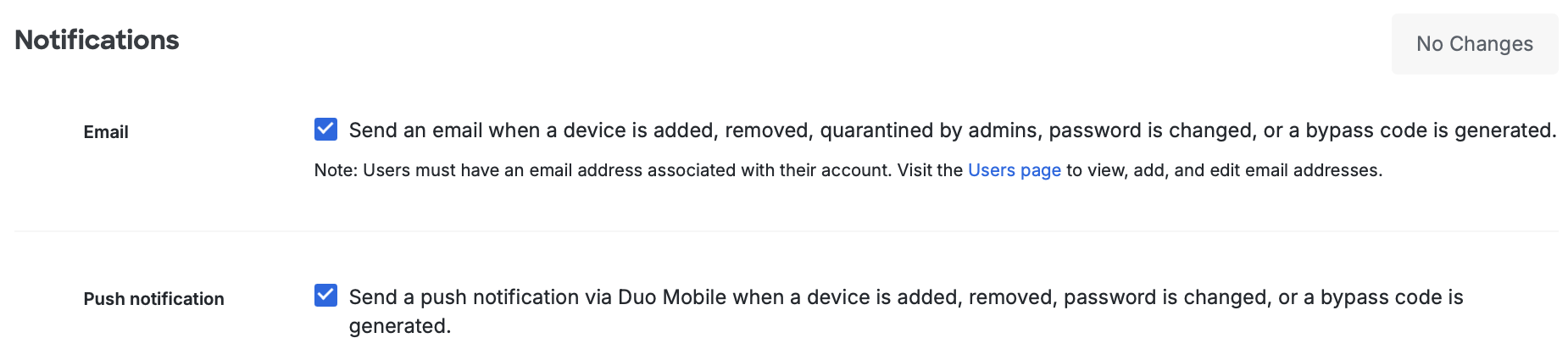
If you have enabled user notifications in Settings, users will receive an email notification when you manually quarantine or restore access for a quarantined phone under their account.
Limitations and Known Issues
Duo Risk-Based Device Registration covers registrations from the Self-Service Portal. Registrations completed through the Admin API or completed by Duo administrators through the Duo Admin Panel are not covered at this time.
Enable Risk-Based Device Registration Automatic Enforcement
Role required: Owner or Administrator.
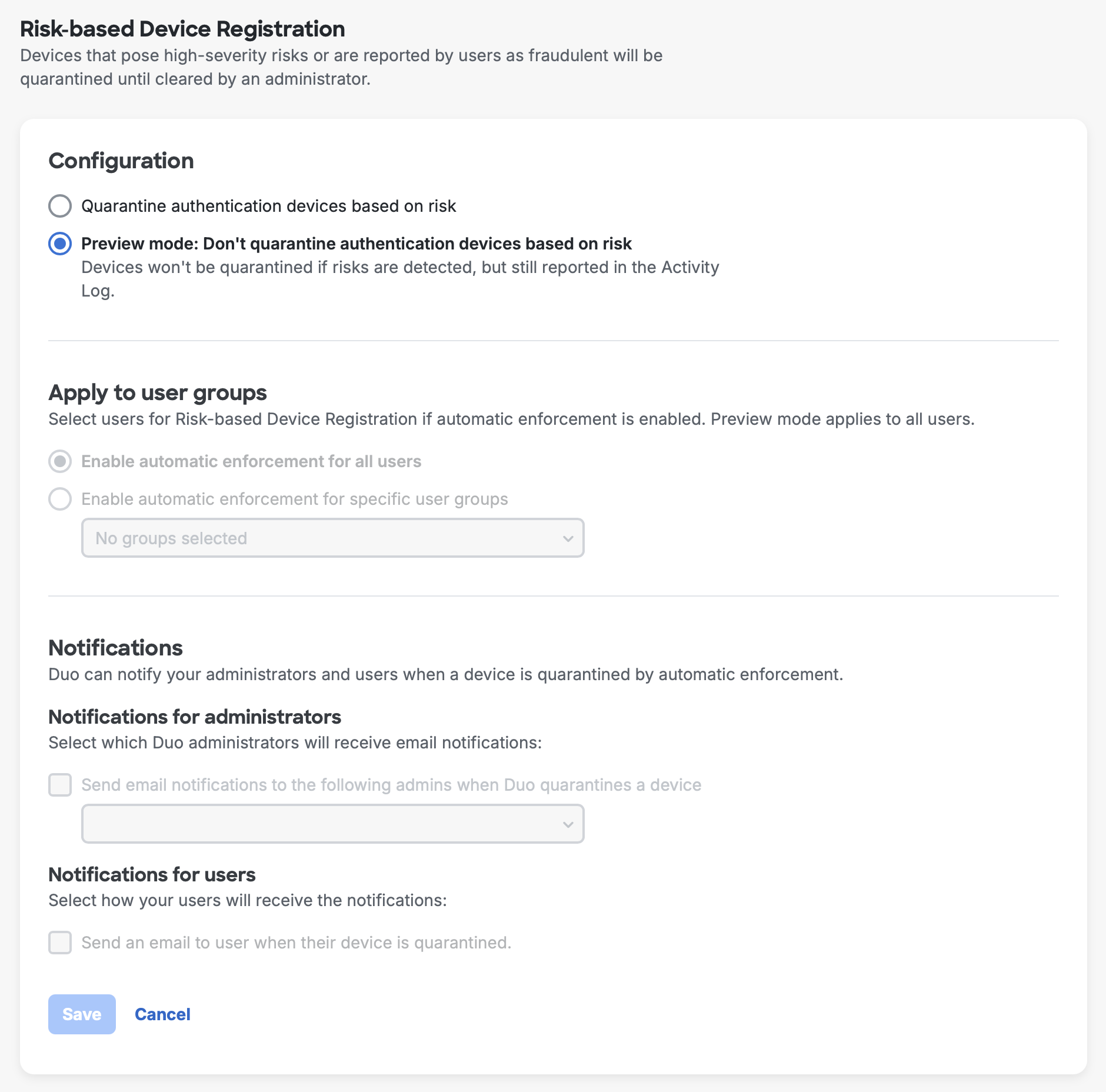
By default, the Preview mode: Don't quarantine authentication devices based on risk option is selected on the Risk-Based Device Registration configuration page and is applied to all users.
To enable Risk-Based Device Registration to operate with automatic enforcement:
- Log in to the Duo Admin Panel and navigate to Devices → Risk-based Device Registration in the left sidebar.
- Select Quarantine authentication devices based on risk in the “Configuration” section.
- In the "Apply to user groups" section, limit the user groups you would like the automatic enforcement to apply to, if desired.
Note: Preview mode still applies to any users or user groups not selected in this section. - In the "Notifications" section, you can enable notifications for administrators or users when a device is quarantined by automatic enforcement.
- For “Notifications for administrators”, click Send email notifications to the following admins when Duo quarantines a device and add at least one administrator.
Note: Only administrators with permission to un-quarantine phones can receive notifications. - For “Notifications for users", click Send an email to user when their device is quarantined.
- Click Save to apply these changes.
Monitor and Triage in the Activity Log
Risk-Based Device Registration offers comprehensive logging and monitoring capabilities through the Activity Log to aid in investigations.
Risk Assessment in the Activity Log
The Risk assessment column provides information about any risks detected and whether Duo performed quarantine enforcement for applicable registration events.
Navigate to Reports → Activity Log in the Duo Admin Panel. Filter by Risk assessment to narrow results to risk-based device registration activities.
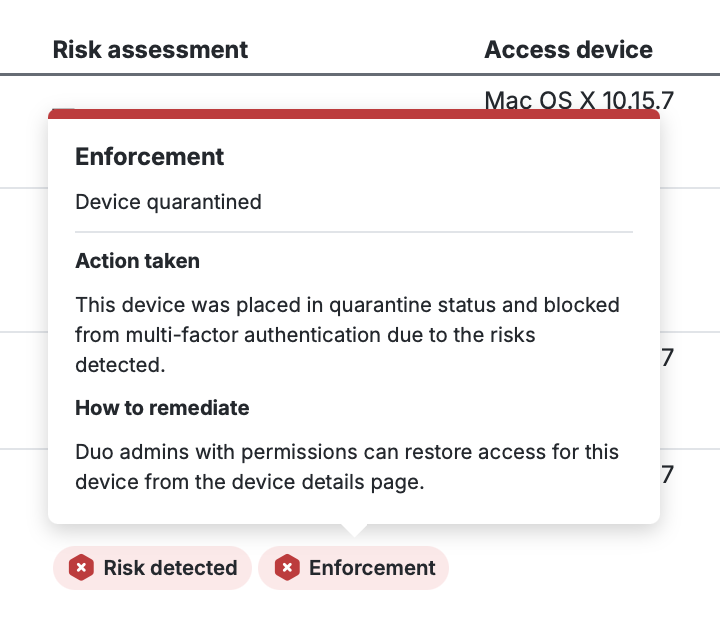
Hover your cursor over "Risk detected" and "Enforcement" to see more details in the tooltips. You can also click View details to see more data captured for this activity.
For activities flagged by Risk-Based Device Registration Preview mode, the result is displayed as "Risk-based device registration not enforced" with blue alerts and tooltips.

For activities flagged by Risk-Based Device Registration automatic enforcement mode, the result is displayed as "Risk-based device registration enforced" with red alerts and tooltips. Additionally, the quarantine enforcement is logged as a separate activity performed by the system, which distinguishes this activity from an administrator's manual quarantine actions.

Refer to the Admin API documentation for more details about retrieving these logs via API.
Troubleshooting
Need some help? Take a look at our Risk-Based Device Registration Knowledge Base articles or Community discussions. For further assistance, contact Support.