

Key takeaways:
Identification is a claim of identity; authentication proves that claim is legitimate.
Authentication protects systems from impersonation, credential theft, and unauthorized access.
Authorization builds on both by defining what a verified user can access across your network.
Strong identity practices—such as MFA, least privilege, and regular monitoring—reduce the chances of breaches and account compromise.
Curious about how organizations are moving beyond basic identification to stronger authentication without passwords? Read our free ebook to explore a five-step path to passwordless authentication and why eliminating passwords strengthens identity verification.
Read our guide to identity security to better understand the broader identity security picture, including how identification, authentication, and authorization fit into a complete access strategy.
What is identification in cybersecurity?
Identification is the first step in any access workflow. It's the moment a user claims an identity so the system knows which account they're attempting to access. The user states who they are, and the system uses that information to locate the right profile. At this stage, no verification happens, and they still need to prove their claim.
In most systems, identification appears in everyday login fields like usernames, email addresses, and account numbers. When a user enters one of these identifiers, the system uses it as a reference point for everything that comes next.
However, because anyone can type in a username, identification is not a security control on its own. Instead, it acts as the organizational step that gives authentication something to verify.
In summary:
What is authentication in security systems?
Authentication is the step that comes after identification. Once a user claims an identity, the system needs a way to confirm that the claim is legitimate.
Authentication provides this proof. It's the process of verifying that a user is who they say they are, usually by asking for one of three things:
Something they know (like a password)
Something they have (like a one-time code or a device)
Something they are (like a biometric scan).
Imagine approaching airport security, telling them your name (identification), and then presenting your passport or ID card (authentication). The verbal claim alone wouldn't get you on a plane. The agent must confirm your identity with a trusted credential. Digital systems work the same way—identification announces who you are, and authentication proves it.
In summary:
What are the key differences between identification vs authentication?
Identification and authentication serve very different roles in a security system. Identification always comes first: the user states who they claim to be. Authentication follows and requires the user to prove that claim before they can proceed.
Identification helps the system locate the correct account, but it doesn't determine whether access should be granted. Authentication performs that verification by checking credentials tied to the true account owner. This step is what protects systems from impersonation, credential theft, and other forms of unauthorized access.
While identification alone is informational, authentication is enforceable because it creates a barrier that attackers must overcome.
Here's a side-by-side look at what identification and authentication do and how they work together to secure access:
Identification | Authentication | Why it matters for security | |
|---|---|---|---|
What it does | Tells the system who you say you are | Proves you are actually that person | Identification alone can be faked; authentication prevents impersonation |
When it happens | First step in the login process | Happens immediately after identification | Authentication decides whether access is allowed |
What it looks like | Typing a username, email, account number, etc. | Entering a password, using a verification code, scanning a fingerprint, etc. | Mistakes in identification find the wrong account; weak authentication lets attackers in |
How much security it provides | Very little (it's just a claim). | High (it validates identity and blocks unauthorized users). | Strong authentication reduces credential-based attacks and protects critical systems |
How authorization completes the security framework
Once a system confirms a user's identity through identification and authentication, the next question becomes what is this user allowed to do?
Authorization determines the level of access a verified user receives, whether they can view specific data, make changes, access administrative functions, or perform restricted actions.
Authorization is important because not all users require the same privileges. An intern, engineer, and administrator should not have identical access. Authorization limits risk by ensuring each person can only interact with the resources appropriate for their role.
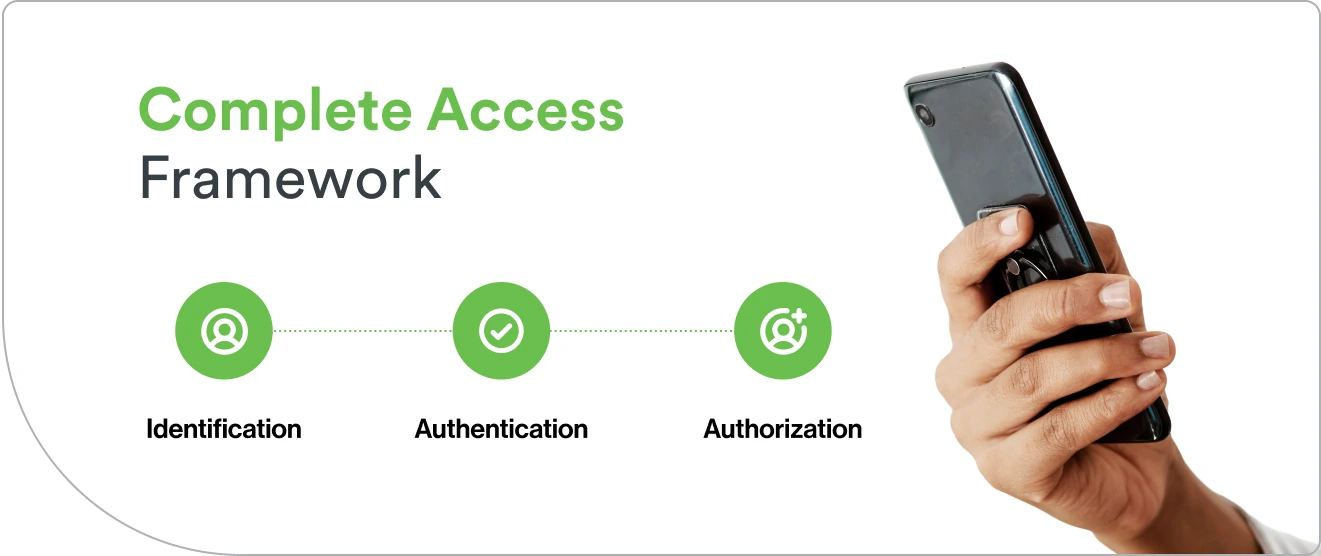
In this way, identification, authentication, and authorization work together to build a complete access framework.
These three processes also reinforce each other. Identification provides the system with a user identity to reference. Authentication ensures the system only grants access to the rightful account owner. Authorization governs what the confirmed identity can actually do.
Together, these steps establish a layered approach that protects systems from unauthorized activity and minimizes the impact of compromised credentials.
Different systems rely on different methods to identify users and authenticate their identities. Each approach comes with its own benefits, trade-offs, and ideal use cases. Understanding how these methods work makes it easier to choose the right mix for your organization.
Here are the most common options you'll see in modern authentication workflows:
1. Knowledge-based methods
Knowledge-based methods rely on something the user knows, like a password, PIN, or an answer to a security question. They're familiar, easy to set up, and don't require extra hardware, which is why they remain common across both personal and workplace accounts. In most cases, the user identifies themselves with a username or email, then authenticates by entering the correct password, code, or answer.
The downside is that knowledge-based authentication comes with well-known weaknesses. Passwords get reused, stolen, or leaked in breaches, and security questions frequently rely on personal details that attackers can guess or look up. While these methods can authenticate identity, they offer the least reliable level of protection and shouldn't be used alone for systems that handle sensitive data.
Learn more about going passwordless across your organization: Passwordless Authentication
2. Possession-based methods
Possession-based methods rely on something the user physically has, like a security token, smart card, mobile phone, or authentication app. These tools add a strong layer of protection because they require the user to have the device in hand. A typical flow might involve identifying yourself with a username and then authenticating with a one-time passcode from your phone or a hardware token. In higher-security environments, these devices help tie digital credentials to a physical object.
The main advantage of possession-based authentication is its resistance to remote attacks. Even if someone steals a password, they still need the physical device to finish the login process. This makes these methods especially effective against phishing and other credential-theft attempts.
The trade-off is that physical devices can be lost, stolen, or damaged, which means organizations need clear recovery processes. Despite that, possession-based methods remain a major step up from password-only authentication and form a core part of most modern identity and access systems.
3. Biometric methods
Biometric methods authenticate identity using traits unique to each user, such as fingerprints, facial recognition, or voice patterns. These approaches are popular because they're quick, intuitive, and harder to fake than passwords or tokens. Behavioral biometrics, like typing rhythm or how someone moves a mouse, add an extra layer by analyzing how a user interacts with a device in real time.
The main benefit of biometrics is convenience. Users don't have to remember anything or carry a separate device, and built-in sensors on phones and laptops make the experience seamless. At the same time, biometrics provide stronger assurance because these traits are much harder for attackers to replicate.
There are still limitations to consider. Environmental factors can affect accuracy, and biometric data can't be reset if it's compromised. For that reason, biometrics are typically used alongside other authentication methods as part of a layered security approach.
4. Multi-factor authentication approaches
Multi-factor authentication (MFA) combines two or more authentication methods, such as a password, a mobile device, or a biometric scan, to verify identity. When exactly two factors are required, this is often called two-factor authentication (2FA). By requiring multiple independent factors, MFA makes it far harder for attackers to gain access. Even if one factor is compromised, the attacker still needs the others, which significantly reduces the likelihood of unauthorized access.
Organizations use MFA because it adds strong protection without drastically changing how users sign in. A common setup pairs a username and password with a push notification on a mobile device while higher-security environments might combine hardware tokens with biometrics. The goal is to layer methods in a way that balances security with everyday convenience.
Phishing-resistant MFA is one of the most effective defenses against credential-based attacks and account takeover. When implemented well, it streamlines identification, authentication, and authorization to protect users and the systems they use to get work done.
What are some security risks of weak identification and authentication?
Weak identification and authentication expose organizations to some of the most common and damaging cyberattacks. When systems rely on guessable identifiers or outdated authentication methods, attackers can impersonate legitimate users and gain access with little friction. Failures at this system entry point often lead to broader compromises across the environment.
Weak identification and authentication—such as guessable identifiers or outdated authentication methods—make it easier for attackers to enter systems by pretending to be legitimate users. Even a single compromised account can create legal, financial, and reputational fallout.
A well-known example is the 2020 Twitter breach. Attackers gained access to internal tools by compromising employee login details, which allowed them to take over high-profile accounts. The incident showed how one authentication failure inside an organization can quickly grow into a major, public security event.
Attackers often target the earliest stages of the login process, using techniques such as:
Credential stuffing with leaked or reused passwords
Brute-force attempts against weak credentials
Phishing emails designed to steal login details
Social engineering aimed at gathering identity information
Man-in-the-middle attacks that intercept authentication traffic
When identification and authentication break down, organizations can face consequences, such as:
Unauthorized access to sensitive systems and data
Lateral movement by attackers posing as legitimate users
Costly data breaches and compliance penalties
Account takeover or disruption of business operations
Loss of customer trust and long-term damage to brand reputation
How to build an effective identification and authentication policy
A strong identification and authentication policy gives organizations a clear, consistent way to manage access. It helps define how users are identified, how their identities are verified, and what protections are needed to keep systems secure.
1. Assess existing access requirements
Start by taking a close look at how people currently access your systems. Which applications do they use? How do they log in? Where are the weak spots? You might find that some tools rely only on passwords or that different teams use completely different sign-in methods. Understanding these inconsistencies helps you spot gaps and figure out what needs to be strengthened.
It's also helpful to consider the sensitivity of each system, because not all apps carry the same level of risk. Financial tools, HR systems, and administrative dashboards typically require stronger authentication than low-stakes internal tools. Build policies that fit your environment by mapping out who needs access and assessing how critical each system is.
2. Define roles and permissions
With a clearer picture of your access landscape, the next step is defining roles and permissions. Many organizations use role-based access control (RBAC), which groups users by job function and assigns the appropriate level of access to each group. This keeps things consistent and makes access easier to manage across teams.
A key principle here is least privilege: users should have the access they need to do their jobs, no more, no less. Limiting unnecessary permissions reduces the risk of accidental data exposure and compromised accounts. Keeping roles documented and updated helps your access model stay clean and predictable over time.
3. Implement multi-factor authentication
Multi-factor authentication (MFA) is one of the most effective ways to strengthen your sign-in process. By requiring more than one type of verification—such as a password in addition to a mobile app prompt or biometric check—you make it much harder for attackers to break in using stolen credentials.
Choosing the right MFA method depends on your environment. Hardware tokens may work best for high-security teams while push notifications often feel more natural for remote or hybrid workforces. Strong onboarding, backup options for lost devices, and clear policies about when MFA is required all help create a smooth experience. With the right approach, MFA becomes a natural part of how users log in, not an obstacle.
4. Establish monitoring and review processes
Regular monitoring helps you catch unusual activity like repeated failed login attempts or access from unfamiliar locations. These signals can alert your team to emerging issues before they become major problems.
Reviewing your policies on a routine basis is just as important. Teams change, systems evolve, and roles shift, and your access controls should keep pace. Check permissions, MFA coverage, and login activity to keep your policies relevant and effective while maintaining greater security in your environment over time. Treating identity management as an ongoing practice, rather than a one-time setup, keeps your environment more secure over the long term.
How Duo strengthens identity verification and access
Cisco Duo helps organizations close the gaps created by weak authentication by adding simple, reliable multi-factor authentication (MFA) to existing sign-in flows. Users keep identifying themselves the same way they always have—with a username or email—and Duo adds a stronger layer of verification on top. This gives teams better protection without changing how people work.
Duo is also designed to be easy to roll out and even easier to use. Admins can integrate it with cloud apps, VPNs, and on-prem systems quickly, and users authenticate with familiar options like push notifications, biometrics, or hardware keys. The result is stronger security that doesn't slow anyone down.
Duo supports stronger identity verification through capabilities such as:
Flexible MFA options (push, biometrics, hardware keys)
Integrations with cloud, VPN, and on-prem applications
Device health checks before granting access
Adaptive policies that respond to risk
Integrations into existing identification workflows
As a result, organizations see security benefits such as:
Blocking account access even if passwords are stolen
Reducing reliance on weak authentication methods
Gaining visibility into device security
Supporting a modern, zero trust-aligned identity strategy
The future of identification and authentication
The boundary between identification and authentication is blurring. Passwordless methods such as Fast IDentity Online 2 (FIDO2) passkeys bind identity claim and verification into a single cryptographic step, eliminating the gap that attackers are trying to exploit. As organizations adopt Cisco Identity Intelligence and Duo Directory as identity sources, dynamic attribute evaluation will replace static identifiers, making the access journey faster, more accurate, and resistant to credential-based attacks.
If you're ready to strengthen your identity strategy with modern, user-friendly authentication, you can try Duo for free!
Start your free trial