

Key takeaways
SAML centralizes authentication. An identity provider (IdP)—the system that verifies a user—issues a signed XML assertion to every connected application, so credentials never leave the IdP and users log in once.
The assertion is the trust mechanism. A SAML assertion is a tamper-evident XML document containing the user's identity data, attributes, and a time-limited validity window. Service providers accept it as proof of identity without ever seeing a password.
SAML is vendor-neutral and broadly adopted. SAML 2.0 is supported by thousands of applications, including Microsoft 365, Salesforce, Google Workspace, and Workday. It works with any compliant identity provider.
Centralized policy enforcement is the security payoff. Multi-Factor Authentication (MFA), device trust, and conditional access policies applied at the IdP automatically protect every SAML-connected application.
Why use SAML for single sign-on?
Organizations use SAML primarily to enable single sign-on, allowing users to authenticate once and access every connected application without requiring separate logins. The protocol remains the dominant enterprise choice even as newer alternatives have emerged for single sign-on.
SAML is vendor-neutral, broadly supported, and offers five practical advantages:
Centralized identity management. A single identity provider—such as Cisco Duo or any SAML 2.0-compliant provider—controls authentication for every connected application. An IT team is able to provision access, enforce policies, and revoke credentials in one place rather than managing separate user stores in each app.
Credentials stay with the IdP. Service providers (SPs) never see or store a user's password. The SP trusts the IdP's signed assertion, which means a compromised SP cannot expose credentials that were never there. This shrinks the attack surface in proportion to the number of connected apps.
Improved user experience. A single authentication event covers every connected application. Users log in once, complete any additional authentication steps, and move freely. Password reset tickets fall sharply when employees have fewer passwords to manage.
Compliance support. Because authentication events are logged centrally at the IdP, every access attempt is captured in one place. That centralized audit trail simplifies SOC 2, HIPAA, and other compliance reporting that requires detailed records of who accessed what and when.
Universal MFA enforcement. Multi-Factor Authentication (MFA) applied at the IdP level covers every SAML-connected application. For example, an organization that uses 80 SaaS apps doesn't need to configure MFA in each one. Instead, a single policy at the IdP level propagates everywhere. This also supports zero trust architectures that require continuous identity verification before granting access.
How does SAML work?
SAML authentication follows a precise sequence of browser redirects between three parties:
The user's browser
The service provider
The identity provider
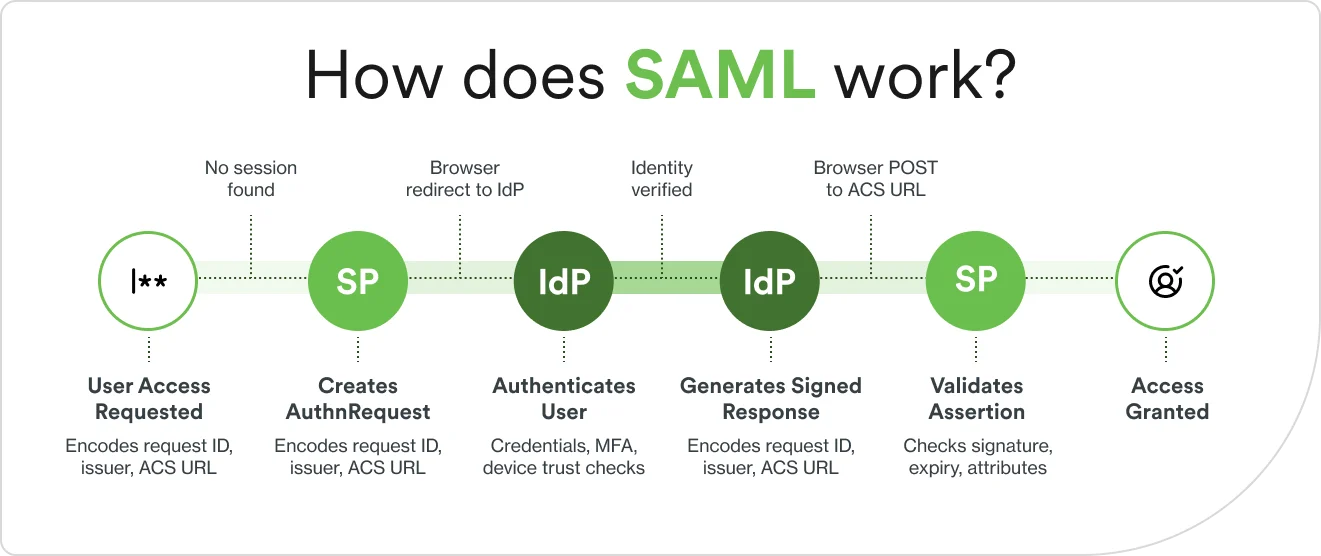
SAML explained: the most common authentication flow
1. The user requests access
This person is called a "principal" in SAML terminology.
The user navigates to a protected application, for example, the company CRM.
The SP checks for an existing authenticated session.
No valid session exists, so the SP saves the destination URL and redirects the browser toward the identity provider.
2. The SP creates a SAML authentication request
The SP generates an XML AuthnRequest—the SAML request that initiates the exchange—and sends this SAML message to the IdP's SSO endpoint through the user's browser. The request includes:
A unique Request ID for replay protection
The SP's entity identifier (issuer)
The IdP's SSO endpoint URL (destination)
The AssertionConsumerServiceURL—the address where the IdP should return its response
3. The IdP authenticates the user
The IdP receives and validates the AuthnRequest.
If the user has an active IdP session, they proceed immediately. If not, the IdP prompts for credentials.
The IdP may enforce additional policies at this step—such as multi-factor authentication, device health checks, or conditional access based on location or risk signals. This is where identity security solutions layer in phishing-resistant authentication before the assertion is ever generated.
Once identity is verified, the IdP determines what access attributes apply to the user.
4. The IdP generates a signed SAML response
After successful authentication, the IdP creates a SAML response wrapping called a SAML assertion, which is the core XML document. The assertion contains three types of statements:
Authentication statements: when and how the user authenticated
Attribute statements: user data like email, name, role, and group memberships
Conditions: validity constraints including NotBefore and NotOnOrAfter timestamps that define the acceptance window, plus an audience restriction confirming which SP the assertion is intended for
The IdP signs the assertion with its private key, producing a SAML token (also called a SAML security token). The IdP then redirects the browser back to the SP's ACS URL with the signed response.
5. The SP validates the assertion and grants access
The SP receives the SAML response and runs four checks:
Verifies the digital signature using the IdP's public certificate
Confirms the assertion hasn't expired
Checks that the audience restriction matches its own entity ID
Extracts the user's attributes and authorization data
If all checks pass, the SP creates a local session and grants access. The user lands on the resource they originally requested without ever having to enter credentials directly into the application.
The OASIS SAML 2.0 Technical Overview describes this process in detail.
What are the key benefits of SAML-based authentication?
The five-step flow above delivers concrete operational and security advantages. Here is how SAML-based authentication compares to the alternative of managing credentials at every application individually.
Aspect | SAML-based authentication | Traditional authentication |
|---|---|---|
User experience | Single login for all connected apps | Separate login for each application |
Password storage | Credentials stored only at the IdP | Passwords stored at each application |
Security controls | MFA and policies enforced centrally | Security settings distributed across multiple apps |
Admin overhead | Provision and revoke in one directory | Manage user accounts in each system |
Audit trail | All authentication events logged at IdP | Logs scattered across individual systems |
Three advantages deserve more detail beyond what the table captures.
Federated identity management lets SAML bridge organizational boundaries without copying user directories. A supplier can authenticate to a manufacturer's procurement portal using their own company's IdP—the two organizations establish a trusted relationship, and credentials never cross organizational lines.
Attribute-based access control is built into the assertion itself. SAML assertions can carry role and group membership data alongside authentication proof. The SP uses those attributes to determine what the user can see and do inside the application—making SAML a vehicle for fine-grained authorization, not just authentication.
Single logout (SLO) is the other side of SSO. When a user logs out of the IdP, SAML SLO sends logout requests to every SP where active sessions exist. Implementation completeness varies across applications, but the capability exists in the SAML 2.0 specification and reduces residual session risk.
What applications and use cases rely on SAML authentication?
SAML is purpose-built for web-based, browser-driven workflows, which covers the majority of enterprise software. Three use cases, described below, account for most SAML deployments.
How does SAML SSO compare to other authentication methods?
SAML, OAuth 2.0, and OpenID Connect (OIDC) are all major identity standards. Despite often being used together in enterprise environments, each has distinct use cases and purposes.
At a high level:
SAML is used when organizations need centralized authentication across a large portfolio of browser-based applications.
OAuth 2.0 is used for API-driven services and delegated access rather than identity verification.
OIDC is used for adding an authentication layer on top of OAuth 2.0, using JSON Web Tokens instead of XML assertions.
SAML and OAuth 2.0 are complementary. When used together, they answer "who is this user?" and "are they allowed in?" Meanwhile, OIDC bridges both questions by adding an authentication layer on top of OAuth 2.0, making it useful in environments where both identity verification and resource authorization are needed in a single flow.
For an in-depth breakdown of how they differ and when to use each, see our SAML vs. OAuth vs. OIDC explained guide.
What's the process for setting up SAML authentication?
SAML implementation follows a consistent pattern regardless of the IdP and SP involved. Whether you are following a vendor's SAML tutorial or building a custom SAML SSO integration, the general sequence is the same: both parties exchange configuration information, establish a SAML connection through certificates and metadata, and verify the exchange before rolling out to users.
Prerequisites. Administrative access to both IdP and SP, SSL/TLS provides administrative access to both IdP and SP while sending certificates for secure communication, enabling the ability to exchange metadata files between both systems, and improving understanding of which user attributes (email, role, group memberships) need to flow in the assertion.
Configure the IdP. Register the service provider in the IdP, upload the SP metadata, and configure which user attributes to include in the assertion.
Configure the SP. Register the identity provider in the SP, upload the IdP metadata, and map incoming attribute names to the SP's expected format.
Exchange metadata. SAML metadata files are XML documents containing entity IDs, SSO endpoint URLs, ACS URLs, and public certificates. Sharing these files is how IdP and SP establish mutual trust.
Test with a pilot user. Run the full authentication flow with a test account, verify the SAML assertion contents, and confirm that user attributes are mapping correctly to permissions inside the SP.
Roll out to users. Deploy to a pilot group before enabling the full organization. Monitor authentication logs during rollout for signature errors, attribute mapping issues, or clock-related failures.
Conduct ongoing certificate management
SAML trust is grounded in X.509 certificates. The IdP signs assertions with its private key, and the SP uses the IdP's public certificate to verify them. Certificate expiration is one of the most common causes of sudden authentication failures in established SAML integrations. Microsoft's guidance on managing federation certificates recommends automating certificate monitoring and configuring overlapping trust windows where both old and new certificates are accepted during a transition period.
What are the most common pitfalls when implementing SAML?
Most SAML authentication failures fall into three categories. Each has a recognizable pattern, a root cause, and a direct fix.
Certificate or metadata mismatch
What happens: authentication fails with a signature validation error. The SP received an assertion but could not verify that it came from the expected IdP.
Why it happens: the IdP rotated its signing certificate without updating the SP's metadata. The SP cached an old certificate fingerprint. Or the wrong certificate was uploaded during initial setup.
Fix: re-exchange SAML metadata after any certificate change. Automate certificate monitoring and configure overlapping trust windows, so both the old and new certificates are accepted during transition. This will, in effect, prevent downtime during rotation.
Clock skew and assertion expiration
What happens: valid users get authentication errors. Assertions arrive at the SP with timestamps that appear expired or not yet valid, even though they were just issued.
Why it happens: SAML assertions carry NotBefore and NotOnOrAfter timestamps. If the clocks on the IdP and SP servers are out of sync—even by a few minutes—the SP rejects assertions that are technically valid. Clock skew is one of the most common SAML authentication failures, and the root cause is always unsynchronized clocks rather than a configuration error.
Fix: synchronize server clocks using NTP (Network Time Protocol) on every system involved in the SAML flow. Configure a clock skew tolerance of 60 to 120 seconds to absorb minor drift, but avoid values above five minutes, which weaken replay attack protection.
Incorrect attribute mapping
What happens: users authenticate successfully but land in the application with wrong permissions, missing roles, or no access to features they should have.
Why it happens: the IdP sends attribute names that don't match what the SP expects. For example, the IdP sends a value called "mail" but the SP looks for "email." The user passes authentication, but the SP can't find the role data it needs for authorization.
Fix: inspect the SAML assertion contents during testing with a browser-based SAML decoder or your IdP's built-in assertion viewer. Verify that each attribute name and value matches the SP's documented requirements. Test with accounts that have clearly defined roles so mapping failures surface immediately.
How can I strengthen my organization's approach to SAML authentication?
SAML is an enabler, and one that organizations build on. The protocol itself doesn't specify how strong the authentication event at the IdP has to be.
An organization could configure a SAML IdP that accepts a username and password with no MFA, leading to weak security standards. That's what makes choosing a SAML SSO provider with strong authentication capabilities so important. The IdP is the single point where security is either enforced or absent.
Strengthen your organization's SAML authentication by layering these capabilities onto the protocol:
Phishing-resistant MFA. Adding strong multi-factor authentication at the IdP layer means every SAML-connected application inherits that protection automatically. Phishing-resistant methods like hardware security keys or passkeys prevent the credential theft that makes stolen passwords useful to attackers—even when those passwords are never shared with individual SPs.
Device trust. Organizations can require that only managed, healthy devices are allowed to complete SAML authentication. A device trust check at the IdP blocks authentication from unmanaged or compromised endpoints before a SAML assertion is ever generated, regardless of whether the user’s credentials are valid.
Adaptive access policies. Risk-based authentication adjusts what's required based on context: the user's location, the device's security posture, the time of day, or behavioral signals. A user logging in from a new country on an unmanaged device faces a higher authentication bar than the same user on a managed laptop from their usual location.
SAML IdP or IdP proxy. A modern identity security platform can act as a SAML IdP itself or sit in front of an existing IdP as a proxy, adding strong authentication and policy enforcement without requiring changes to existing SP configurations. Either way, the SP continues to receive standard SAML assertions and never needs to be reconfigured.
Zero trust alignment. Zero trust architectures require verification at every access attempt, not just at login. SAML's centralized authentication model supports this as every application access that triggers a SAML exchange is an opportunity to verify identity and context. Pair that with continuous session monitoring and conditional access policies, and SAML becomes a zero trust enforcement point rather than a one-time gate.
What's next for SAML and identity security?
SAML 2.0 has been stable for more than two decades, and the enterprise ecosystem built around it is not going away. But several developments are reshaping how organizations think about identity security at the SAML layer.
AI-assisted policy enforcement. Identity security vendors are using supervised machine learning models trained on historical authentication data to flag anomalous access attempts in real time. These models score each authentication attempt against behavior baselines and adjust policy requirements accordingly. Risk-based MFA that responds to specific signals is available today. Fully autonomous identity orchestration that requires no human policy input remains largely aspirational.
Continuous verification. The shift toward zero trust architectures is pushing organizations beyond one-time SAML assertions to continuous session validation. SAML itself issues a point-in-time credential, but organizations are layering session risk monitoring on top, so that a suspicious event mid-session (a new IP or a device configuration change, for example) triggers step-up authentication rather than waiting for the next SAML exchange.
Non-human identities. Enterprise identity programs historically focused on human users. The next frontier is the credentials used by service accounts, automation pipelines, and machine-to-machine communication. These non-human identities often hold elevated privileges, are rarely monitored, and are almost never subject to MFA, making them a growing attack surface. Extending SAML-style identity governance to non-human identities is an active area of development.
OIDC adoption alongside SAML. Modern cloud-native applications increasingly ship with native OIDC support rather than SAML. Organizations will run both protocols for the foreseeable future: SAML for legacy enterprise apps with deep SAML integrations and OIDC for newer cloud services. Identity security platforms that support both protocols without requiring separate configuration reduce operational overhead as the mix shifts.
Duo Directory and unified protocol support. As environments split between legacy SAML integrations and newer OIDC services, Duo Directory provides a single control plane that spans both. Duo can act as a SAML IdP for applications that require it or sit in front of an existing IdP as a proxy, adding strong authentication and policy enforcement without reconfiguring downstream service providers. Dynamic routing rules handle mixed-protocol environments, so organizations manage one identity policy across SAML and OIDC workloads rather than maintaining separate configurations as the protocol mix shifts.
Ready to strengthen your organization's SAML authentication with phishing-resistant MFA, device trust, and more? Try Duo for free.