

Key takeaways
OIDC is built on OAuth 2.0, but does a different job. OAuth 2.0 handles authorization (what a user or application can access). OIDC adds authentication (who the user is).
The protocol issues an ID token, which is a signed JSON Web Token containing verified information about the user. Applications validate the token's signature and claims rather than handling passwords directly.
OIDC supports multiple authentication flows, which are the steps of getting an ID token from an identity provider. Proof Key for Code Exchange (PKCE) is the recommended default for web, mobile, and single-page applications.
Where SAML still dominates legacy enterprise SSO, OIDC has become the standard for cloud apps, mobile, and APIs because it uses JSON, supports modern clients, and is simpler to implement.
How does OIDC work?
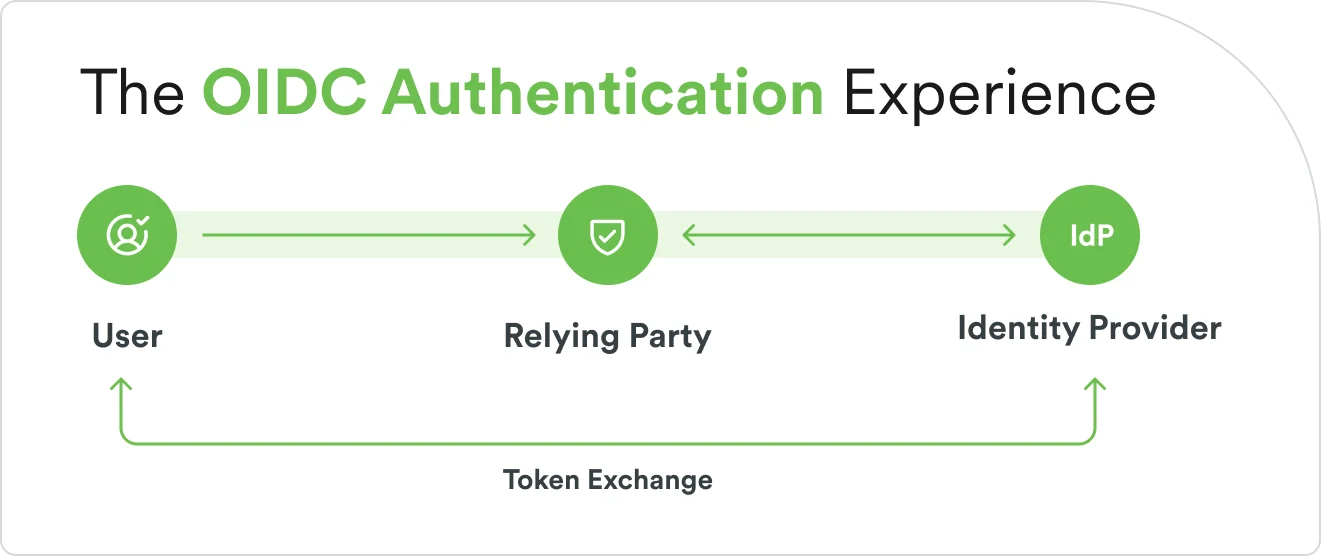
OIDC works by handing off authentication to a trusted identity provider (IdP). That IdP stores characteristics like personal info, passwords, biometrics, and passkeys that systems and users use to prove a user's identity claim. The IdP verifies the user and sends back a signed token the application can trust. The application never sees the user's password. It only sees a cryptographically signed statement from the provider confirming the user's identity.
Think of OIDC like showing your passport at airport security. The TSA agent doesn't verify your identity from scratch. They trust the State Department that issued your passport, and they trust the holographic features that prove the document hasn't been forged. In OIDC, the identity provider is the State Department, the application is the TSA agent, and the ID token is the passport, complete with a cryptographic signature the application can check.
Before walking through the steps, a quick vocabulary check. OIDC stands for OpenID Connect. You may also see it written as "open connect id" or "openid connect"—these all refer to the same protocol.
OIDC: key terms explained
Authentication proves who you are.
Authorization is what you’re allowed to do once you're identified. OIDC handles authentication. OAuth 2.0, the framework underneath it, handles authorization.
The Identity Provider (IdP), sometimes called the OpenID Provider, is the service that verifies the user's identity. Google, Microsoft Entra ID, Okta, and Duo are all examples.
The Relying Party (RP), also called the OIDC Client, is the application requesting authentication.
OAuth 2.0 is the authorization framework OIDC builds on. OIDC reuses OAuth's redirect flows and token machinery, then adds a standardized identity layer on top.
An ID token is a digitally signed JSON Web Token (JWT) containing verified information about the user—who they are, who issued the token, when it expires.
An access token is a separate token used to request additional user information from the identity provider if the application needs it.
What does a typical OIDC sign-in look like?
User redirection. The user tries to access an application. The application redirects them to the identity provider with an authentication request.
User authentication. The identity provider verifies the user’s credentials. This is where multi-factor authentication, passwordless login, or biometrics happen.
Token issuance. The identity provider creates a signed ID token, and optionally an access token, and sends them back to the application.
Token validation. The application verifies the ID token’s signature using the provider’s public keys and checks the claims inside it.
Access granted. The user is logged into the application, often with no password ever touching the application's servers.
This delegation pattern enables experiences most users now take for granted:
Single sign-on (SSO): sign in once at the identity provider and access many applications without re-entering credentials.
Standardized authentication: the same login works across vendors, platforms, and programming languages.
Delegated authentication: applications don't store or handle passwords. The identity provider simply tells an application that the user is cleared or blocked.
What are the key components in the OpenID Connect protocol?
OIDC relies on a handful of standardized components that make authentication portable and automatic across applications. Each one has a specific job.
ID token
The ID token is the core deliverable of OIDC. It’s a JSON Web Token (JWT) that contains verified information about the authenticated user, structured in three parts:
Header: specifies the signing algorithm (for example, RS256).
Payload: contains claims about the user, including who they are, when they authenticated, and which application requested the authentication.
Signature: a cryptographic signature that proves the token hasn’t been tampered with.
Inside the payload, several standard claims identify the user and the context of the authentication:
iss (issuer): the identity provider that created the token.
sub (subject): a unique identifier for the user.
aud (audience): the application this token was created for.
exp (expiration): when the token expires.
iat (issued at): when the token was created.
email, name, profile: optional user information the application may need.
The application validates the signature using the identity provider's public keys, which it fetches from a URL called the JWKS (JSON Web Key Set) endpoint. If the signature checks out and the claims match expectations, the application trusts the token.
Discovery endpoint
The discovery endpoint is a standardized URL where identity providers publish their configuration. Every OIDC provider hosts it at a well-known path: /.well-known/openid-configuration. When an application connects to a new identity provider, it reads this endpoint to learn how to interact with the provider automatically.
The discovery document tells the application several things:
Authorization endpoint: where to send users for authentication.
Token endpoint: where to exchange authorization codes for tokens.
UserInfo endpoint: where to request additional user profile information.
Supported scopes: what types of user information can be requested.
Supported flows: which authentication flows the provider supports.
JWKS URI: where to find the public keys for token verification.
This is what makes OIDC integrations relatively painless. Instead of manually configuring every endpoint, the application just reads one URL and configures itself.
UserInfo endpoint
The UserInfo endpoint is an API where applications can request additional profile information beyond what's included in the ID token. After authentication, if the application needs details like a profile picture, phone number, or mailing address, it sends the access token to this endpoint and receives additional claims in JSON format.
Users control what gets shared. When an application requests authentication, it specifies scopes (permission categories) describing the information it needs. The user consents to sharing that information during the login process. The standard scopes include "openid" (required), "profile" (name, picture), "email," "address," and "phone."
What are OIDC workflows?
OIDC supports different authentication flows, each designed for a specific type of application. Think of them as different routes to the same destination. The destination is always a verified ID token. The route depends on where your application runs and how much you can trust the environment.
Authorization Code Flow
Authorization Code Flow is the most secure and widely recommended flow. It works by keeping tokens off the user's browser entirely. The identity provider sends back a short-lived authorization code, and the application exchanges that code for tokens on a secure back-channel between servers.
The Authorization Code Flow sequence:
The application redirects the user to the identity provider.
The user authenticates.
The identity provider redirects back to the application with an authorization code.
The application exchanges the code for tokens on the server side.
Tokens are stored securely on the server and never exposed to the browser.
For mobile apps and single-page applications that don't have a traditional server backend, Authorization Code Flow adds an extension called PKCE (Proof Key for Code Exchange). PKCE prevents an attacker from intercepting the authorization code and exchanging it for tokens. It’s now the recommended approach for nearly every type of application.
Common PKCE use cases include:
Traditional web applications with server-side code.
Mobile applications on iOS and Android.
Single-page applications (SPAs) using JavaScript, when combined with PKCE.
Implicit and hybrid flows
The Implicit Flow was originally designed for browser-based applications that couldn't make secure back-channel requests. It skips the authorization code step and returns tokens directly in the URL. The convenience came at a cost: tokens were visible in the browser's address bar, making them vulnerable to interception, so the Implicit Flow is now deprecated.
The Hybrid Flow combines elements of both Implicit Flow and Authorization Flow. It returns some tokens immediately and delivers others through the secure back-channel. It exists for specific enterprise scenarios that need both immediate and server-side token delivery, but in practice it’s rarely implemented.
For most applications built today, use Authorization Code Flow with PKCE.
How does OIDC compare to OAuth 2.0 and SAML?
OIDC, OAuth 2.0, and SAML handle related but distinct jobs. OIDC adds an identity layer on top of OAuth 2.0, so while OAuth 2.0 answers "what can this application access?", OIDC answers "who is this user?" SAML has been the enterprise SSO standard since 2005 and remains deeply embedded in large organizations today. OIDC is the default for modern cloud apps, mobile, and APIs because it uses JSON instead of XML and requires less configuration.
For a full side-by-side breakdown of all three protocols, see SAML vs. OAuth vs. OpenID Connect.
OIDC vs. OAuth 2.0
OAuth 2.0 was designed for authorization, not authentication. It lets a user grant an application permission to access a resource on their behalf. For example, when an app asks to read your Google Calendar, that’s OAuth 2.0. But OAuth 2.0 doesn't tell the application who the user is. It only confirms the user granted permission.
OIDC fills the authentication role. It reuses OAuth 2.0's redirect flows and token endpoints, then adds a standardized ID token that carries verified identity information. When you click "Sign in with Google" on a website, that's OIDC. When you click "Allow this app to access your Google Drive," that's OAuth 2.0.
OIDC vs. SAML
SAML has been the enterprise SSO standard since 2005, making it deeply embedded in large organizations today. It uses XML-based assertions and was designed for browser-based enterprise applications.
OIDC is lighter, faster to implement, and built for authentication outside of closed corporate networks. It uses JSON instead of XML, works natively with mobile apps and APIs, and requires less configuration. For new applications, OIDC is the default choice. For enterprises with established SAML integrations, both protocols often run side by side, with OIDC handling newer cloud and mobile applications while SAML continues to serve legacy systems.
What are the benefits of OIDC authentication?
Organizations and developers choose OIDC because it moves authentication out of the application and into a purpose-built system, giving security teams and users a range of benefits.
Simplified user experience. Users use SSO once at their identity provider and access multiple applications without re-entering credentials.
Enhanced security. Applications never handle user passwords. Authentication is delegated to identity providers that specialize in credential management, multi-factor authentication, and threat detection. OIDC also uses cryptographic tokens that resist tampering and prevent interception.
Standardized implementation. OIDC is an open standard maintained by the OpenID Foundation. Any OIDC-compliant application can authenticate users against any OIDC-compliant provider, regardless of vendor.
Reduced development time. Developers can integrate with an existing identity provider using well-documented libraries available in every major programming language.
Mobile-friendly functionality. JSON-based tokens work natively with mobile apps and APIs, unlike XML-based protocols that were designed for browsers.
Support for modern authentication. OIDC integrates naturally with multi-factor authentication, passwordless options, and biometrics because the identity provider handles the authentication method.
Scalability. Identity providers handle the authentication workload. Applications scale without building or maintaining their own authentication infrastructure.
OIDC powers authentication across consumer and enterprise applications. Modern identity platforms like Duo Security leverage OIDC to provide phishing-resistant authentication and seamless single sign-on, combining security and user experience.
What are the implementation steps for an OIDC integration?
Implementing OIDC is straightforward compared to building custom authentication. Most of the work is configuration, not code. The process follows three steps.
1. Choose or set up an OIDC provider
If your organization already uses an identity provider, start there. If not, choose one based on your user base and security requirements.
Factors to consider:
Existing infrastructure. Do you already use an identity provider for SSO or directory services?
User base. Are your users consumers (Google, Apple sign-in) or employees (enterprise IdP)?
Security requirements. Do you need multi-factor authentication, passwordless login, or biometrics?
Compliance. Industry requirements like HIPAA, SOC 2, or FedRAMP may narrow the list.
Scale and reliability. Provider uptime and global availability matter for user-facing applications.
Common OIDC providers include Duo Security (with Cisco) and other major cloud identity platforms.
Each publishes a discovery endpoint at /.well-known/openid-configuration that your application will use for automatic setup.
2. Configure the OIDC client
Your applications, the relying parties, need to be registered with the identity provider. Registration creates the credentials your application uses to communicate with the provider.
Register your application with the OIDC provider to create a client record.
Obtain credentials: a client ID (your application's public identifier) and a client secret (a private key for server-side applications).
Configure redirect URIs: the URLs where users should return after authentication. The provider will only send tokens to these registered addresses.
Select scopes: choose what user information your application needs (openid, profile, email, and so on).
Choose the flow: Use authorization Code Flow with PKCE for most applications.
Most programming languages have OIDC libraries that handle the protocol details. Test in the provider’s sandbox or development environment before deploying to production.
3. Verify token security and claims
Token validation is where security lives or dies. Never trust a token without verifying it.
Verify the signature using the provider's public keys from the JWKS endpoint. This confirms the token hasn't been modified.
Check the issuer (iss) to confirm the token came from the identity provider you expect.
Validate the audience (aud) to make sure the token was issued for your application, not someone else's.
Check expiration (exp) to verify the token is still valid.
Validate the nonce if your authentication request included one. Nonce validation prevents replay attacks where an attacker reuses a captured token.
Once validated, extract the user information you need from the token's claims. Store tokens securely, using server-side sessions for web apps, encrypted storage for mobile apps, secure cookies where appropriate. If your application needs to maintain long sessions, use refresh tokens to obtain new access tokens without requiring the user to re-authenticate.
How can my business get enhanced security with OIDC?
OIDC provides the authentication standard. The identity provider you choose determines how strong that authentication actually is. Duo Security, part of Cisco, implements OIDC as a foundation for identity security that goes beyond basic sign-in.
Duo serves as an OIDC-compliant identity provider, enabling secure single sign-on across cloud, on-premises, and custom applications. During the OIDC authentication flow, Duo adds layers that a basic provider doesn't:
Phishing-resistant MFA. Before issuing an ID token, Duo can require verification through methods that resist phishing, including biometrics and hardware security keys.
Adaptive access policies. Duo evaluates risk in real time during the OIDC flow, factoring in device health, location, and behavior before granting access.
Device trust. Duo checks that the device requesting access meets security requirements, verifying endpoint health as part of the authentication process.
Seamless user experience. OIDC-based single sign-on through Duo reduces authentication friction. Users sign in once and move between applications without repeated prompts.
Rapid deployment. Because Duo uses OIDC standards, integration with existing applications is fast. Standard libraries and the discovery endpoint handle the protocol details.
Flexible integration. Duo works with cloud applications, on-premises systems, custom-built tools, and legacy infrastructure that supports OIDC or SAML.
What's next for OIDC and identity security?
OIDC has become the default authentication protocol for cloud-native, mobile, and API-driven applications, and that trajectory is accelerating. Several developments are shaping how organizations build on top of it.
OIDC is displacing SAML for new builds. Enterprises still run SAML for legacy applications, but new application deployments increasingly ship with native OIDC support. Organizations running both protocols use OIDC for modern cloud and mobile apps, while SAML continues to serve established integrations.
Passwordless authentication. OIDC integrates naturally with passkeys and biometric authentication because the identity provider controls the authentication method. As passkey adoption grows, OIDC is the protocol delivering those credentials to applications at scale.
AI-driven adaptive authentication. Identity providers are applying machine learning to the OIDC flow, scoring each authentication attempt against behavioral baselines in real time. Risk signals like a new device, an unfamiliar location, or an anomalous access pattern can trigger step-up authentication before an ID token is ever issued.
Dynamic policy routing. Modern identity platforms like Duo Directory are extending OIDC with dynamic routing rules that evaluate context at authentication time and apply different policies based on the application, user role, or risk score—without requiring changes at the application level.
For a forward-looking statistic on OIDC adoption, the OpenID Foundation publishes adoption data at openid.net that the web team can reference for a verified figure before publication.
See for yourself how Duo can strengthen your organization's security with a free 30-day trial.