
Key takeaways
802.1X controls network access at the port level. The IEEE 802.1X standard blocks all traffic on a network port until the connecting device or user proves their identity through a central authentication server.
Three components handle every authentication. The supplicant (client device), authenticator (network switch or access point), and authentication server (typically RADIUS) work together to verify identity before opening port access.
Port-based network access control protects both wired and wireless networks. 802.1X applies the same identity verification to Ethernet switch ports and wireless access points, giving organizations a single authentication framework across their infrastructure.
802.1X works best as part of a broader identity security strategy. Combining 802.1X with multi-factor authentication, device trust, and adaptive policies creates layered protection that addresses modern threats like stolen credentials and compromised devices.
Why does 802.1X network access control matter?
A corporate network may connect thousands of devices. What could happen if any user could bring their laptop into wireless range, and gain access, no questions asked? 802.1X access control is critical to network security because without it, unauthorized devices like these would have no mechanism to challenge them. This attack technique, known as hardware addition, lets someone posing as a guest or contractor smuggle a device into a building, connect it to an open port, and reach internal systems. The IEEE 802.1X standard addresses this kind of threat by requiring identity verification before any network port grants access.
Traditional network security like firewalls and VPN gateways trust devices inside the network, making them vulnerable to these attacks.
Compounding this security challenge: networks have grown more complex. Connected IoT devices are projected to reach 21.1 billion worldwide by the end of 2025, up 14% year over year. Bring Your Own Device (BYOD) policies, remote workers, and devices like cameras and smart building systems all connect to corporate infrastructure. Each connection is a potential entry point. 802.1X network access control addresses this by requiring every device and user to authenticate before gaining access to wired Ethernet or wireless networks.
How is the 802.1X protocol structured?
802.1X, also called dot1x, operates by applying two possible states at every network port, a mechanism called port-based network access control (PNAC). These states are simply unauthorized and authorized. It applies these states between three structural components.
Before authentication, the port sits in an unauthorized state, blocking all regular data traffic and permitting only Extensible Authentication Protocol over LAN (EAPoL) messages. In other words, only information related to access authorization is transmitted. This protocol 802.1X uses to carry authentication data. After successful authentication, the port transitions to an authorized state and allows full network traffic. Moving a port from unauthorized to authorized involves three components.
What are the three components of 802.1X access control?
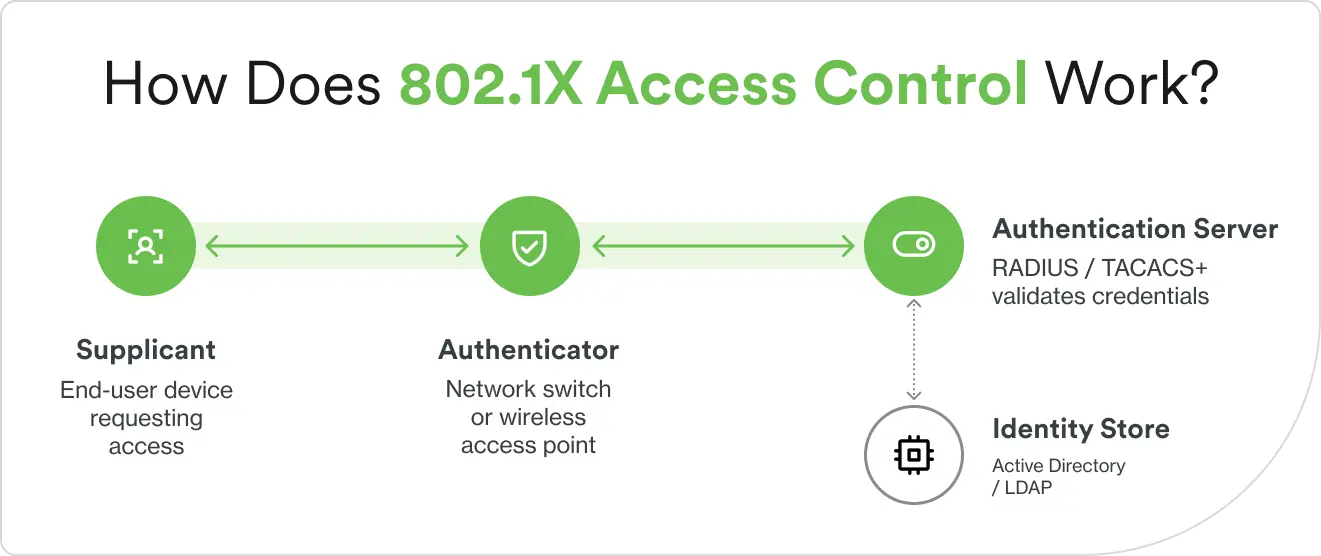
Supplicant: The client device requests network access and provides credentials. This could include a laptop on corporate Wi-Fi, a network printer on the LAN, or a mobile device. Any device attempting to connect must have 802.1X-compatible software to succeed.
Authenticator: The network device that controls port access. Common authenticators include wired networks switches, wireless access points, and VPN concentrators. They do not make the decision, but rather enforce the decision made by the authentication server.
Authentication server: The device that validates credentials and makes the authorization decision. This is typically a RADIUS server, which checks credentials against a central database that holds user accounts and permissions called an identity store. Examples of RADIUS servers include Microsoft Network Policy Server (NPS), FreeRADIUS, Cisco ISE, and cloud-based RADIUS services.
Working together, these components communicate using the 802.1X protocol to authorize connected devices, check user identities, and prevent unauthorized access. For more information read our overview article about how identity providers aid in authorization requests.
How does 802.1X network access control work?
Enabling IEEE 802.1X authentication involves a conversation between the three components. Each step passes a message from one role to the next, starting the moment a device connects and ending when the port opens or stays closed.
A new device initiates the connection. The authenticator immediately places the port in the unauthorized state, blocking all Layer 3 traffic (standard network data). The only frames permitted are EAPoL messages, which carry 802.1X authentication data.
The authenticator requests identity. It sends an Extensible Authentication Protocol (EAP) request to the supplicant, which responds. That response depends on the types of identity a network requires, which could be user credentials, digital certificates, or anything in between.
The authenticator forwards the supplicant’s identity to the RADIUS authentication server in a RADIUS Access-Request packet.
The authentication server proposes an EAP method. This is a specific technique for proving identity. Common methods include EAP-TLS (certificate-based), PEAP (password-based inside an encrypted tunnel), and EAP-TTLS. The supplicant either accepts or proposes an alternative.
The authentication server checks the credentials. It compares them against its identity store, whether that’s Active Directory, an LDAP directory, or a certificate authority.
The RADIUS server authorizes or rejects. It sends either an Access-Accept or Access-Reject message back to the authenticator, which enforces the decision at the port.
Access-Accept decisions open the port. It transitions to an authorized state and allows full network traffic. Session keys such as the Pairwise Master Key (PMK) are distributed to encrypt subsequent traffic between the device and the network.
802.1X also supports mutual authentication. The client authenticates to the network, and the network authenticates back to the client. This two-way verification prevents man-in-the-middle attacks, where an attacker intercepts traffic by impersonating a legitimate access point or switch. With mutual authentication, a rogue access point cannot fool the client into connecting because it cannot produce valid server-side credentials.
Network access and identity threats: what the numbers show
Unauthorized network access and stolen credentials remain leading entry points for attackers. These numbers show why verifying identity at the port level matters.
1. Verizon, 2025 Data Breach Investigations Report; 2. IoT Analytics, State of IoT 2025
What are the benefits of enabling IEEE 802.1X authentication?
Implementing 802.1X port security provides multiple layers of protection beyond basic network access control. Here are the specific benefits organizations gain.
Pre-admission control: 802.1X blocks all unauthorized network traffic before network authentication completes. A rogue device plugged into a switch port cannot scan the network, reach internal systems, or exfiltrate data because the port stays closed until the device proves its identity.
Device and user identification: 802.1X identifies both devices (via machine certificates or MAC addresses) and users (via credentials). This gives security teams visibility into who and what is accessing the network at any given time.
Granular policy enforcement: RADIUS attributes returned during authentication enable VLAN assignment (placing a device on a specific network segment, which is an isolated section of the network with its own traffic rules), role-based access control, and access control lists (ACLs)—all based on user identity or device type.
Mutual authentication: Both the client and the network prove their identities to each other, preventing rogue access points and man-in-the-middle attacks.
Unified wired and wireless security: 802.1X provides port-based access control across both Ethernet and 802.11 wireless networks.
Compliance support: NIST SP 800-53, the security controls standard used across federal agencies and widely adopted in commercial frameworks, recommends 802.1X and EAP as mechanisms for device identification and authentication on local and wide area networks.
Automated network segmentation: Authenticated devices are automatically placed into the appropriate VLAN or network segment based on their role, department, or security posture. A guest device lands on the guest network. An engineering laptop lands on the engineering VLAN. No manual configuration required per device.
How do you strengthen an 802.1X deployment?
Your organization most likely implemented 802.1X long ago. Most enterprise switches, access points, and client operating systems ship with 802.1X support built in. If you’re running a managed network, you’re likely already using it. Follow these steps to strengthen security using this robust standard.
Audit your authentication methods
EAP-TLS (certificate-based) is the strongest method available. If your deployment is still running PEAP-MSCHAPv2 (password-based), that’s the first thing worth reviewing—passwords can be phished, certificates can’t.
Identify your MAB devices
Any device authenticating via MAC Authentication Bypass—printers, IoT sensors, legacy systems—is a gap. MAC addresses aren’t secrets and can be spoofed. Take inventory of these devices, segment them onto restricted VLANs, and apply stricter access policies to limit what they can reach.
Add a second authentication factor
802.1X verifies that a device has valid credentials or a valid certificate. It doesn’t verify that the right person is behind the device. Adding multi-factor authentication (MFA) through a RADIUS proxy closes that gap, so a stolen laptop with a valid certificate still can’t authenticate without the second factor. Duo’s RADIUS integration layers onto existing infrastructure without replacing it.
Enforce device health checks
Authentication tells you who is connecting. Device trust tells you whether the device connecting meets your security baseline, reviewing the device’s current OS, disk encryption, endpoint protection, and other factors.
Centralize your logging
Most 802.1X attacks first show up in authentication logs. If your RADIUS logs aren’t feeding a central Security Information and Event Management (SIEM) or security dashboard, anomalies go undetected.
What are common troubleshooting steps for 802.1X deployments?
802.1X deployments can encounter configuration issues. Most issues fall into a few common categories. Learn to recognize them, and you’ll quickly narrow in on a solution.
1. Verify credentials and certificates
Start with the most common culprit: the credentials themselves. Check that user accounts are correct, not locked, and not expired in your identity store. Confirm that computer accounts are in the correct Active Directory group for network access—a machine that’s been moved out of the right group will fail silently.
For certificate-based authentication like EAP-TLS, verify that:
Client certificates are valid, not expired, and trusted by the RADIUS server
The RADIUS server certificate is trusted by every client device—this is one of the most common silent failures in PEAP deployments
Certificate revocation lists (CRLs) are accessible—if the RADIUS server can’t reach the CRL, it may reject otherwise valid certificates
Common symptoms: “Authentication failed” errors, repeated credential prompts, or devices stuck in the unauthorized state with no clear reason in the logs.
2. Check EAP method compatibility
Confirm that the supplicant and authentication server are configured for the same EAP method—EAP-TLS, PEAP, or EAP-TTLS. It’s not enough for both sides to support the method. The configuration has to match end to end, including the inner authentication method for PEAP and any certificate requirements specific to the method.
Watch for protocol version incompatibilities. Older devices may not support newer EAP implementations on a recently upgraded RADIUS server, and that mismatch won’t always produce an obvious error. This is especially common in environments where 802.1X authentication was enabled years ago, and the RADIUS infrastructure has been upgraded since.
EAP negotiation failures typically surface in RADIUS logs as “EAP method not supported” or “NAK received.” If you see either, compare the supplicant configuration to the 802.1X RADIUS policy—the mismatch is usually straightforward once you know where to look.
3. Inspect switch or access point configuration
Start with the basics: verify the RADIUS server IP address and shared secrets on every authenticator. A mismatched shared secret silently prevents communication between the authenticator and the RADIUS server—no error, no log entry on the authenticator side. It’s one of the first things to check when dot1x authentication requests aren’t reaching the server at all.
Then confirm that 802.1X is enabled on the correct ports or SSIDs. On wireless networks, this is where 802.1X Wi-Fi authentication issues most often originate. On switches, verify that each port is set to the correct authentication mode:
Single-host—one device per port. A conference room port set to single-host will reject every device after the first.
Multi-host—multiple devices allowed after one authenticates. Less secure, but practical for shared ports behind IP phones.
Multi-auth—each device authenticates individually. The most granular option for 802.1X network access control.
Check timeout values. If they’re too aggressive, users get disconnected mid-authentication, especially on slower or congested networks. And verify that every VLAN referenced in your RADIUS policies actually exists on the switch. A RADIUS response that assigns a VLAN the switch doesn’t recognize will drop the session.
4. Review logs for error codes
When the first three steps don’t surface the issue, logs will. Start with RADIUS server logs and look for Access-Reject reasons—invalid credentials, policy violations, certificate failures. Each one points to a different part of the 802.1X authentication chain.
Review authenticator logs for EAPoL message flows and state transitions. These show you where in the handshake the process stalled—whether the supplicant sent its identity, whether the RADIUS server responded, and where the exchange broke down.
Common error messages and what they point to:
“User not found”—identity store issue. The account may not exist, or the RADIUS server can’t reach the directory.
“Certificate validation failed”—PKI problem. Expired certificates, untrusted CAs, or unreachable CRLs.
“Port security violation”—MAC address conflict or a device count exceeding what the port authentication mode allows.
When logs aren’t enough, run a packet capture on the authenticator port. Tools like Wireshark can decode the full EAP exchange and show you exactly which message triggered the failure. For organizations looking to enable IEEE 802.1X authentication across a large deployment, building a standard troubleshooting runbook around these four categories will save significant time during rollout.
What are some steps to build a stronger network authentication strategy?
Network security is converging with identity security. The perimeter-based model, where devices inside the network are trusted by default, no longer reflects how organizations operate. Zero Trust Network Access takes the next step, continuously verifying identity, device health, and context on every access request rather than trusting a device once it clears the port. The ZTNA market is projected to grow at a 25.5% CAGR through 2030. 802.1X remains the foundation, and Cisco Duo adds the capabilities Zero Trust requires on top of it.
Duo incorporates:
RADIUS-based MFA: Duo’s cloud-based Authentication Proxy adds a second authentication factor to any 802.1X deployment by sitting between the authenticator and the existing RADIUS server.
Device health checks: Duo Device Trust can verify device security posture—operating system version, disk encryption status, and whether security software is running—before granting network access.
Adaptive policies: Duo Passport evaluates contextual signals and can require stronger verification for unusual access patterns, unfamiliar locations, or high-risk scenarios.
Unified visibility: Centralized logging and reporting across all authentication events make it easier to detect anomalies and investigate incidents.
Combining 802.1X with modern identity security creates defense-in-depth: the network verifies identity at the port, MFA verifies the person, and device trust verifies the endpoint.
Ready to strengthen your identity security with MFA, device health checks, and adaptive policies? Start your free Duo trial today.