

Key takeaways
Dynamic access control evaluates identity, device, location, and behavior in real time. It grants or restricts access based on conditions at the moment of each request, replacing static, always-on permissions.
Four components power every DAC decision: identity attributes, a policy engine, context signals, and continuous monitoring.
Organizations that adopt dynamic access management reduce over-permissioning and strengthen compliance by enforcing least privilege automatically.
Effective implementation starts with classifying your assets, automating policy updates, integrating strong identity verification, and auditing regularly.
What is dynamic access control?
Dynamic access control (DAC) operates at the authorization layer to determine what a verified user is allowed to do. It does not determine whether they are who they claim to be. Confirming identity is the job of adaptive authentication.
The two work in sequence. Authentication first confirms who is requesting access, then DAC uses that confirmed identity, plus real-time context, to decide what access to grant and under what conditions.
It evaluates contextual factors at the moment of each request:
User identity
Device health
Location
Behavior
Sensitivity of the resource being accessed
If the conditions meet the organization’s policies, access is granted. If they do not, access is denied or limited.
Instead of assigning fixed permissions that stay the same regardless of circumstances, DAC makes a fresh decision every time someone requests access.
What does that look like in practice? Consider Arthur, a network security engineer at a mid-size technology company. His organization enforces dynamic access control using an identity and access management platform. He goes through this process to access all company systems and applications.
When Arthur logs in from his managed laptop at the office during business hours, DAC evaluates the context. His identity, device, location, and timing all match expected patterns. He gets full access.
Now imagine Arthur tries to reach the same system from a personal tablet at a coffee shop on a Saturday night. He has the same trusted login and password. But DAC evaluates the new context and reaches a different conclusion. It might require additional verification, limit him to read-only access, or deny the request entirely. Each decision reflects the conditions at that moment.
A DAC approach can also respond to other contexts. During an incident, for example, Arthur’s manager might receive temporary elevated privileges to specific systems. When the incident ends, DAC revokes them automatically. No one submits a ticket. No one forgets.
Why does dynamic access management matter?
Static access models were designed for a simpler environment: one office, company-owned devices, and a single corporate network.
Source 1: 2025 Data Breach Investigations Report (Verizon); Source 2: 2024 Cost of a Data Breach Report (IBM)
As organizations adopt more cloud-based tools, and as remote work introduces a new reality for security and access management, a dynamic access management model helps security teams respond to the ways their teams work. Employees now connect from personal laptops, home networks, and public Wi-Fi. Contractors and partners need varying levels of access that change frequently. A permission set assigned on someone’s first day may be dangerously broad six months later.
Attackers have adapted. Rather than breaking through firewalls, modern adversaries sign in with stolen credentials. As we see in the trend numbers above, they often work with a legitimate username and password stolen through phishing, social engineering, or dark-web marketplaces. In other words, they appear as legitimate users. Static access models have no way to tell the difference between an actual employee and an attacker using that employee’s credentials from an unfamiliar device in another country.
Dynamic access management closes this gap. DAC evaluates context with every access request. When something is off, DAC either denies access or requires additional verification. It treats every request as an opportunity to verify trust, rather than assuming trust was established once and still holds.
That shift from "trust once" to "verify every time" is a core principle of zero trust security. It is also what makes dynamic access control an effective cyber security strategy.
What are the key components of dynamic access control?
Dynamic access control relies on four interconnected components. Each plays a distinct role. The security value comes from how they work together.
Identity attributes and claims.
Attributes are characteristics of the user, device, or resource. Claims are verified assertions about those attributes—packaged by the identity provider so the access control system can evaluate them together.
When Arthur requests access, the system collects:
User claims: Role (security analyst), department (IT), security clearance (standard)
Device claims: Company-managed laptop, current OS version, encryption enabled, endpoint protection active
Resource attributes: Infrastructure management platform, classified as confidential, subject to SOC 2 requirements
Policy engine and rules.
The policy engine is the decision-making core. It takes Arthur's attributes and claims, evaluates them against the organization's rules, and produces an access decision: grant, deny, or grant with conditions.
This is an authorization decision that determines what the verified user can access, not an authentication challenge, though the policy engine can require step-up authentication if the current trust level is insufficient.
A simple rule for Arthur's request might read: grant access to the claims database IF role = financial analyst AND device = managed AND location = corporate network AND time = business hours
More complex rules can layer conditions—an organization-wide policy requiring multifactor authentication (MFA) for all access, combined with a resource-specific policy restricting the threat monitoring dashboard to the security team only
Expressions allow flexible thresholds rather than hard-coded scenarios. For example, allowing access from any location when the device risk score is low, but requiring step-up authentication (an additional identity check beyond the initial login) when the score is higher
Real-time context signals.
Context signals are environmental factors evaluated at the exact moment Arthur makes his request. Unlike his job title, which changes infrequently, these signals change constantly.
Location: Arthur is on the corporate network, logged in from the office—expected
Time: 10:15 AM on a Wednesday—within business hours
Device posture: Patches current, antivirus definitions up to date, firewall active
Behavior patterns: This is a database Arthur accesses daily at this time—consistent with his history
Risk level: No recent failed login attempts, no threat intelligence flags on his account
All signals align with expected patterns. The policy engine scores the request as low risk.
Continuous monitoring.
The access decision does not end at login. The system monitors Arthur's session for changes.
At 11:30 AM, Arthur's laptop disconnects from the corporate network and connects to public Wi-Fi at a coffee shop across the street. The system detects the network change and requires reauthentication with MFA before restoring access.
At 2:00 PM, a security scan flags that Arthur's endpoint protection has been disabled. The system steps his permissions down to read-only until the issue is resolved.
Every decision, context change, and enforcement action is logged, giving security teams a full audit trail and giving compliance teams evidence for regulatory reporting.
Organizations can also use "proposed permissions" to test new policy rules against real traffic before enforcing them. If a policy change would have disrupted Arthur's access 15 times last month, the team sees that before the rule goes live.
Component | What it does | Example |
|---|---|---|
Identity Attributes & Claims | Defines who or what is requesting access and packages verified facts for evaluation | User role: “network engineer.” Device: “company-managed laptop with current patches” |
Policy Engine & Rules | Evaluates attributes and context against defined rules to produce an access decision | “IF role = engineer AND device = managed AND location = corporate network THEN grant access” |
Real-Time Context Signals | Provides current environmental factors evaluated at the moment of each request | Location: “office network.” Time: “9 AM on Monday.” Device posture: “compliant” |
Continuous Monitoring | Tracks session activity and re-evaluates access if conditions change | Detects a mid-session VPN disconnect and steps down permissions to read-only |
How does dynamic authorization management work?
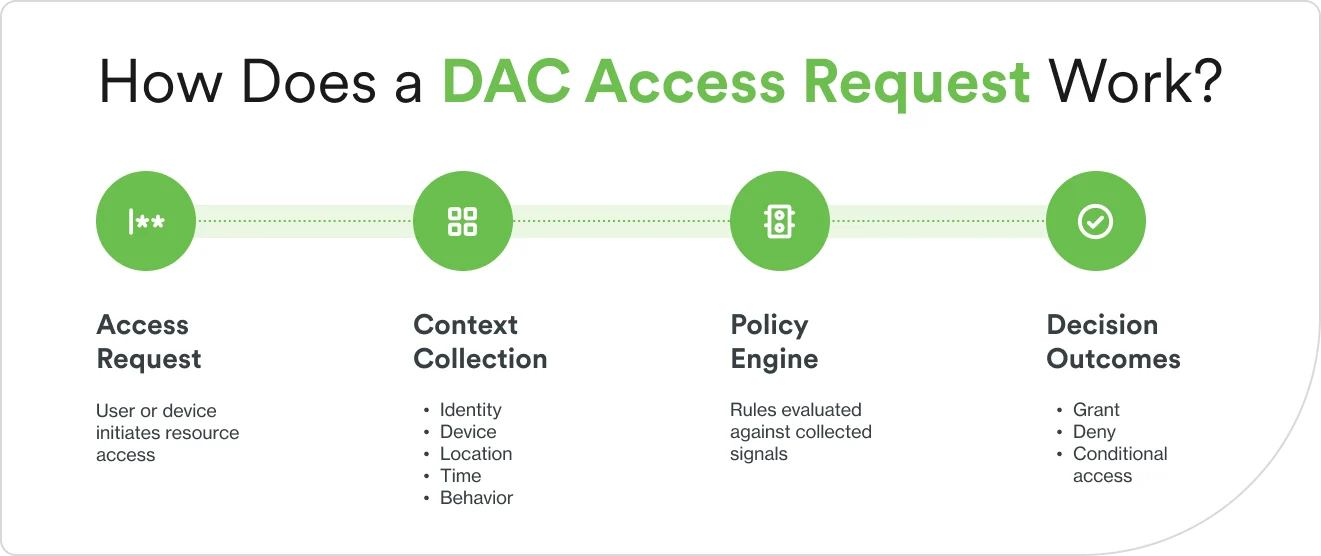
Dynamic authorization management follows a continuous cycle of evaluation and enforcement. The components described above execute this cycle every time someone requests access. Here is what happens at each stage.
1. Determine contextual risk
Every access request triggers a risk assessment. The system collects identity attributes, device posture, location, time, and behavioral history, then aggregates those signals into an overall risk score: low, medium, or high. The score is not pass-fail. It informs a range of possible responses.
2. Apply adaptive policies.
The policy engine evaluates the risk score and context against the organization's dynamic access control policies. Three outcomes are possible:
Grant access. Context matches expectations. Risk is low. Full permissions apply.
Grant with conditions. Risk is elevated. The system requires step-up authentication, limits permissions to read-only, or restricts the session duration.
Deny access. Context fails critical requirements, for example, unrecognized device, blocked geography, or a risk score above the allowed threshold.
Multiple policies can apply simultaneously. An organization-wide rule might require MFA for all remote access. A resource-specific rule might restrict a database to one department. The policy engine layers them and applies the most restrictive outcome.
3. Enforce and re-evaluate in real time.
Dynamic access management does not stop at the initial decision. The system continuously re-evaluates sessions. If a device falls out of compliance, the session is stepped down or terminated. If a time-limited privilege expires, access is revoked automatically. If behavior patterns shift mid-session, the system can require reauthentication. Every decision and context change is logged, creating audit trails for both security teams and compliance reporting.
What are the benefits of dynamic access control (DAC)?
DAC delivers security, compliance, and operational advantages that static access models cannot match. Here are the core dynamic access control benefits.
1. Improved security posture
DAC reduces the attack surface by limiting access based on real-time risk. When an attacker steals credentials and attempts to log in from an unrecognized device or unusual location, DAC flags the mismatch and denies access or demands additional verification. This limits lateral movement—when an attacker moves through systems after gaining initial access—by restricting what a compromised account can reach at any given moment.
According to a 2024 Cost of a Data Breach Report (IBM), breaches involving stolen credentials took an average of approximately 292 days to identify and contain.
2. Granular compliance enforcement
Regulations like HIPAA, GDPR, SOC 2, and PCI DSS require organizations to demonstrate that access to sensitive data is controlled, auditable, and limited to authorized purposes. DAC automates this by encoding regulatory rules directly into access policies. Every access decision is logged with the context that informed it, creating audit trails compliance teams can reference during assessments rather than reconstructing after the fact.
3. Reduced over-permissioning
Over-permissioning means users have broader access than their job requires. DAC addresses this with just-in-time access: elevated permissions are granted when a task requires them and revoked automatically when the task or time window ends.
4. Streamlined user experience
Adaptive authentication means requiring additional verification only when the context warrants it. Arthur accessing internal reports from his managed laptop on the corporate network will face minimal authentication friction. Arthur accessing sensitive financial data from a personal device on public Wi-Fi will prompt him to authenticate via MFA. Low-risk contexts move quickly. High-risk contexts get the protection the situation demands.
What are the challenges and limitations of DAC access?
Dynamic access control delivers significant security advantages. Implementing and managing it also comes with challenges that organizations should plan for.
Complex policy management. Defining and maintaining context-aware policies requires careful planning and ongoing governance. Overly complex rules can lead to misconfigurations or unintended access denials. Policies that work well individually may create conflicts when combined. This requires dedicated policy ownership and regular reviews.
Integration complexity. DAC systems must integrate with existing identity providers, directory services (centralized databases of user accounts and permissions), applications, and infrastructure. Older applications not designed for real-time policy evaluation may require significant modification to support dynamic controls.
Performance overhead. Real-time context evaluation and continuous monitoring can introduce latency in access decisions. Organizations need to balance the depth of context they evaluate against acceptable response times, particularly for high-volume applications.
User resistance. Adaptive authentication can frustrate users if not implemented thoughtfully. Frequent step-up challenges or unexpected access denials reduce productivity and erode trust in the system. Clear communication about why access was restricted, and a fast resolution path, help reduce this friction.
Resource requirements. DAC requires investment in technology, expertise, and ongoing management. The policy engine, integrations, monitoring infrastructure, and staff training represent meaningful costs. This is particularly true for smaller organizations building these capabilities for the first time.
Visibility and troubleshooting. When access is denied, users and IT teams need clear explanations of which policy or context factor triggered the decision. Without detailed, accessible logging, troubleshooting becomes time-consuming and opaque.
Despite these challenges, the security and compliance benefits typically outweigh the complexity. This is especially true for organizations handling sensitive data or operating in regulated industries.

What are some best practices for implementing dynamic access management?
Successful DAC implementation requires thoughtful planning, phased rollout, and ongoing refinement. Follow these practices to avoid common pitfalls.
Start with clear classification of assets
List your organization's resources and data. Categorize each by sensitivity level: public, internal, confidential, or restricted. Factor in regulatory requirements (does HIPAA or GDPR apply?), business impact if access is compromised, and the type of data involved.
Use that classification to set policy thresholds. Public resources might require only basic authentication. Restricted data like customer financial records might require a managed device, a corporate network connection, and MFA regardless of the user's role.
Use automated policy updates
Connect your DAC system to your HR platform and identity provider so that role changes, new hires, and departures trigger immediate policy updates. Define rules once using policy templates or infrastructure-as-code, then deploy them consistently across environments. Test every proposed change in simulation mode before enforcing it. If a new rule would have blocked 200 legitimate access requests last week, you want to know that before it goes live.
Integrate with identity verification methods
DAC authorization decisions are only as strong as the identity inputs feeding them. Pair your access policies with strong authentication upstream:
Passwordless authentication (biometrics or hardware security keys instead of passwords)
Layer in adaptive authentication so the system escalates verification when context signals indicate higher risk.
Access from a known device on the corporate network requires one factor. Access from an unrecognized device in a new geography triggers a biometric or hardware key challenge. Duo's approach to adaptive authentication and device trust complements DAC by providing the identity verification layer that context-aware policies depend on.
Perform regular audits and reviews
Review your access policies quarterly to align them with current organizational structure. Analyze access logs monthly to spot anomalies and over-permissioning. Set up real-time alerts for high-risk events—access attempts from blocked geographies, sudden spikes in denied requests, or disabled endpoint protection. When logs reveal patterns that you did not expect, investigate whether they reflect legitimate business needs or security concerns. Then adjust policies accordingly.
Best practice | Key action | Benefit |
|---|---|---|
Classify assets | Categorize data and resources by sensitivity level | Policies match the protection each resource needs |
Automate policies | Integrate with HR systems; use templates and simulation modes | Reduces errors, eliminates drift, stays current with org changes |
Verify identity | Combine DAC with MFA, passwordless auth, and device trust | Gives the policy engine high-confidence inputs for decisions |
Audit regularly | Review logs quarterly, analyze access monthly, alert in real time | Continuous improvement and early detection of policy gaps |
How can I strengthen access security?
Dynamic access control represents a fundamental shift in how organizations protect access to systems and data. It replaces static assumptions with adaptive, evidence-based decisions. The result: stronger security, more consistent compliance, and a user experience that matches friction to actual risk.
Duo Security’s identity and access management (IAM) platform supports dynamic access control principles across every layer:
Phishing-resistant MFA provides the strong identity verification that dynamic policies depend on
Device health checks contribute critical context signals about device posture and trust level
Adaptive authentication adjusts security requirements based on risk context: location, device, and behavior
Single sign-on (SSO) with policy-based access controls enables granular, context-aware access decisions across applications
Identity intelligence provides behavioral analytics and risk scoring to inform dynamic policies
Pre-built integrations with existing identity providers and infrastructure makes adopting dynamic access controls faster and less disruptive
Duo’s approach balances security with usability. It steps up security when the context demands it and minimizes friction when the context does not.
See how Duo’s adaptive access controls and phishing-resistant MFA can strengthen your security posture while keeping access simple for your users. Try Duo for free and experience the difference.