
Duo Single Sign-On Token Exchange
Last updated:
Overview
Duo Single Sign-On supports OAuth 2.0 Token Exchange (RFC 8693). With token exchange, a client of one Duo application (the source application) sends an existing access token to Duo and receives a new access token intended for another Duo application (the destination application). The user doesn't need to authenticate again, and the new token keeps the original user's or client's identity and records which client performed the exchange.
Token exchange is useful when one service needs to call other services on behalf of a user. For example, an MCP gateway can exchange a user's gateway token for a separate token for each MCP server it calls, so each server receives a token with only the scopes it needs. Token exchange works with OAuth 2.1 / OIDC - Single Sign-On and Model Context Protocol (MCP) - Single Sign-On applications.
How Token Exchange Works
-
A user logs in to the source application, or a machine client obtains a token with the client credentials grant. Duo issues an access token for the source application.
-
A client of the source application sends that access token to the Duo token endpoint as the
subject_tokenand identifies the destination application. -
Duo validates the request against the token exchange rule for the source application. Duo confirms that the rule includes both the client and the destination application and that the destination application's user access settings permit the user.
-
Duo issues a new access token for the destination application. The new token contains only the scopes that the rule, the destination application, and the user's group membership all allow. Its
actclaim identifies the client that performed the exchange.
Prerequisites
- At least one source application and one destination application in Duo. Both must be OAuth 2.1 / OIDC - Single Sign-On or Model Context Protocol (MCP) - Single Sign-On applications. See Duo Single Sign-On for OAuth 2.1 and OIDC or Duo Single Sign-On for Model Context Protocol (MCP).
- A confidential client on the source application. This client makes the token exchange requests.
- At least one resource URL on the destination application's Scopes tab if you plan to identify the destination application by resource URL. See Target a Destination Application.
- User access settings on the destination application that permit the users whose tokens you plan to exchange.
- Access to the Duo Admin Panel as an administrator with the Owner, Administrator, or Application Manager administrative roles.
Configure Token Exchange Rules
A token exchange rule defines which clients of a source application can exchange tokens, which destination applications they can exchange tokens for, and which scopes and token lifetime apply to each destination. You can configure one token exchange rule per source application. Each rule can include one or more destination applications.
To exchange tokens within a single application (for example, to reduce a token's scopes), add that application as a destination in its own rule.
-
Log in to the Duo Admin Panel and navigate to Applications → Token Exchange Rules in the left sidebar.
-
Click + Add rule, select the source application where the token originates, and click Add. The new rule appears on the "Token Exchange Rules" page.
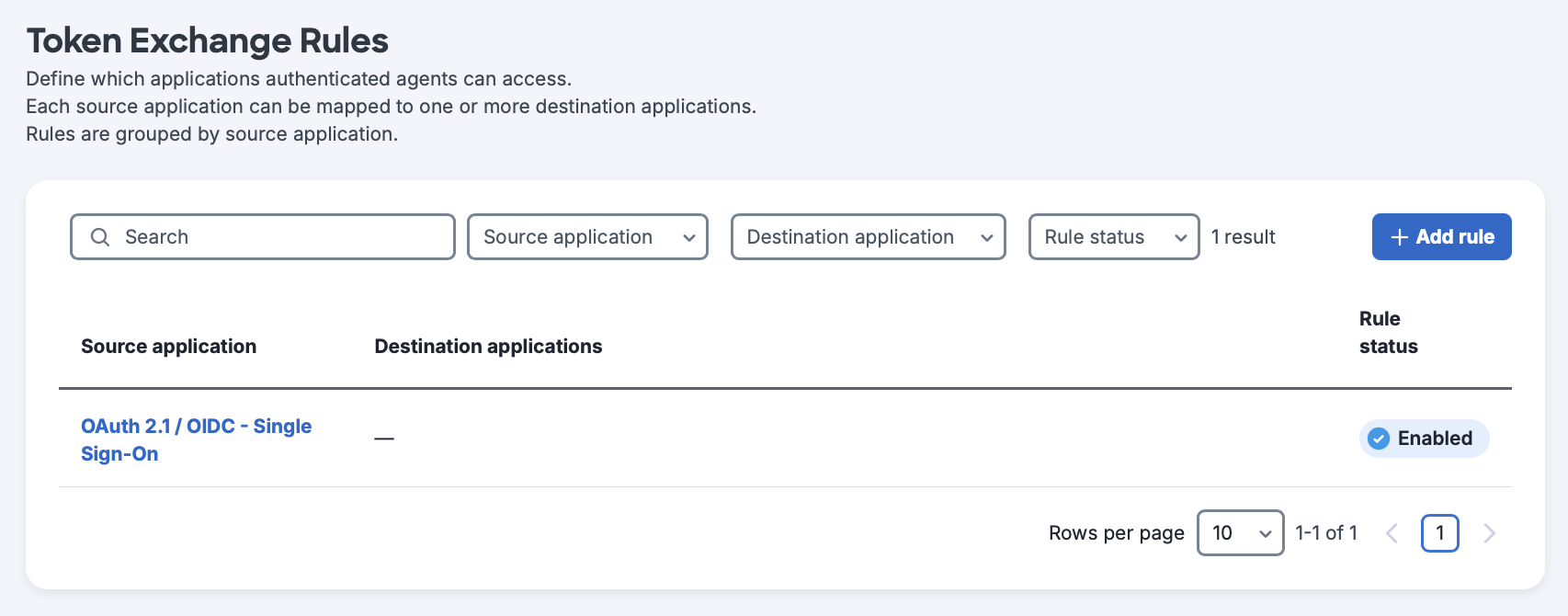
-
Click the source application to open its rule details page. On this page, you can select the source application's clients that can perform token exchanges, select destination applications, and configure the token lifetime.
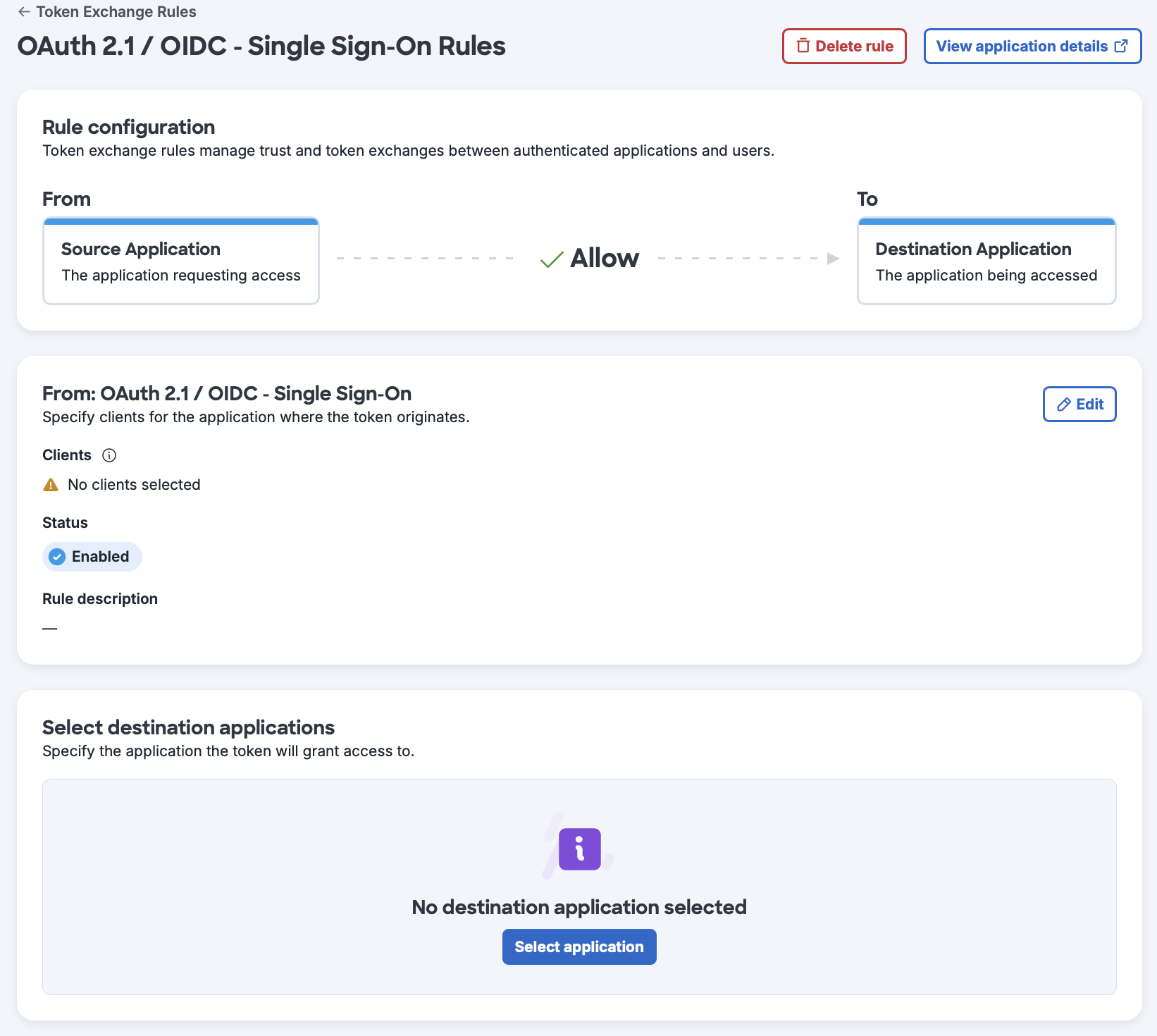
You can also click Delete rule to delete the token exchange rule or View application details to open the source application's details page.
-
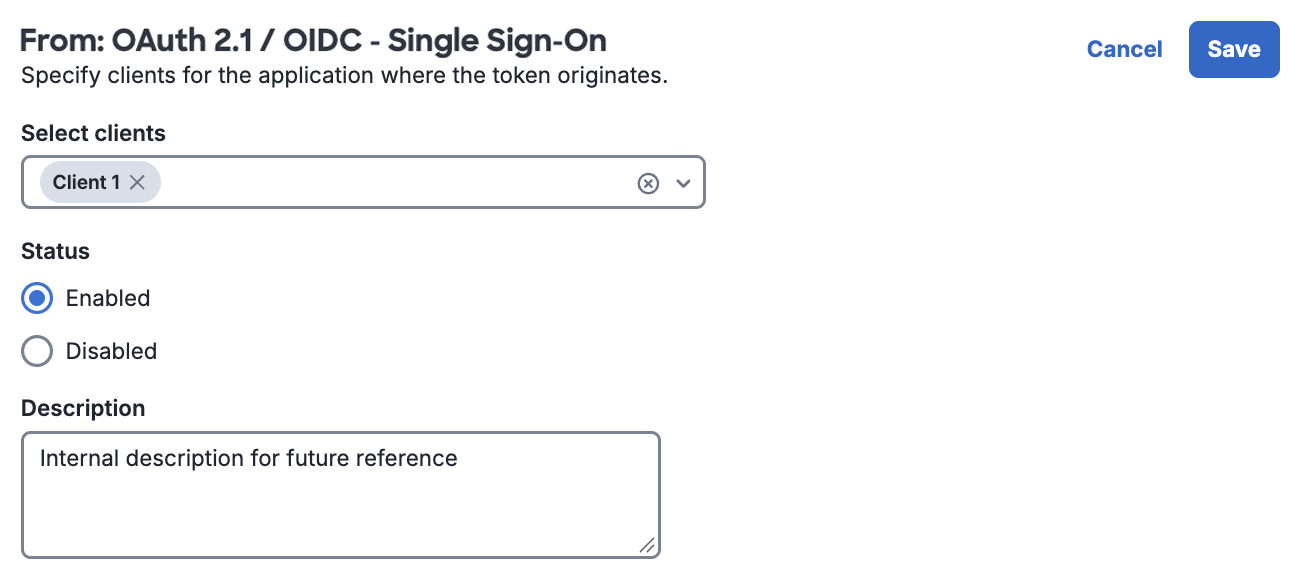
Click Edit to select the clients, change the rule status, or add a rule description. You can click Select all in the Select clients drop-down list to include all currently configured clients. If you add clients to the source application later, you must also add them to the rule before they can perform token exchanges.
Disabling the rule blocks all token exchanges from the source application without deleting the rule configuration. Make your changes and click Save.
-
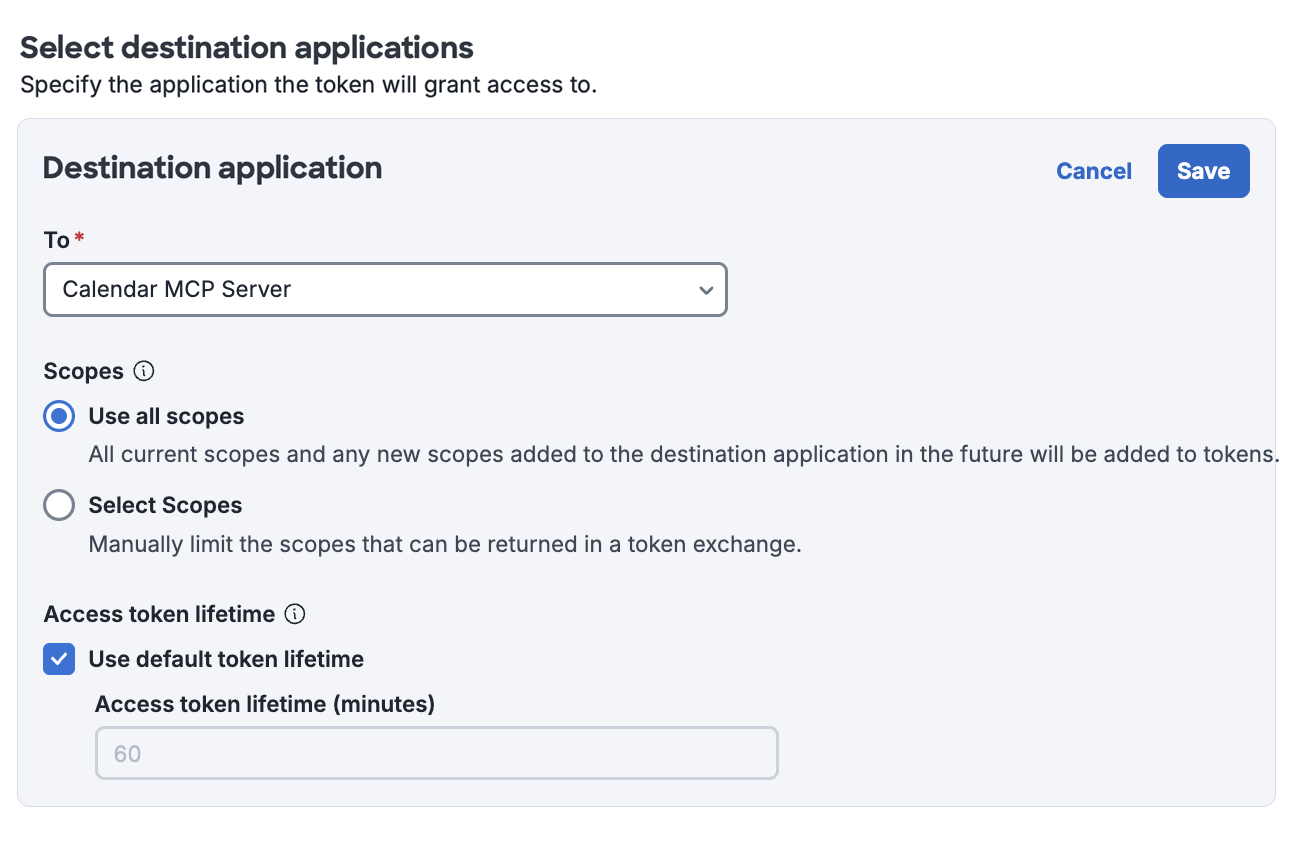
Click Select application in the "Select destination applications" section. From the To drop-down list, select the destination application that the exchanged token grants access to.
Under "Scopes", choose one of the following options:
- Use all scopes: Include all current and future scopes of the destination application in exchanged tokens.
- Select Scopes: Select which scopes exchanged tokens can include.
You can use the default token lifetime or clear the checkbox to specify a different lifetime for exchanged tokens. See Scopes and Token Lifetime.
Make your changes and click Save.
Make a Token Exchange Request
Token Exchange Endpoint
Send token exchange requests to the token endpoint of either the source application or the destination application. You can find the token endpoint on the application's Metadata tab in the Duo Admin Panel or in the token_endpoint value returned by the application's Discovery URL. Duo rejects requests sent to the token endpoint of any other application.
POST /tokenAuthenticate the request with the client ID and client secret of a confidential client on the source application. Send the credentials in the request body (client_secret_post) or in an HTTP Basic Authorization header (client_secret_basic). The source application's token exchange rule must include the client.
Token Exchange Parameters
| Parameter | Required? | Description |
|---|---|---|
client_id
|
Required |
The client ID of a confidential client on the source application. Not required in the request body if you send credentials in an HTTP Basic |
client_secret
|
Required |
The client secret of the confidential client. Not required in the request body if you send credentials in an HTTP Basic |
grant_type
|
Required |
Requires the value |
subject_token
|
Required |
The access token to exchange. This can be a token issued after a user logged in or a token issued with the client credentials grant. If you exchange a client credentials token, the client making the exchange request must be the same client that obtained the token. |
subject_token_type
|
Required |
Requires the value |
actor_token
|
Optional |
An access token that represents the client performing the exchange, such as a token the client obtained with the client credentials grant. The client ID in the actor token must match the client ID that authenticates the request. If you omit this parameter, Duo identifies the acting party by the authenticated client ID. |
actor_token_type
|
Optional* |
*Required if |
audience
|
Optional |
A client ID of a client on the destination application. Duo uses this value to identify the destination application. Don't send with |
requested_token_type
|
Optional |
The type of token to issue. The only supported value is |
resource
|
Optional |
A resource URL configured on the destination application's Scopes tab. Duo uses this value to identify the destination application. Don't send with |
scope
|
Optional |
A space-separated list of scopes to request for the new token. If omitted, Duo returns all scopes the token exchange rule and the user's access allow. |
Token Exchange Request Format
The examples in this section use these values:
- Token endpoint: The token endpoint of the source application, from the source application's Metadata tab in the Duo Admin Panel. You can also use the destination application's token endpoint.
$clientIdand$clientSecret: The client ID and client secret of a confidential client on the source application. The source application's token exchange rule must include this client.$subjectToken: The access token to exchange. For a user, this is the access token your application received after the user logged in to the source application. For a machine client, this is a token the same client obtained with the client credentials grant.$resourceUrl: A resource URL from the destination application's Scopes tab.$destinationClientId: The client ID of a client on the destination application, from the destination application's Clients tab.$actorToken: Optional. An access token that represents the acting client, such as a token the client obtained with the client credentials grant.$scopes: Optional. A space-separated list of scopes to request. The examples don't include thescopeparameter. To request specific scopes, add-d "scope=$scopes"to the request. If a token exchange request doesn't includescope, Duo returns all scopes the token exchange rule and the user's access allow.
Exchange a User's Token by Resource URL
This example authenticates with the client secret in the request body and identifies the destination application by resource URL.
curl -v -X POST \
-H "Content-type:application/x-www-form-urlencoded" \
"https://sso-abc1def2.sso.duosecurity.com/oauth2/DIABC123678901234567/token" \
-d "client_id=$clientId" \
-d "client_secret=$clientSecret" \
-d "grant_type=urn:ietf:params:oauth:grant-type:token-exchange" \
-d "subject_token=$subjectToken" \
-d "subject_token_type=urn:ietf:params:oauth:token-type:access_token" \
-d "resource=$resourceUrl"
To include an actor token, add the actor_token and actor_token_type parameters:
-d "actor_token=$actorToken" \
-d "actor_token_type=urn:ietf:params:oauth:token-type:access_token"
Exchange a Machine Token by Audience
In this example, a machine client with no user involved first obtains its own access token from the source application with the client credentials grant. The source application must have the Client Credentials grant type enabled.
curl -v -X POST \
-u "$clientId:$clientSecret" \
-H "Content-type:application/x-www-form-urlencoded" \
"https://sso-abc1def2.sso.duosecurity.com/oauth2/DIABC123678901234567/token" \
-d "grant_type=client_credentials"
The same client then exchanges that token for one intended for the destination application. This request authenticates with an HTTP Basic Authorization header and identifies the destination application by one of its client IDs:
curl -v -X POST \
-u "$clientId:$clientSecret" \
-H "Content-type:application/x-www-form-urlencoded" \
"https://sso-abc1def2.sso.duosecurity.com/oauth2/DIABC123678901234567/token" \
-d "grant_type=urn:ietf:params:oauth:grant-type:token-exchange" \
-d "subject_token=$subjectToken" \
-d "subject_token_type=urn:ietf:params:oauth:token-type:access_token" \
-d "audience=$destinationClientId"
Token Exchange Response
A successful request returns a new access token for the destination application.
{
  "access_token": "eyJraWQiOiAiNmYxNjM2YjY3ZjE5OGZjOWM1OTRjYmJkODVkNDA2ZDE0NWM1MGRiMDg2OWU5MmYwM2Q0Yzg2NGMyZTM1YjlhYSIsICJhbGciOiAiUlMyNTYiLCAidHlwIjogImp3dCJ9...",
  "token_type": "Bearer",
  "expires_in": 3600,
  "scope": "read:calendar",
  "issued_token_type": "urn:ietf:params:oauth:token-type:access_token"
}
Token exchange returns only an access token. It doesn't return an ID token or a refresh token.
Duo signs the new token with the destination application's keys, and the token's iss claim is the destination application's issuer. The token's act claim contains the client ID of the client that performed the exchange. If the subject token was itself the result of an exchange, the act claim nests the earlier actors inside it, with the most recent actor at the top level. For example, a decoded token payload might contain:
{
  "iss": "https://sso-abc1def2.sso.duosecurity.com/oauth2/DIDEF456789012345678",
  "sub": "b1cee4e55dec5a665546adda8ed1beb29d07ec2c99221438cedfd63c50db5945",
  "aud": "https://calendar.example.com",
  "scope": "read:calendar",
  "exp": 1762963200,
  "act": {
    "sub": "DIABC123678901234567"
  }
}
Target a Destination Application
Each token exchange request identifies one destination application. Send either resource or audience, but not both. Each parameter accepts a single value.
resource: Duo finds the destination application that has a matching resource URL on its Scopes tab. This is the recommended method.audience: Duo finds the destination application that has a client with a matching client ID.- Neither: Duo uses the audience of the subject token as the destination. Use this to exchange a token within the same application, for example, to request a token with fewer scopes. The application's token exchange rule must list the application as a destination.
If you expect to exchange a token for a different application but omit both resource and audience, Duo targets the source application instead. Check that your client sends one of these parameters.
Scopes and Token Lifetime
Scopes
The scopes on the new token are the scopes allowed by all of the following:
- The scopes in the request's
scopeparameter. If the request doesn't includescope, Duo treats the request as asking for all scopes. - The scopes the user can receive from the destination application, including the application's default scopes and any group-based scopes.
- The scopes allowed by the token exchange rule for that destination (Use all scopes or the selected scopes).
Duo never includes the openid scope in an exchanged token. If no scopes remain, Duo returns an invalid_scope error.
For example, a destination application has the scopes read, write, and admin. Its group-based scope settings give a user's group only the read scope, and the token exchange rule allows read and write. If a request for that user doesn't include scope, the new token contains only read.
Token Lifetime
The new token's lifetime is the lifetime configured in the token exchange rule for that destination or the destination application's default access token lifetime if the rule uses the default. The lifetime can't be longer than the time remaining on the subject token. For example, if the subject token expires in five minutes, the new token also expires in five minutes, regardless of the rule's lifetime setting.
Use Cases
MCP Gateways
An MCP gateway sits between AI agents and the MCP servers that provide tools. Without token exchange, a gateway often calls every MCP server with the same static credential, so the MCP servers can't tell which user made a request.
With token exchange, configure the gateway as the source application and each MCP server as a destination application. When a user's agent calls a tool, the gateway exchanges the user's gateway token for a token scoped to that MCP server. Each MCP server receives a token that identifies the user and contains only that server's scopes, and the act claim records that the gateway made the request. Learn more about protecting MCP servers in Duo Single Sign-On for Model Context Protocol (MCP).
Reduce Token Scopes
An application that calls several resource servers can exchange its access token for a separate token for each server, with only the scopes that server needs. If an attacker compromises one resource server, they can't use its token to perform actions on the other servers.
Chained Services
A back-end service that receives a user's token can exchange it for a token to call another back-end service on the user's behalf. Each exchange adds the acting client to the token's act claim, so the full chain of services is visible in the token.
Limitations
- Exchange depth: Duo allows up to three exchanges in a chain starting from the original access token. For example, exchanges from application A → B → C → D succeed, but Duo rejects a fourth exchange from D → E with an
invalid_granterror. Contact Duo Support if you need a longer chain. - Rate limit: By default, Duo allows 60 token exchange requests per client ID per minute. Requests over the limit receive an HTTP 429 response with a
rate_limitederror. Contact Duo Support if you need a higher limit. - One rule per source application: Each source application can have one token exchange rule. Add multiple destination applications to that rule as needed.
- One destination per request: Each request can include one
resourceor oneaudiencevalue. - Access tokens only: Duo accepts only access tokens as subject and actor tokens and issues only access tokens.
- Client credentials tokens: The client that exchanges a client credentials token must be the same client that obtained it.
- Actor tokens: The client ID in an actor token must match the client ID that authenticates the request.
Test Token Exchange Safely
A token exchange rule applies to its source application as soon as you enable it. To test token exchange with an application that's already in use, limit what the rule allows:
- Use a dedicated test client: Create a new client on the source application and select only that client in the rule. Users can still log in through your production client, and you can use the resulting token to test exchanges with the test client.
- Restrict user access: On the source or destination application, set user access to a small test group. Only users in that group can obtain tokens eligible for exchange. This works best for new applications that aren't in use yet.
- Use a limited scope: Select a read-only scope or create a test-only scope on the destination application that grants no real permissions.
- Set a short token lifetime: Set the rule's token lifetime to one minute so that any exchanged token expires quickly.
Troubleshooting
Need some help? Try searching our Knowledge Base articles or Community discussions. For further assistance, contact Support.
Troubleshoot Token Exchange
Token exchange requests, including failed requests and the reasons they failed, appear in the Duo SSO authentication log. When a request fails, Duo returns a JSON response with error and error_description values. Enable debug logging in your client to capture these responses.
| Error | Common Causes |
|---|---|
access_denied
|
The request doesn't match an enabled token exchange rule. For example, the rule doesn't include the client, the rule is disabled, or the rule doesn't include the destination application. Duo also returns this error if the destination application's user access settings don't permit the user or if the user is disabled, locked out, or pending deletion. The |
invalid_target
|
The |
invalid_request
|
The client sent the request to the token endpoint of an application other than the source or destination application. |
invalid_access_token
|
The subject token or actor token is invalid, expired, or revoked, or the actor token's client ID doesn't match the client that authenticated the request. |
invalid_grant
|
The subject token is already the result of the maximum number of exchanges in a chain. See Limitations. |
invalid_scope
|
No scopes remain after Duo combines the requested scopes, the user's scopes, and the rule's scopes. See Scopes. |
unsupported_token_type
|
The |
rate_limited
|
The client exceeded the token exchange rate limit. See Limitations. |